
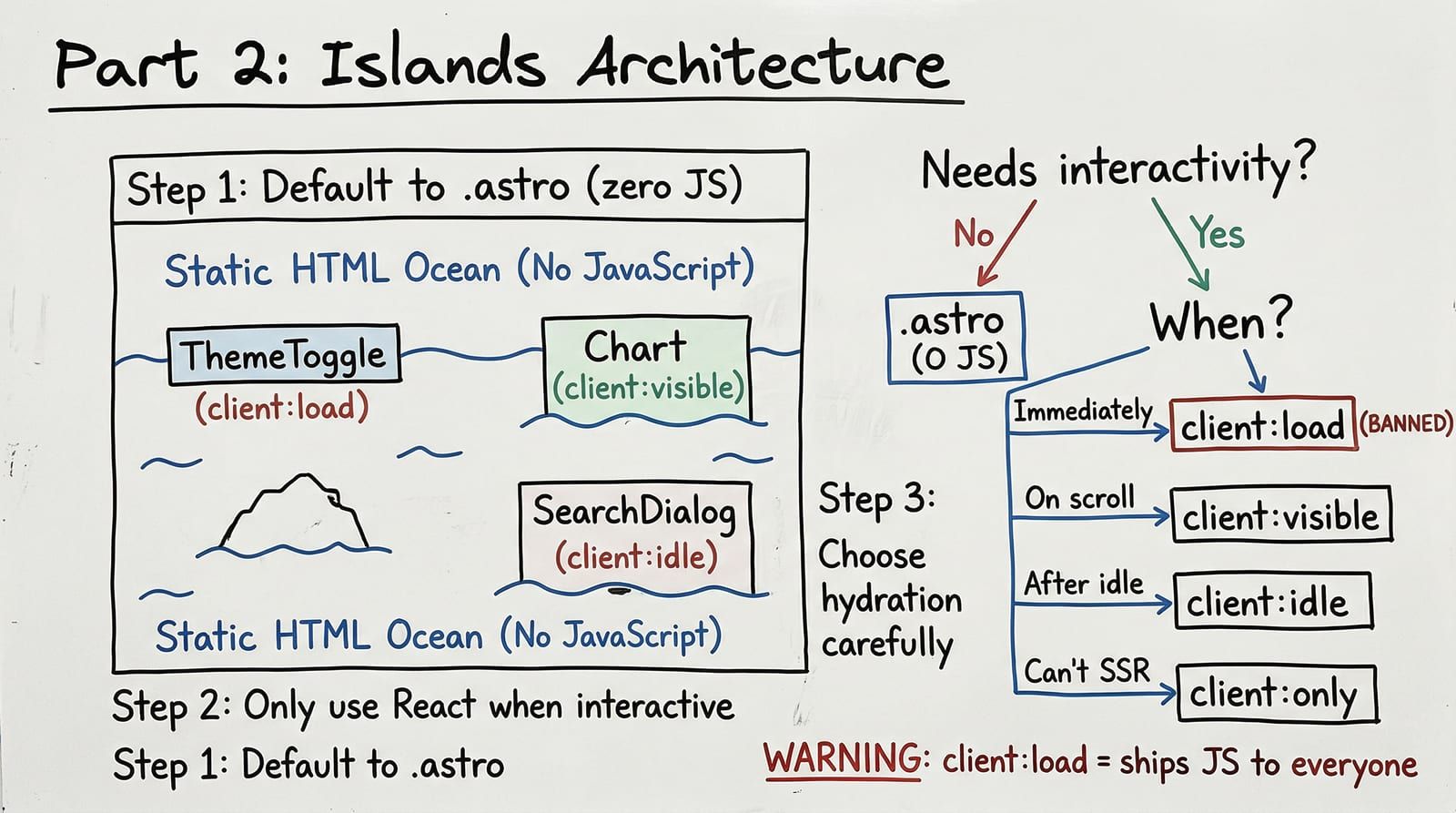
Every client:load directive you add ships JavaScript to every reader. A theme toggle: 3KB. A search dialog: 45KB. A chart library: 120KB. Add three islands with client:load and you have blown past the 200KB initial load budget before the page has any actual content. Most of those readers will never click the search icon. Most will never scroll to the chart. The JavaScript downloaded, parsed, and executed for nothing.
The difference between a Lighthouse 100/100 score and an 85 is not clever optimization tricks. It is understanding which components actually need interactivity — and choosing the right hydration strategy for each.
Two Types of Components
Astro draws a hard line between two component types. Understanding this distinction is the single most important architectural decision you will make.
Static components (.astro files) render at build time. They produce HTML. They ship zero JavaScript. They cannot hold state, respond to clicks, or run effects. They are the default, and that default is the entire performance story.
Interactive islands (.tsx, .svelte, .vue files) are framework components that hydrate on the client. They can hold state, handle events, and run lifecycle effects. They ship framework runtime code plus the component’s own JavaScript.
---// This runs at BUILD TIME only. No JavaScript ships.const navLinks = [  { href: '/', label: 'Home' },  { href: '/blog', label: 'Blog' },  { href: '/about', label: 'About' },];---
<header class="border-b border-[var(--color-border)]">  <nav class="mx-auto flex max-w-3xl items-center justify-between px-6 py-4">    <a href="/" class="font-sans text-xl font-bold">Blogcraft</a>    <ul class="flex gap-6">      {navLinks.map(link => (        <li>          <a href={link.href} class="text-[var(--color-text-muted)] hover:text-[var(--color-text)]">            {link.label}          </a>        </li>      ))}    </ul>  </nav></header>
This header has loops, conditional logic, and dynamic data — but it is all resolved at build time. The output is pure HTML. A navigation bar does not need useState.
The Four Hydration Directives
When a component genuinely needs client-side JavaScript, Astro provides four directives that control when it hydrates. The choice determines how much JavaScript loads, when it loads, and whether it blocks the critical rendering path.
| Directive | When It Hydrates | JS Impact | Use Case |
|---|---|---|---|
| client:load | Immediately on page load | Blocks FCP. JS downloads and executes before first paint completes. | Components that MUST be interactive before the user can see anything. Almost nothing qualifies. |
| client:visible | When the component enters the viewport | Zero impact until scroll. Uses IntersectionObserver internally. | Charts, animations, TOC highlighter — things below the fold or in the reading flow. |
| client:idle | After page load, during idle time | Deferred via requestIdleCallback. Does not block main thread. | Search dialogs, code playgrounds — heavy components the user might interact with eventually. |
| client:only="react" | Client-side only, no SSR | Component renders entirely on the client. Shows nothing during SSR. | Components that depend on browser APIs or libraries that crash during SSR (Plate editor, certain D3 bindings). |
The decision is not arbitrary. Here is the flowchart:
%3b%7d%23mermaid-0 .cluster rect%7bfill:hsl(0%2c 0%25%2c 98.9215686275%25)%3bstroke:%23707070%3bstroke-width:1px%3b%7d%23mermaid-0 .cluster text%7bfill:%23333%3b%7d%23mermaid-0 .cluster span%7bcolor:%23333%3b%7d%23mermaid-0 div.mermaidTooltip%7bposition:absolute%3btext-align:center%3bmax-width:200px%3bpadding:2px%3bfont-family:arial%2csans-serif%3bfont-size:12px%3bbackground:hsl(-160%2c 0%25%2c 93.3333333333%25)%3bborder:1px solid %23707070%3bborder-radius:2px%3bpointer-events:none%3bz-index:100%3b%7d%23mermaid-0 .flowchartTitleText%7btext-anchor:middle%3bfont-size:18px%3bfill:black%3b%7d%23mermaid-0 rect.text%7bfill:none%3bstroke-width:0%3b%7d%23mermaid-0 .icon-shape%2c%23mermaid-0 .image-shape%7bbackground-color:white%3btext-align:center%3b%7d%23mermaid-0 .icon-shape p%2c%23mermaid-0 .image-shape p%7bbackground-color:white%3bpadding:2px%3b%7d%23mermaid-0 .icon-shape .label rect%2c%23mermaid-0 .image-shape .label rect%7bopacity:0.5%3bbackground-color:white%3bfill:white%3b%7d%23mermaid-0 .label-icon%7bdisplay:inline-block%3bheight:1em%3boverflow:visible%3bvertical-align:-0.125em%3b%7d%23mermaid-0 .node .label-icon path%7bfill:currentColor%3bstroke:revert%3bstroke-width:revert%3b%7d%23mermaid-0 .node .neo-node%7bstroke:%23999%3b%7d%23mermaid-0 %5bdata-look='neo'%5d.node rect%2c%23mermaid-0 %5bdata-look='neo'%5d.cluster rect%2c%23mermaid-0 %5bdata-look='neo'%5d.node polygon%7bstroke:url(%23mermaid-0-gradient)%3bfilter:drop-shadow( 1px 2px 2px rgba(185%2c185%2c185%2c1))%3b%7d%23mermaid-0 %5bdata-look='neo'%5d.node path%7bstroke:url(%23mermaid-0-gradient)%3bstroke-width:1px%3b%7d%23mermaid-0 %5bdata-look='neo'%5d.node .outer-path%7bfilter:drop-shadow( 1px 2px 2px rgba(185%2c185%2c185%2c1))%3b%7d%23mermaid-0 %5bdata-look='neo'%5d.node .neo-line path%7bstroke:%23999%3bfilter:none%3b%7d%23mermaid-0 %5bdata-look='neo'%5d.node circle%7bstroke:url(%23mermaid-0-gradient)%3bfilter:drop-shadow( 1px 2px 2px rgba(185%2c185%2c185%2c1))%3b%7d%23mermaid-0 %5bdata-look='neo'%5d.node circle .state-start%7bfill:black%3b%7d%23mermaid-0 %5bdata-look='neo'%5d.icon-shape .icon%7bfill:url(%23mermaid-0-gradient)%3bfilter:drop-shadow( 1px 2px 2px rgba(185%2c185%2c185%2c1))%3b%7d%23mermaid-0 %5bdata-look='neo'%5d.icon-shape .icon-neo path%7bstroke:url(%23mermaid-0-gradient)%3bfilter:drop-shadow( 1px 2px 2px rgba(185%2c185%2c185%2c1))%3b%7d%23mermaid-0 :root%7b--mermaid-font-family:arial%2csans-serif%3b%7d%3c/style%3e%3cg%3e%3cmarker id='mermaid-0_flowchart-v2-pointEnd' class='marker flowchart-v2' viewBox='0 0 10 10' refX='5' refY='5' markerUnits='userSpaceOnUse' markerWidth='8' markerHeight='8' orient='auto'%3e%3cpath d='M 0 0 L 10 5 L 0 10 z' class='arrowMarkerPath' style='stroke-width: 1%3b stroke-dasharray: 1%2c 0%3b'/%3e%3c/marker%3e%3cmarker id='mermaid-0_flowchart-v2-pointStart' class='marker flowchart-v2' viewBox='0 0 10 10' refX='4.5' refY='5' markerUnits='userSpaceOnUse' markerWidth='8' markerHeight='8' orient='auto'%3e%3cpath d='M 0 5 L 10 10 L 10 0 z' class='arrowMarkerPath' style='stroke-width: 1%3b stroke-dasharray: 1%2c 0%3b'/%3e%3c/marker%3e%3cmarker id='mermaid-0_flowchart-v2-pointEnd-margin' class='marker flowchart-v2' viewBox='0 0 11.5 14' refX='11.5' refY='7' markerUnits='userSpaceOnUse' markerWidth='10.5' markerHeight='14' orient='auto'%3e%3cpath d='M 0 0 L 11.5 7 L 0 14 z' class='arrowMarkerPath' style='stroke-width: 0%3b stroke-dasharray: 1%2c 0%3b'/%3e%3c/marker%3e%3cmarker id='mermaid-0_flowchart-v2-pointStart-margin' class='marker flowchart-v2' viewBox='0 0 11.5 14' refX='1' refY='7' markerUnits='userSpaceOnUse' markerWidth='11.5' markerHeight='14' orient='auto'%3e%3cpolygon points='0%2c7 11.5%2c14 11.5%2c0' class='arrowMarkerPath' style='stroke-width: 0%3b stroke-dasharray: 1%2c 0%3b'/%3e%3c/marker%3e%3cmarker id='mermaid-0_flowchart-v2-circleEnd' class='marker flowchart-v2' viewBox='0 0 10 10' refX='11' refY='5' markerUnits='userSpaceOnUse' markerWidth='11' markerHeight='11' orient='auto'%3e%3ccircle cx='5' cy='5' r='5' class='arrowMarkerPath' style='stroke-width: 1%3b stroke-dasharray: 1%2c 0%3b'/%3e%3c/marker%3e%3cmarker id='mermaid-0_flowchart-v2-circleStart' class='marker flowchart-v2' viewBox='0 0 10 10' refX='-1' refY='5' markerUnits='userSpaceOnUse' markerWidth='11' markerHeight='11' orient='auto'%3e%3ccircle cx='5' cy='5' r='5' class='arrowMarkerPath' style='stroke-width: 1%3b stroke-dasharray: 1%2c 0%3b'/%3e%3c/marker%3e%3cmarker id='mermaid-0_flowchart-v2-circleEnd-margin' class='marker flowchart-v2' viewBox='0 0 10 10' refY='5' refX='12.25' markerUnits='userSpaceOnUse' markerWidth='14' markerHeight='14' orient='auto'%3e%3ccircle cx='5' cy='5' r='5' class='arrowMarkerPath' style='stroke-width: 0%3b stroke-dasharray: 1%2c 0%3b'/%3e%3c/marker%3e%3cmarker id='mermaid-0_flowchart-v2-circleStart-margin' class='marker flowchart-v2' viewBox='0 0 10 10' refX='-2' refY='5' markerUnits='userSpaceOnUse' markerWidth='14' markerHeight='14' orient='auto'%3e%3ccircle cx='5' cy='5' r='5' class='arrowMarkerPath' style='stroke-width: 0%3b stroke-dasharray: 1%2c 0%3b'/%3e%3c/marker%3e%3cmarker id='mermaid-0_flowchart-v2-crossEnd' class='marker cross flowchart-v2' viewBox='0 0 11 11' refX='12' refY='5.2' markerUnits='userSpaceOnUse' markerWidth='11' markerHeight='11' orient='auto'%3e%3cpath d='M 1%2c1 l 9%2c9 M 10%2c1 l -9%2c9' class='arrowMarkerPath' style='stroke-width: 2%3b stroke-dasharray: 1%2c 0%3b'/%3e%3c/marker%3e%3cmarker id='mermaid-0_flowchart-v2-crossStart' class='marker cross flowchart-v2' viewBox='0 0 11 11' refX='-1' refY='5.2' markerUnits='userSpaceOnUse' markerWidth='11' markerHeight='11' orient='auto'%3e%3cpath d='M 1%2c1 l 9%2c9 M 10%2c1 l -9%2c9' class='arrowMarkerPath' style='stroke-width: 2%3b stroke-dasharray: 1%2c 0%3b'/%3e%3c/marker%3e%3cmarker id='mermaid-0_flowchart-v2-crossEnd-margin' class='marker cross flowchart-v2' viewBox='0 0 15 15' refX='17.7' refY='7.5' markerUnits='userSpaceOnUse' markerWidth='12' markerHeight='12' orient='auto'%3e%3cpath d='M 1%2c1 L 14%2c14 M 1%2c14 L 14%2c1' class='arrowMarkerPath' style='stroke-width: 2.5%3b'/%3e%3c/marker%3e%3cmarker id='mermaid-0_flowchart-v2-crossStart-margin' class='marker cross flowchart-v2' viewBox='0 0 15 15' refX='-3.5' refY='7.5' markerUnits='userSpaceOnUse' markerWidth='12' markerHeight='12' orient='auto'%3e%3cpath d='M 1%2c1 L 14%2c14 M 1%2c14 L 14%2c1' class='arrowMarkerPath' style='stroke-width: 2.5%3b stroke-dasharray: 1%2c 0%3b'/%3e%3c/marker%3e%3cg class='root'%3e%3cg class='clusters'/%3e%3cg class='edgePaths'%3e%3cpath d='M288.954%2c86L280.519%2c92.167C272.083%2c98.333%2c255.211%2c110.667%2c246.776%2c131.078C238.34%2c151.49%2c238.34%2c179.979%2c238.34%2c194.224L238.34%2c208.469' id='mermaid-0-L_Start_Static_0' class='edge-thickness-normal edge-pattern-solid edge-thickness-normal edge-pattern-solid flowchart-link' style='%3b' data-edge='true' data-et='edge' data-id='L_Start_Static_0' data-points='W3sieCI6Mjg4Ljk1NDMwNzE1NDYwNTI2LCJ5Ijo4Nn0seyJ4IjoyMzguMzM5ODQzNzUsInkiOjEyM30seyJ4IjoyMzguMzM5ODQzNzUsInkiOjIxMi40Njg3NX1d' data-look='classic' marker-end='url(%23mermaid-0_flowchart-v2-pointEnd)'/%3e%3cpath d='M395.655%2c86L404.091%2c92.167C412.527%2c98.333%2c429.398%2c110.667%2c437.834%2c122.333C446.27%2c134%2c446.27%2c145%2c446.27%2c150.5L446.27%2c156' id='mermaid-0-L_Start_SSR_0' class='edge-thickness-normal edge-pattern-solid edge-thickness-normal edge-pattern-solid flowchart-link' style='%3b' data-edge='true' data-et='edge' data-id='L_Start_SSR_0' data-points='W3sieCI6Mzk1LjY1NTA2Nzg0NTM5NDc0LCJ5Ijo4Nn0seyJ4Ijo0NDYuMjY5NTMxMjUsInkiOjEyM30seyJ4Ijo0NDYuMjY5NTMxMjUsInkiOjE2MH1d' data-look='classic' marker-end='url(%23mermaid-0_flowchart-v2-pointEnd)'/%3e%3cpath d='M399.461%2c296.129L384.821%2c310.097C370.181%2c324.065%2c340.901%2c352.001%2c326.261%2c380.141C311.621%2c408.281%2c311.621%2c436.625%2c311.621%2c450.797L311.621%2c464.969' id='mermaid-0-L_SSR_ClientOnly_0' class='edge-thickness-normal edge-pattern-solid edge-thickness-normal edge-pattern-solid flowchart-link' style='%3b' data-edge='true' data-et='edge' data-id='L_SSR_ClientOnly_0' data-points='W3sieCI6Mzk5LjQ2MTAxODM0MTM2MjU1LCJ5IjoyOTYuMTI4OTg3MDkxMzYyNTV9LHsieCI6MzExLjYyMTA5Mzc1LCJ5IjozNzkuOTM3NX0seyJ4IjozMTEuNjIxMDkzNzUsInkiOjQ2OC45Njg3NX1d' data-look='classic' marker-end='url(%23mermaid-0_flowchart-v2-pointEnd)'/%3e%3cpath d='M493.078%2c296.129L507.718%2c310.097C522.358%2c324.065%2c551.638%2c352.001%2c566.278%2c371.469C580.918%2c390.938%2c580.918%2c401.938%2c580.918%2c407.438L580.918%2c412.938' id='mermaid-0-L_SSR_Timing_0' class='edge-thickness-normal edge-pattern-solid edge-thickness-normal edge-pattern-solid flowchart-link' style='%3b' data-edge='true' data-et='edge' data-id='L_SSR_Timing_0' data-points='W3sieCI6NDkzLjA3ODA0NDE1ODYzNzQ1LCJ5IjoyOTYuMTI4OTg3MDkxMzYyNTV9LHsieCI6NTgwLjkxNzk2ODc1LCJ5IjozNzkuOTM3NX0seyJ4Ijo1ODAuOTE3OTY4NzUsInkiOjQxNi45Mzc1fV0=' data-look='classic' marker-end='url(%23mermaid-0_flowchart-v2-pointEnd)'/%3e%3cpath d='M520.275%2c538.357L487.8%2c554.631C455.324%2c570.905%2c390.373%2c603.452%2c357.897%2c625.226C325.422%2c647%2c325.422%2c658%2c325.422%2c663.5L325.422%2c669' id='mermaid-0-L_Timing_Load_0' class='edge-thickness-normal edge-pattern-solid edge-thickness-normal edge-pattern-solid flowchart-link' style='%3b' data-edge='true' data-et='edge' data-id='L_Timing_Load_0' data-points='W3sieCI6NTIwLjI3NTI4MTQzMzk2NzcsInkiOjUzOC4zNTczMTI2ODM5Njc3fSx7IngiOjMyNS40MjE4NzUsInkiOjYzNn0seyJ4IjozMjUuNDIxODc1LCJ5Ijo2NzN9XQ==' data-look='classic' marker-end='url(%23mermaid-0_flowchart-v2-pointEnd)'/%3e%3cpath d='M260.345%2c818.173L232.701%2c835.186C205.056%2c852.199%2c149.766%2c886.224%2c122.121%2c908.737C94.477%2c931.25%2c94.477%2c942.25%2c94.477%2c947.75L94.477%2c953.25' id='mermaid-0-L_Load_UseLoad_0' class='edge-thickness-normal edge-pattern-solid edge-thickness-normal edge-pattern-solid flowchart-link' style='%3b' data-edge='true' data-et='edge' data-id='L_Load_UseLoad_0' data-points='W3sieCI6MjYwLjM0NTMzMjY4ODUyMjIsInkiOjgxOC4xNzM0NTc2ODg1MjIxfSx7IngiOjk0LjQ3NjU2MjUsInkiOjkyMC4yNX0seyJ4Ijo5NC40NzY1NjI1LCJ5Ijo5NTcuMjV9XQ==' data-look='classic' marker-end='url(%23mermaid-0_flowchart-v2-pointEnd)'/%3e%3cpath d='M325.422%2c883.25L325.422%2c889.417C325.422%2c895.583%2c325.422%2c907.917%2c325.422%2c919.583C325.422%2c931.25%2c325.422%2c942.25%2c325.422%2c947.75L325.422%2c953.25' id='mermaid-0-L_Load_UseIdle_0' class='edge-thickness-normal edge-pattern-solid edge-thickness-normal edge-pattern-solid flowchart-link' style='%3b' data-edge='true' data-et='edge' data-id='L_Load_UseIdle_0' data-points='W3sieCI6MzI1LjQyMTg3NSwieSI6ODgzLjI1fSx7IngiOjMyNS40MjE4NzUsInkiOjkyMC4yNX0seyJ4IjozMjUuNDIxODc1LCJ5Ijo5NTcuMjV9XQ==' data-look='classic' marker-end='url(%23mermaid-0_flowchart-v2-pointEnd)'/%3e%3cpath d='M587.03%2c592.888L587.547%2c600.073C588.064%2c607.259%2c589.099%2c621.629%2c589.616%2c645.336C590.133%2c669.042%2c590.133%2c702.083%2c590.133%2c718.604L590.133%2c735.125' id='mermaid-0-L_Timing_UseVisible_0' class='edge-thickness-normal edge-pattern-solid edge-thickness-normal edge-pattern-solid flowchart-link' style='%3b' data-edge='true' data-et='edge' data-id='L_Timing_UseVisible_0' data-points='W3sieCI6NTg3LjAyOTkwMDQwNjQ2OCwieSI6NTkyLjg4ODA2ODM0MzUzMn0seyJ4Ijo1OTAuMTMyODEyNSwieSI6NjM2fSx7IngiOjU5MC4xMzI4MTI1LCJ5Ijo3MzkuMTI1fV0=' data-look='classic' marker-end='url(%23mermaid-0_flowchart-v2-pointEnd)'/%3e%3cpath d='M642.988%2c536.93L678.375%2c553.442C713.763%2c569.953%2c784.538%2c602.977%2c819.925%2c636.009C855.313%2c669.042%2c855.313%2c702.083%2c855.313%2c718.604L855.313%2c735.125' id='mermaid-0-L_Timing_UseIdle2_0' class='edge-thickness-normal edge-pattern-solid edge-thickness-normal edge-pattern-solid flowchart-link' style='%3b' data-edge='true' data-et='edge' data-id='L_Timing_UseIdle2_0' data-points='W3sieCI6NjQyLjk4Nzc0MjQ0OTA1MTcsInkiOjUzNi45MzAyMjYzMDA5NDgzfSx7IngiOjg1NS4zMTI1LCJ5Ijo2MzZ9LHsieCI6ODU1LjMxMjUsInkiOjczOS4xMjV9XQ==' data-look='classic' marker-end='url(%23mermaid-0_flowchart-v2-pointEnd)'/%3e%3c/g%3e%3cg class='edgeLabels'%3e%3cg class='edgeLabel' transform='translate(238.33984375%2c 123)'%3e%3cg class='label' data-id='L_Start_Static_0' transform='translate(-10.2265625%2c -12)'%3e%3cforeignObject width='20.453125' height='24'%3e%3cdiv xmlns='http://www.w3.org/1999/xhtml' class='labelBkg' style='display: table-cell%3b white-space: nowrap%3b line-height: 1.5%3b max-width: 200px%3b text-align: center%3b'%3e%3cspan class='edgeLabel'%3e%3cp%3eNo%3c/p%3e%3c/span%3e%3c/div%3e%3c/foreignObject%3e%3c/g%3e%3c/g%3e%3cg class='edgeLabel' transform='translate(446.26953125%2c 123)'%3e%3cg class='label' data-id='L_Start_SSR_0' transform='translate(-13.0546875%2c -12)'%3e%3cforeignObject width='26.109375' height='24'%3e%3cdiv xmlns='http://www.w3.org/1999/xhtml' class='labelBkg' style='display: table-cell%3b white-space: nowrap%3b line-height: 1.5%3b max-width: 200px%3b text-align: center%3b'%3e%3cspan class='edgeLabel'%3e%3cp%3eYes%3c/p%3e%3c/span%3e%3c/div%3e%3c/foreignObject%3e%3c/g%3e%3c/g%3e%3cg class='edgeLabel' transform='translate(311.62109375%2c 379.9375)'%3e%3cg class='label' data-id='L_SSR_ClientOnly_0' transform='translate(-10.2265625%2c -12)'%3e%3cforeignObject width='20.453125' height='24'%3e%3cdiv xmlns='http://www.w3.org/1999/xhtml' class='labelBkg' style='display: table-cell%3b white-space: nowrap%3b line-height: 1.5%3b max-width: 200px%3b text-align: center%3b'%3e%3cspan class='edgeLabel'%3e%3cp%3eNo%3c/p%3e%3c/span%3e%3c/div%3e%3c/foreignObject%3e%3c/g%3e%3c/g%3e%3cg class='edgeLabel' transform='translate(580.91796875%2c 379.9375)'%3e%3cg class='label' data-id='L_SSR_Timing_0' transform='translate(-13.0546875%2c -12)'%3e%3cforeignObject width='26.109375' height='24'%3e%3cdiv xmlns='http://www.w3.org/1999/xhtml' class='labelBkg' style='display: table-cell%3b white-space: nowrap%3b line-height: 1.5%3b max-width: 200px%3b text-align: center%3b'%3e%3cspan class='edgeLabel'%3e%3cp%3eYes%3c/p%3e%3c/span%3e%3c/div%3e%3c/foreignObject%3e%3c/g%3e%3c/g%3e%3cg class='edgeLabel' transform='translate(325.421875%2c 636)'%3e%3cg class='label' data-id='L_Timing_Load_0' transform='translate(-59.5703125%2c -12)'%3e%3cforeignObject width='119.140625' height='24'%3e%3cdiv xmlns='http://www.w3.org/1999/xhtml' class='labelBkg' style='display: table-cell%3b white-space: nowrap%3b line-height: 1.5%3b max-width: 200px%3b text-align: center%3b'%3e%3cspan class='edgeLabel'%3e%3cp%3eBefore first scroll%3c/p%3e%3c/span%3e%3c/div%3e%3c/foreignObject%3e%3c/g%3e%3c/g%3e%3cg class='edgeLabel' transform='translate(94.4765625%2c 920.25)'%3e%3cg class='label' data-id='L_Load_UseLoad_0' transform='translate(-13.0546875%2c -12)'%3e%3cforeignObject width='26.109375' height='24'%3e%3cdiv xmlns='http://www.w3.org/1999/xhtml' class='labelBkg' style='display: table-cell%3b white-space: nowrap%3b line-height: 1.5%3b max-width: 200px%3b text-align: center%3b'%3e%3cspan class='edgeLabel'%3e%3cp%3eYes%3c/p%3e%3c/span%3e%3c/div%3e%3c/foreignObject%3e%3c/g%3e%3c/g%3e%3cg class='edgeLabel' transform='translate(325.421875%2c 920.25)'%3e%3cg class='label' data-id='L_Load_UseIdle_0' transform='translate(-10.2265625%2c -12)'%3e%3cforeignObject width='20.453125' height='24'%3e%3cdiv xmlns='http://www.w3.org/1999/xhtml' class='labelBkg' style='display: table-cell%3b white-space: nowrap%3b line-height: 1.5%3b max-width: 200px%3b text-align: center%3b'%3e%3cspan class='edgeLabel'%3e%3cp%3eNo%3c/p%3e%3c/span%3e%3c/div%3e%3c/foreignObject%3e%3c/g%3e%3c/g%3e%3cg class='edgeLabel' transform='translate(590.1328125%2c 636)'%3e%3cg class='label' data-id='L_Timing_UseVisible_0' transform='translate(-78.6953125%2c -12)'%3e%3cforeignObject width='157.390625' height='24'%3e%3cdiv xmlns='http://www.w3.org/1999/xhtml' class='labelBkg' style='display: table-cell%3b white-space: nowrap%3b line-height: 1.5%3b max-width: 200px%3b text-align: center%3b'%3e%3cspan class='edgeLabel'%3e%3cp%3eWhen user scrolls to it%3c/p%3e%3c/span%3e%3c/div%3e%3c/foreignObject%3e%3c/g%3e%3c/g%3e%3cg class='edgeLabel' transform='translate(855.3125%2c 636)'%3e%3cg class='label' data-id='L_Timing_UseIdle2_0' transform='translate(-76.7890625%2c -12)'%3e%3cforeignObject width='153.578125' height='24'%3e%3cdiv xmlns='http://www.w3.org/1999/xhtml' class='labelBkg' style='display: table-cell%3b white-space: nowrap%3b line-height: 1.5%3b max-width: 200px%3b text-align: center%3b'%3e%3cspan class='edgeLabel'%3e%3cp%3eEventually%2c not urgent%3c/p%3e%3c/span%3e%3c/div%3e%3c/foreignObject%3e%3c/g%3e%3c/g%3e%3c/g%3e%3cg class='nodes'%3e%3cg class='node default' id='mermaid-0-flowchart-Start-0' data-look='classic' transform='translate(342.3046875%2c 47)'%3e%3crect class='basic label-container' style='' x='-123.84375' y='-39' width='247.6875' height='78'/%3e%3cg class='label' style='' transform='translate(-93.84375%2c -24)'%3e%3crect/%3e%3cforeignObject width='187.6875' height='48'%3e%3cdiv xmlns='http://www.w3.org/1999/xhtml' style='display: table-cell%3b white-space: nowrap%3b line-height: 1.5%3b max-width: 200px%3b text-align: center%3b'%3e%3cspan class='nodeLabel'%3e%3cp%3eDoes the component need%3cbr /%3eclient-side interactivity%3f%3c/p%3e%3c/span%3e%3c/div%3e%3c/foreignObject%3e%3c/g%3e%3c/g%3e%3cg class='node default' id='mermaid-0-flowchart-Static-1' data-look='classic' transform='translate(238.33984375%2c 251.46875)'%3e%3crect class='basic label-container' style='fill:%23e8f5e8 !important%3bstroke:%234A8C5C !important' x='-66.4609375' y='-39' width='132.921875' height='78'/%3e%3cg class='label' style='' transform='translate(-36.4609375%2c -24)'%3e%3crect/%3e%3cforeignObject width='72.921875' height='48'%3e%3cdiv xmlns='http://www.w3.org/1999/xhtml' style='display: table-cell%3b white-space: nowrap%3b line-height: 1.5%3b max-width: 200px%3b text-align: center%3b'%3e%3cspan class='nodeLabel'%3e%3cp%3eUse .astro%3cbr /%3e(zero JS)%3c/p%3e%3c/span%3e%3c/div%3e%3c/foreignObject%3e%3c/g%3e%3c/g%3e%3cg class='node default' id='mermaid-0-flowchart-SSR-3' data-look='classic' transform='translate(446.26953125%2c 251.46875)'%3e%3cpolygon points='91.46875%2c0 182.9375%2c-91.46875 91.46875%2c-182.9375 0%2c-91.46875' class='label-container' transform='translate(-90.96875%2c 91.46875)'/%3e%3cg class='label' style='' transform='translate(-52.46875%2c -24)'%3e%3crect/%3e%3cforeignObject width='104.9375' height='48'%3e%3cdiv xmlns='http://www.w3.org/1999/xhtml' style='display: table-cell%3b white-space: nowrap%3b line-height: 1.5%3b max-width: 200px%3b text-align: center%3b'%3e%3cspan class='nodeLabel'%3e%3cp%3eCan it%3cbr /%3eserver-render%3f%3c/p%3e%3c/span%3e%3c/div%3e%3c/foreignObject%3e%3c/g%3e%3c/g%3e%3cg class='node default' id='mermaid-0-flowchart-ClientOnly-5' data-look='classic' transform='translate(311.62109375%2c 507.96875)'%3e%3crect class='basic label-container' style='fill:%23f5f0e8 !important%3bstroke:%238B7355 !important' x='-128.265625' y='-39' width='256.53125' height='78'/%3e%3cg class='label' style='' transform='translate(-98.265625%2c -24)'%3e%3crect/%3e%3cforeignObject width='196.53125' height='48'%3e%3cdiv xmlns='http://www.w3.org/1999/xhtml' style='display: table-cell%3b white-space: nowrap%3b line-height: 1.5%3b max-width: 200px%3b text-align: center%3b'%3e%3cspan class='nodeLabel'%3e%3cp%3eclient:only=react%3cbr /%3e(no SSR%2c client render only)%3c/p%3e%3c/span%3e%3c/div%3e%3c/foreignObject%3e%3c/g%3e%3c/g%3e%3cg class='node default' id='mermaid-0-flowchart-Timing-7' data-look='classic' transform='translate(580.91796875%2c 507.96875)'%3e%3cpolygon points='91.03125%2c0 182.0625%2c-91.03125 91.03125%2c-182.0625 0%2c-91.03125' class='label-container' transform='translate(-90.53125%2c 91.03125)'/%3e%3cg class='label' style='' transform='translate(-52.03125%2c -24)'%3e%3crect/%3e%3cforeignObject width='104.0625' height='48'%3e%3cdiv xmlns='http://www.w3.org/1999/xhtml' style='display: table-cell%3b white-space: nowrap%3b line-height: 1.5%3b max-width: 200px%3b text-align: center%3b'%3e%3cspan class='nodeLabel'%3e%3cp%3eWhen must it%3cbr /%3ebe interactive%3f%3c/p%3e%3c/span%3e%3c/div%3e%3c/foreignObject%3e%3c/g%3e%3c/g%3e%3cg class='node default' id='mermaid-0-flowchart-Load-9' data-look='classic' transform='translate(325.421875%2c 778.125)'%3e%3cpolygon points='105.125%2c0 210.25%2c-105.125 105.125%2c-210.25 0%2c-105.125' class='label-container' transform='translate(-104.625%2c 105.125)'/%3e%3cg class='label' style='' transform='translate(-66.125%2c -24)'%3e%3crect/%3e%3cforeignObject width='132.25' height='48'%3e%3cdiv xmlns='http://www.w3.org/1999/xhtml' style='display: table-cell%3b white-space: nowrap%3b line-height: 1.5%3b max-width: 200px%3b text-align: center%3b'%3e%3cspan class='nodeLabel'%3e%3cp%3eIs it literally%3cbr /%3ethe ThemeToggle%3f%3c/p%3e%3c/span%3e%3c/div%3e%3c/foreignObject%3e%3c/g%3e%3c/g%3e%3cg class='node default' id='mermaid-0-flowchart-UseLoad-11' data-look='classic' transform='translate(94.4765625%2c 996.25)'%3e%3crect class='basic label-container' style='fill:%23f5e8e8 !important%3bstroke:%238C4A4A !important' x='-86.4765625' y='-39' width='172.953125' height='78'/%3e%3cg class='label' style='' transform='translate(-56.4765625%2c -24)'%3e%3crect/%3e%3cforeignObject width='112.953125' height='48'%3e%3cdiv xmlns='http://www.w3.org/1999/xhtml' style='display: table-cell%3b white-space: nowrap%3b line-height: 1.5%3b max-width: 200px%3b text-align: center%3b'%3e%3cspan class='nodeLabel'%3e%3cp%3eclient:load%3cbr /%3e(only exception)%3c/p%3e%3c/span%3e%3c/div%3e%3c/foreignObject%3e%3c/g%3e%3c/g%3e%3cg class='node default' id='mermaid-0-flowchart-UseIdle-13' data-look='classic' transform='translate(325.421875%2c 996.25)'%3e%3crect class='basic label-container' style='fill:%23e8f0f5 !important%3bstroke:%234A7B8C !important' x='-94.46875' y='-39' width='188.9375' height='78'/%3e%3cg class='label' style='' transform='translate(-64.46875%2c -24)'%3e%3crect/%3e%3cforeignObject width='128.9375' height='48'%3e%3cdiv xmlns='http://www.w3.org/1999/xhtml' style='display: table-cell%3b white-space: nowrap%3b line-height: 1.5%3b max-width: 200px%3b text-align: center%3b'%3e%3cspan class='nodeLabel'%3e%3cp%3eclient:idle%3cbr /%3e(defer to idle time)%3c/p%3e%3c/span%3e%3c/div%3e%3c/foreignObject%3e%3c/g%3e%3c/g%3e%3cg class='node default' id='mermaid-0-flowchart-UseVisible-15' data-look='classic' transform='translate(590.1328125%2c 778.125)'%3e%3crect class='basic label-container' style='fill:%23e8f0f5 !important%3bstroke:%234A7B8C !important' x='-109.5859375' y='-39' width='219.171875' height='78'/%3e%3cg class='label' style='' transform='translate(-79.5859375%2c -24)'%3e%3crect/%3e%3cforeignObject width='159.171875' height='48'%3e%3cdiv xmlns='http://www.w3.org/1999/xhtml' style='display: table-cell%3b white-space: nowrap%3b line-height: 1.5%3b max-width: 200px%3b text-align: center%3b'%3e%3cspan class='nodeLabel'%3e%3cp%3eclient:visible%3cbr /%3e(IntersectionObserver)%3c/p%3e%3c/span%3e%3c/div%3e%3c/foreignObject%3e%3c/g%3e%3c/g%3e%3cg class='node default' id='mermaid-0-flowchart-UseIdle2-17' data-look='classic' transform='translate(855.3125%2c 778.125)'%3e%3crect class='basic label-container' style='fill:%23e8f0f5 !important%3bstroke:%234A7B8C !important' x='-105.59375' y='-39' width='211.1875' height='78'/%3e%3cg class='label' style='' transform='translate(-75.59375%2c -24)'%3e%3crect/%3e%3cforeignObject width='151.1875' height='48'%3e%3cdiv xmlns='http://www.w3.org/1999/xhtml' style='display: table-cell%3b white-space: nowrap%3b line-height: 1.5%3b max-width: 200px%3b text-align: center%3b'%3e%3cspan class='nodeLabel'%3e%3cp%3eclient:idle%3cbr /%3e(requestIdleCallback)%3c/p%3e%3c/span%3e%3c/div%3e%3c/foreignObject%3e%3c/g%3e%3c/g%3e%3c/g%3e%3c/g%3e%3c/g%3e%3cdefs%3e%3cfilter id='mermaid-0-drop-shadow' height='130%25' width='130%25'%3e%3cfeDropShadow dx='4' dy='4' stdDeviation='0' flood-opacity='0.06' flood-color='black'/%3e%3c/filter%3e%3c/defs%3e%3cdefs%3e%3cfilter id='mermaid-0-drop-shadow-small' height='150%25' width='150%25'%3e%3cfeDropShadow dx='2' dy='2' stdDeviation='0' flood-opacity='0.06' flood-color='black'/%3e%3c/filter%3e%3c/defs%3e%3clinearGradient id='mermaid-0-gradient' gradientUnits='objectBoundingBox' x1='0%25' y1='0%25' x2='100%25' y2='0%25'%3e%3cstop offset='0%25' stop-color='hsl(0%2c 0%25%2c 83.3333333333%25)' stop-opacity='1'/%3e%3cstop offset='100%25' stop-color='hsl(0%2c 0%25%2c 88.9215686275%25)' stop-opacity='1'/%3e%3c/linearGradient%3e%3c/svg%3e)
Walk through this for every interactive component. The default answer is .astro (zero JS). The escalation path is deliberate.
client:load — The Banned Directive
On Blogcraft, client:load is banned. Not discouraged — banned. A shell script runs in the prebuild step and fails the build if any .astro file contains client:load outside the exception list.
Why this extreme? Because client:load downloads, parses, and executes JavaScript before the page finishes rendering. It directly increases First Contentful Paint (FCP) and Interaction to Next Paint (INP). On a content site where the primary action is reading, that cost has zero return for 99% of page loads.
The single exception is ThemeToggle. Without client:load, the theme toggle cannot read the user’s saved preference from localStorage before the first paint, causing a flash of wrong theme (FOWT). That flash is a worse user experience than the 3KB JavaScript cost.
---import ThemeToggle from '@/components/islands/ThemeToggle.tsx';---
<!-- The ONLY client:load on the entire site --><ThemeToggle client:load />
Everything else uses client:visible or client:idle.
The Enforcement Script
#!/usr/bin/env bashset -euo pipefail
# Files allowed to use client:loadEXCEPTIONS="BaseLayout.astro"
VIOLATIONS=$(grep -rn "client:load" src/ \  --include="*.astro" \  | grep -v "$EXCEPTIONS" \  || true)
if [ -n "$VIOLATIONS" ]; then  echo "ERROR: client:load detected outside allowed files:"  echo "$VIOLATIONS"  echo ""  echo "Use client:visible or client:idle instead."  exit 1fi
echo "OK: No unauthorized client:load directives found."client:visible — Hydrate on Scroll
client:visible uses the browser’s IntersectionObserver to detect when a component enters the viewport. The component renders as static HTML during the initial page load. When the user scrolls to it, the JavaScript downloads and the component hydrates into a fully interactive React component.
This is the right directive for anything in the reading flow: charts, animated illustrations, the table-of-contents highlighter that tracks scroll position.
---import Chart from '@/components/islands/Chart.tsx';import TOCHighlighter from '@/components/islands/TOCHighlighter.tsx';import Animation from '@/components/islands/Animation.tsx';---
<!-- Renders static HTML initially, hydrates when scrolled into view --><TOCHighlighter client:visible headings={headings} />
<!-- Chart shows a loading skeleton until hydration --><Chart client:visible  data={chartData}  type="bar"  title="Build time comparison"/>
<!-- Lottie animation starts only when visible --><Animation client:visible src="/animations/deploy-flow.lottie" />
The user sees the static HTML (or a skeleton) immediately. There is no layout shift because the component occupies its full space from the initial render. When it scrolls into view, hydration adds interactivity — click handlers, hover states, animation playback.
The Performance Math
A blog post with three client:visible charts loads zero chart JavaScript on initial page load. If the reader finishes the article before scrolling to the third chart, that chart’s JavaScript never downloads at all. Compare this with client:load, which would download all three chart bundles before the reader sees the first paragraph.
client:idle — Hydrate When the Browser Is Free
client:idle defers hydration until the browser’s main thread has no pending work, using requestIdleCallback. The component renders as static HTML, then hydrates during a quiet moment after the page finishes loading.
This is the right directive for components that are always present but rarely used immediately: the search dialog, code playgrounds, comment sections.
---import SearchDialog from '@/components/islands/SearchDialog.tsx';import CodePlayground from '@/components/islands/CodePlayground.tsx';---
<!-- Search button is visible immediately as static HTML.     The dialog functionality hydrates during idle time. --><SearchDialog client:idle />
<!-- Playground shows read-only code initially.     Edit/run capability loads during idle time. --><CodePlayground client:idle  template="react"  files={{    '/App.tsx': `export default function App() {  return <h1>Hello</h1>;}`  }}/>
The SearchDialog renders its trigger button as static HTML immediately. The user sees a search icon in the header from the first paint. The actual search index (loaded via Fuse.js), keyboard shortcut handling, and modal overlay load during idle time. On fast connections, this happens within a second of page load. On slow connections, the static button is still visible — it just does not respond to clicks until hydration completes.
client:only — Skip SSR Entirely
Some components cannot server-render. They depend on browser APIs (window, document, localStorage), use libraries that crash during SSR, or require a DOM measurement before first render. client:only="react" tells Astro to skip the component entirely during the static build and render it exclusively on the client.
---import WriteEditor from '@/components/editor/WriteEditor.tsx';export const prerender = false; // SSR route, not static---
<!-- Plate editor cannot server-render — it requires DOM APIs --><WriteEditor client:only="react" />
The tradeoff is clear: the component contributes nothing to the initial HTML. The user sees an empty container until JavaScript loads and renders the component. Use this only when there is no alternative.
On Blogcraft, only the Plate-based writing editor uses client:only. It depends on contentEditable, browser selection APIs, and DOM measurement that have no server-side equivalent.
Slots: Composing Without JavaScript
Astro’s <slot /> is the composition primitive for static components. It works like React’s children prop but compiles away entirely — no runtime, no virtual DOM, no reconciliation.
---interface Props {  title: string;  href: string;}const { title, href } = Astro.props;---
<article class="rounded-lg border border-[var(--color-border)] p-6"> <h3 class="font-sans text-lg font-semibold"> <a href={href}>{title}</a> </h3> <div class="mt-2 text-[var(--color-text-muted)]"> <slot /> </div></article><Card title="Islands Architecture" href="/blog/islands"> <p>Learn when to hydrate and when to stay static.</p> <span class="text-sm">5 min read</span></Card>The <slot /> is replaced with the child content at build time. The output is pure HTML. Named slots work too — <slot name="footer" /> with <div slot="footer"> — giving you full layout composition without a component runtime.
Props Serialization: Astro to React
When you pass data from an .astro file to a React island, Astro serializes the props to JSON and embeds them in the HTML. The island deserializes them during hydration. This means props must be JSON-serializable.
---// This data is fetched at build timeconst chartData = await getChartData();---
<!-- chartData is serialized to JSON in the HTML output --><Chart client:visible  data={chartData}  title="Framework Bundle Sizes"  type="bar"/>
What works: strings, numbers, booleans, plain objects, arrays, null. What does not work: functions, class instances, Date objects, Map, Set, symbols. If you need to pass a date, serialize it as an ISO string and parse it in the React component.
// Date objects cannot cross the Astro/React boundary// Pass as string, parse on the clientinterface Props {  dateString: string; // ISO 8601}
export default function PostDate({ dateString }: Props) { const date = new Date(dateString); return <time dateTime={dateString}>{date.toLocaleDateString()}</time>;}The Performance Budget
Blogcraft enforces a strict performance budget: less than 10KB of JavaScript on non-interactive pages, and zero main-thread JavaScript on content pages that have no islands.
Here is what that budget looks like in practice:
| Page Type | JS Budget | Islands Allowed | Example |
|---|---|---|---|
| Landing page | 0KB | ThemeToggle only (client:load, ~3KB) | / (home) |
| Blog post (text only) | 0KB | ThemeToggle + TOCHighlighter (client:visible, lazy) | /blog/project-structure |
| Blog post (interactive) | < 150KB total | ThemeToggle + TOC + Chart + CodePlayground | /blog/performance-benchmarks |
| Search page | < 80KB | ThemeToggle + SearchDialog (client:idle) | /search |
| Write page (editor) | No budget — author-only | Plate editor (client:only) | /write |
The write page has no performance budget because it is an author-only tool behind an authentication gate. Readers never load it. Every reader-facing page stays under budget.
Measuring the Budget
Use the browser’s Network tab filtered to JavaScript, or run Lighthouse in CI. The build pipeline includes Lighthouse CI with a 95%+ threshold on all four categories:
module.exports = { ci: { collect: { url: [ 'http://localhost:4321/', 'http://localhost:4321/blog/project-structure/', ], }, assert: { assertions: { 'categories:performance': ['error', { minScore: 0.95 }], 'categories:accessibility': ['error', { minScore: 0.95 }], 'categories:best-practices': ['error', { minScore: 0.95 }], 'categories:seo': ['error', { minScore: 0.95 }], }, }, },};A Lighthouse regression from 100 to 95 passes. A regression to 94 fails the build. This gives headroom for third-party analytics scripts while catching genuine performance regressions.
Common Mistakes
Mistake 1: Making Everything a React Component
The most common island architecture mistake is reaching for React by default. A card grid, a tag list, a breadcrumb trail — none of these need client-side JavaScript. They are static content that should be .astro components.
---// TagList.astro — zero JavaScriptinterface Props {  tags: string[];}const { tags } = Astro.props;---
<ul class="flex flex-wrap gap-2"> {tags.map(tag => ( <li> <a href={`/tags/${tag}`} class="rounded-full bg-[var(--color-bg-surface)] px-3 py-1 text-sm"> {tag} </a> </li> ))}</ul>// TagList.tsx — ships React runtime for no reasonexport default function TagList({ tags }: { tags: string[] }) { return ( <ul className="flex flex-wrap gap-2"> {tags.map(tag => ( <li key={tag}> <a href={`/tags/${tag}`} className="rounded-full bg-[var(--color-bg-surface)] px-3 py-1 text-sm"> {tag} </a> </li> ))} </ul> );}Both produce identical HTML. The .astro version costs nothing. The .tsx version ships the React runtime.
Mistake 2: Using client:load for Below-Fold Content
A chart that appears halfway through a 3,000-word article does not need client:load. The reader will not interact with it for at least 30 seconds of scrolling. Use client:visible and the JavaScript loads only when the chart enters the viewport — if it ever does.
Mistake 3: Passing Fetched Data as Props When the Island Could Fetch It
If a React island needs data that changes frequently, do not fetch it in the .astro file and pass it as serialized props. The island will receive stale build-time data. Instead, let the island fetch its own data after hydration.
import { useState, useEffect } from 'react';
export default function LiveStats() {  const [stats, setStats] = useState<Stats | null>(null);
  useEffect(() => {    fetch('/api/stats')      .then(r => r.json())      .then(setStats);  }, []);
  if (!stats) return <StatsSkeleton />;  return <StatsDisplay stats={stats} />;}
This pattern works with client:visible — the fetch fires only when the component enters the viewport, not on every page load.
Real-World Island Inventory
Here is every interactive island on Blogcraft, the hydration directive it uses, and why.
| Component | Directive | Bundle Size | Justification |
|---|---|---|---|
| ThemeToggle | client:load | ~3KB | Must read localStorage before first paint to prevent theme flash |
| SearchDialog | client:idle | ~45KB (Fuse.js) | Always in header, but search is not the first user action |
| TOCHighlighter | client:visible | ~2KB | Tracks scroll position for active heading — only relevant when the TOC is visible |
| Chart | client:visible | ~120KB (Recharts) | Interactive tooltips and hover states, but only when scrolled into view |
| CodePlayground | client:idle | ~180KB (Sandpack) | Heaviest island. Loads read-only code immediately, edit mode after idle |
| Animation | client:visible | ~15KB (dotlottie) | Lottie playback starts when visible, pauses when out of viewport |
| WriteEditor | client:only="react" | ~250KB (Plate) | Cannot SSR. Author-only route, excluded from performance budget |
Total reader-facing JavaScript on a typical blog post with one chart: ~5KB (ThemeToggle + TOCHighlighter). The chart’s 120KB loads only if the reader scrolls to it. The search dialog’s 45KB loads during idle time. The result: Lighthouse 100/100 on every content page.
Key Takeaways
- The default is zero JavaScript. Start with
.astro. Escalate to React only when the component needs client-side state or event handling. client:loadis banned except forThemeToggle. Enforce this with a prebuild script that fails the build on violations.client:visiblefor in-viewport content — charts, animations, scroll-aware components. JavaScript loads only when the user scrolls to it.client:idlefor present-but-not-urgent — search, code playgrounds. JavaScript loads during browser idle time.client:onlyis a last resort for components that genuinely cannot server-render.- Props must be JSON-serializable. No functions, no class instances, no
Dateobjects across the Astro/React boundary. - Measure and enforce. Lighthouse CI in the build pipeline catches regressions. The
client:loadban script prevents the most common performance mistake.