
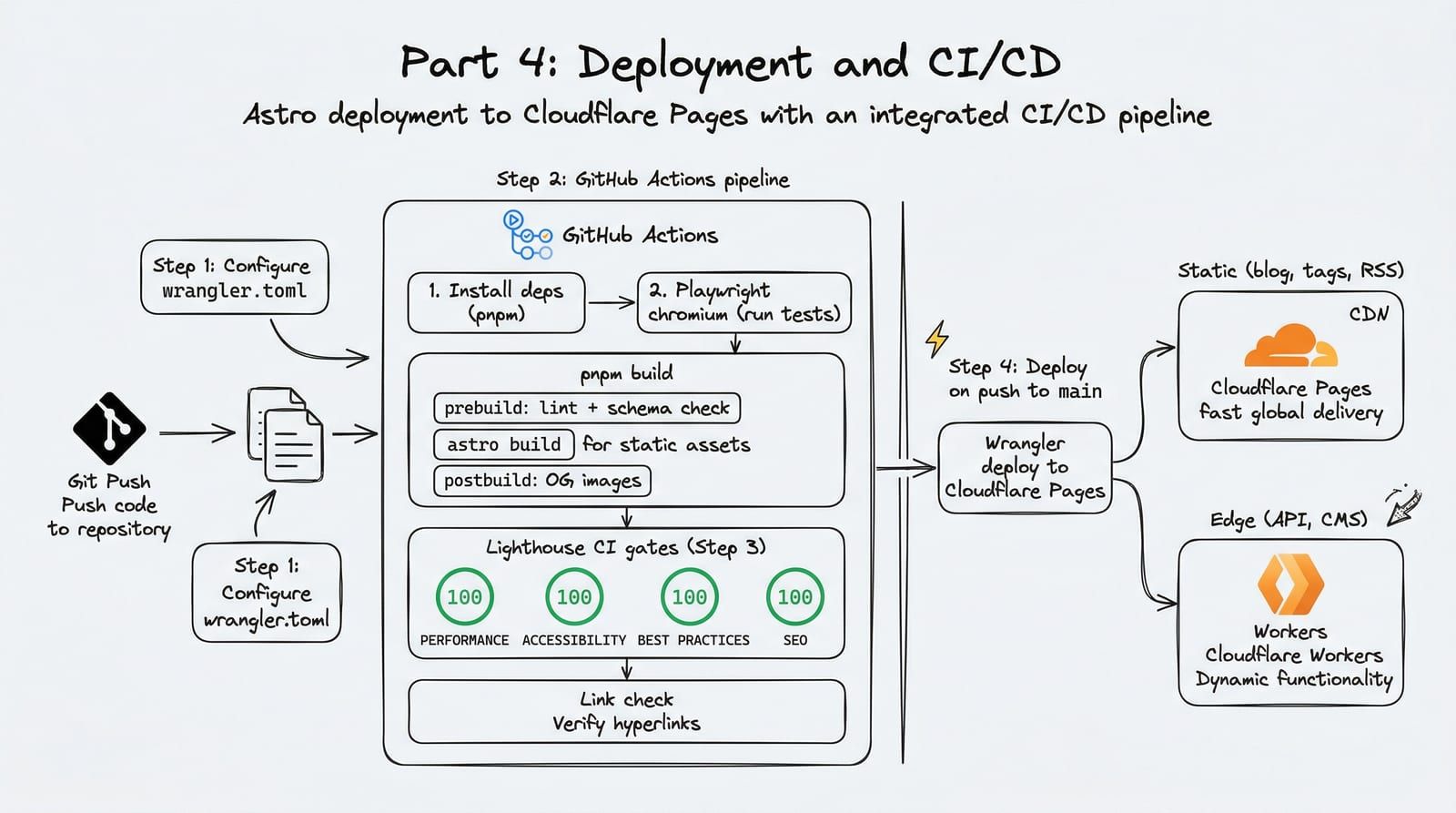
Your Astro site builds locally. You push to GitHub. The deploy fails because Mermaid diagrams need Playwright’s headless Chromium, which is not installed in CI. You fix that, push again. The build succeeds but the edge functions crash because you wrote process.env.OPENAI_API_KEY instead of Astro.locals.runtime.env.OPENAI_API_KEY. You fix that too. The site deploys. Then someone runs Lighthouse and the performance score is 72 because nobody configured the image service for production.
This post makes sure deploy day is boring. We configure Cloudflare Pages, write a complete GitHub Actions workflow, enforce Lighthouse 100/100/100/100, and handle every sharp edge between “works on my machine” and “works in production.”
This is Part 4 of the Astro Deep Dive series. Part 1 scaffolded the project. Part 2 wired up islands architecture. Part 3 built the content layer. Now we ship it.
Static vs Edge: Know Your Routes
Before configuring anything, understand what runs where. Astro 5 makes this explicit with prerender:
// Default: static (prerendered at build time)// Every page is static unless you opt out
// Edge route — runs on Cloudflare Workersexport const prerender = false;
Blogcraft’s route map:
| Route | Runtime | Why |
|---|---|---|
| / | Static (CDN) | Landing page, changes only on deploy |
| /blog/* | Static (CDN) | Content pages, built from MDX at build time |
| /tags/* | Static (CDN) | Tag listing pages, known at build time |
| /about | Static (CDN) | Static content |
| /rss.xml | Static (CDN) | Generated at build time |
| /sitemap-*.xml | Static (CDN) | Generated by @astrojs/sitemap |
| /search.json | Static (CDN) | Pre-built search index for Fuse.js |
| /api/ai/* | Edge (Workers) | AI proxy routes — needs secrets, streaming |
| /write | Edge (Workers) | Editor — needs auth gate, can't be static |
| /keystatic/* | Edge (Workers) | CMS admin — injected by @keystatic/astro |
The rule is simple: if a route needs secrets, authentication, or dynamic responses, it runs on the edge. Everything else is static HTML on a CDN. Static pages cost nothing to serve, load instantly from edge caches worldwide, and ship zero JavaScript by default (as we established in Part 2).
Cloudflare Pages Configuration
The Adapter
The @astrojs/cloudflare adapter bridges Astro’s build output to Cloudflare’s runtime. The key configuration:
import cloudflare from '@astrojs/cloudflare';
adapter: cloudflare({  imageService: 'compile',}),
The imageService: 'compile' setting is critical. It tells Astro to run Sharp image optimization at build time on the Node.js CI runner, not at request time on Cloudflare Workers. Sharp uses native bindings that do not run on workerd (Cloudflare’s JavaScript runtime). Without this setting, your image optimization silently falls back to passthrough — serving unoptimized images that tank your Lighthouse performance score.
wrangler.toml
Wrangler is Cloudflare’s CLI for Pages and Workers. The configuration:
name = "blogcraft"compatibility_date = "2025-09-01"compatibility_flags = ["nodejs_compat_v2"]
[site]bucket = "./dist"
Two fields matter here:
compatibility_date pins the Workers runtime behavior to a specific date. Cloudflare ships breaking changes behind compatibility dates — setting this to a recent date ensures you get modern APIs without surprise regressions when they update the runtime.
nodejs_compat_v2 enables the Node.js compatibility layer in workerd. React 19’s SSR code uses Node APIs that workerd does not natively provide. Without this flag, your edge-rendered pages crash with ReferenceError: process is not defined or similar errors.
Environment Variables
Here is the correct way to access secrets in an Astro edge route on Cloudflare:
export const prerender = false;
export async function POST({ locals, request }: APIContext) {  // Correct: Cloudflare runtime bindings  const apiKey = locals.runtime.env.OPENAI_API_KEY;
  // WRONG: process.env is empty on Workers  // const apiKey = process.env.OPENAI_API_KEY;
  if (!apiKey) {    return new Response('API key not configured', { status: 500 });  }
  // ... use the key}
Set these variables in the Cloudflare Pages dashboard under Settings > Environment variables, or through wrangler pages secret put:
wrangler pages secret put OPENAI_API_KEY --project-name=blogcraftwrangler pages secret put WRITE_PASSWORD --project-name=blogcraftRequired secrets for Blogcraft:
| Variable | Required | Purpose |
|---|---|---|
CLOUDFLARE_API_TOKEN | Yes (CI only) | GitHub Actions deploys via wrangler |
CLOUDFLARE_ACCOUNT_ID | Yes (CI only) | Identifies your Cloudflare account |
OPENAI_API_KEY | For /write AI | AI writing assistant proxy |
WRITE_PASSWORD | For /write auth | Simple auth gate for the editor |
PUBLIC_UMAMI_WEBSITE_ID | For analytics | Umami tracking (public, not secret) |
The GitHub Actions Workflow
Here is the complete CI/CD pipeline. Every line earns its place:
name: Deploy to Cloudflare Pages
on:  push:    branches: [main]  pull_request:    branches: [main]
jobs:  build-and-deploy:    runs-on: ubuntu-latest    steps:      - uses: actions/checkout@v4
      - uses: pnpm/action-setup@v4        with:          version: 9
      - uses: actions/setup-node@v4        with:          node-version: 22          cache: 'pnpm'
      # Cache Playwright browsers (Mermaid needs Chromium)      - name: Cache Playwright browsers        uses: actions/cache@v4        with:          path: ~/.cache/ms-playwright          key: playwright-${{ runner.os }}-${{ hashFiles('pnpm-lock.yaml') }}
      - name: Install dependencies        run: pnpm install --frozen-lockfile
      - name: Install Playwright Chromium        run: npx playwright install --with-deps chromium
      # Build (prebuild: lint:islands + check:schema)      # Build (postbuild: OG image generation)      - name: Build        run: pnpm build
      # Lighthouse CI (PRs only)      - name: Lighthouse CI        if: github.event_name == 'pull_request'        run: |          pnpm exec lhci autorun        env:          LHCI_GITHUB_TOKEN: ${{ secrets.GITHUB_TOKEN }}
      # Broken link check      - name: Check for broken links        uses: lycheeverse/lychee-action@v2        with:          args: './dist --no-progress'          fail: true
      # Deploy (main branch only)      - name: Deploy to Cloudflare Pages        if: github.ref == 'refs/heads/main'        run: pnpm exec wrangler pages deploy dist --project-name=blogcraft        env:          CLOUDFLARE_API_TOKEN: ${{ secrets.CLOUDFLARE_API_TOKEN }}          CLOUDFLARE_ACCOUNT_ID: ${{ secrets.CLOUDFLARE_ACCOUNT_ID }}
Let me walk through the non-obvious decisions.
Playwright Chromium for Mermaid
The rehype-mermaid plugin renders Mermaid diagrams to SVG at build time (as covered in the Mermaid tutorial). It launches a headless Chromium browser via Playwright to do the rendering. Without npx playwright install --with-deps chromium, the build fails with a cryptic “browser not found” error.
The --with-deps flag installs system-level dependencies (libgbm, libnss3, etc.) that Chromium requires on Ubuntu. The cache step avoids re-downloading the ~400MB browser binary on every run.
Prebuild Checks
The pnpm build command triggers prebuild hooks that run two critical checks:
1. Island hydration audit (lint:islands)
#!/bin/bash# Fail if any component uses client:load (except ThemeToggle)VIOLATIONS=$(grep -rn 'client:load' src/ --include='*.astro' \  | grep -v 'ThemeToggle')
if [ -n "$VIOLATIONS" ]; then  echo "ERROR: client:load usage detected (use client:visible or client:idle):"  echo "$VIOLATIONS"  exit 1fi
As established in Part 2, client:load blocks the main thread immediately on page load. The only exception is ThemeToggle, which must hydrate early to prevent a flash of wrong theme. Everything else uses client:visible or client:idle.
2. Schema parity check (check:schema)
Verifies that the Keystatic CMS field definitions match the Zod schemas in content.config.ts. If someone adds a field to one without updating the other, the build fails with a clear diff.
OG Image Generation
The postbuild step generates Open Graph images using Satori (JSX to SVG) and resvg-js (SVG to PNG):
import satori from 'satori';import { Resvg } from '@resvg/resvg-js';import { readFileSync, writeFileSync, mkdirSync } from 'fs';
// For each blog post, generate a 1200x630 PNG// with the title, author, and date rendered via SatoriLighthouse 100/100/100/100
A Lighthouse score is four independent audits. Each one measures different things and breaks for different reasons. Here is what each score requires and what tanks it.
Performance (Target: 100)
The performance score is dominated by four Core Web Vitals:
First Contentful Paint (FCP) under 0.8s — The browser renders the first piece of content. Static HTML from a CDN with inlined critical CSS achieves this trivially. What breaks it: render-blocking JavaScript, unoptimized fonts loading via external font services, large CSS files loaded synchronously.
Largest Contentful Paint (LCP) under 2.5s — The largest visible element finishes rendering. For blog posts, this is usually the hero image. What breaks it: unoptimized images (no AVIF/WebP, no responsive srcset, no width/height attributes causing layout recalculation). The fix: Astro’s <Picture> component with the image() schema helper from Part 3.
Cumulative Layout Shift (CLS) = 0 — Nothing moves after initial render. What breaks it: images without dimensions, fonts that swap with different metrics, dynamically injected content. The fix: image() provides dimensions at build time, self-hosted fonts with font-display: swap and proper size-adjust fallbacks.
Total Blocking Time (TBT) = 0ms — No long tasks block the main thread. This is where Astro’s zero-JS default is decisive. A content page with no islands ships no JavaScript. TBT is literally zero. What breaks it: adding client:load to components, shipping Mermaid.js client-side (1.1MB), or importing a charting library on a page that does not need it.
adapter: cloudflare({ imageService: 'compile', // Sharp runs at build time, not on Workers}),Self-hosted fonts eliminate the external font service round-trip:
@font-face { font-family: 'Source Serif 4 Variable'; src: url('/fonts/source-serif-4-variable.woff2') format('woff2'); font-display: swap; font-weight: 200 900;}Accessibility (Target: 100)
Lighthouse’s accessibility audit checks a subset of WCAG 2.2. The high-impact items:
- Semantic HTML:
<main>,<article>,<nav>,<header>,<footer>— not<div>for everything - Alt text on every image: The
heroAltfield in the schema is required (z.string(), notz.string().optional()). Missing alt text fails the build, not just the audit - Color contrast: Text against background must meet WCAG AA ratios (4.5:1 for normal text, 3:1 for large text). CSS variables in
global.cssare tuned for both light and dark themes - Heading hierarchy: No skipping levels.
<h1>then<h2>then<h3>, never<h1>to<h3> - Focus indicators: Visible
:focus-visibleoutlines on all interactive elements - Skip navigation link: Hidden link at the top of the page that jumps to
<main>for keyboard users
Best Practices (Target: 100)
- HTTPS everywhere: Cloudflare Pages provides this automatically with free certificates
- No deprecated APIs: Avoid legacy DOM injection methods, synchronous XHR, and
navigator.userAgentstring parsing - Security headers:
Content-Security-Policy,X-Content-Type-Options,X-Frame-Optionsconfigured in Cloudflare Pages headers or_headersfile - No browser errors: No console errors, no failed resource loads, no mixed content
SEO (Target: 100)
- Meta tags:
<title>,<meta name="description">,<meta property="og:*">on every page - Canonical URLs:
<link rel="canonical">preventing duplicate content penalties - Structured data: JSON-LD for blog posts (
BlogPostingschema) with author, date, description - Sitemap: Generated by
@astrojs/sitemap, filtered to exclude/writeand/keystatic - robots.txt: Allow all crawlers, link to sitemap
- RSS feed:
@astrojs/rssgenerates a valid Atom/RSS feed
import rss from '@astrojs/rss';import { getCollection } from 'astro:content';
export async function GET(context: APIContext) {  const posts = (await getCollection('blog', ({ data }) => !data.draft))    .sort((a, b) => b.data.pubDate.valueOf() - a.data.pubDate.valueOf());
  return rss({    title: 'Blogcraft Blog',    description: 'A technical blog with paper-first aesthetics',    site: context.site!,    items: posts.map((post) => ({      title: post.data.title,      pubDate: post.data.pubDate,      description: post.data.description,      link: `/blog/${post.id}/`,    })),  });}
Lighthouse CI Configuration
The lighthouserc.cjs file enforces scores on every pull request:
module.exports = { ci: { collect: { staticDistDir: './dist', url: [ '/', '/blog/astro-deep-dive-01-scaffolding/', '/tags/', ], }, assert: { assertions: { 'categories:performance': ['error', { minScore: 0.95 }], 'categories:accessibility': ['error', { minScore: 0.95 }], 'categories:best-practices': ['error', { minScore: 0.95 }], 'categories:seo': ['error', { minScore: 0.95 }], }, }, upload: { target: 'temporary-public-storage', }, },};The 0.95 threshold (not 1.0) accounts for minor Lighthouse scoring variance between runs. In practice, a site that consistently scores 95+ on CI will score 100 in manual audits. Setting the threshold to 1.0 causes flaky CI failures from Lighthouse’s own measurement jitter.
The Full Pipeline
Here is the complete flow from git push to live site:
%3b%7d%23mermaid-0 .cluster rect%7bfill:hsl(0%2c 0%25%2c 98.9215686275%25)%3bstroke:%23707070%3bstroke-width:1px%3b%7d%23mermaid-0 .cluster text%7bfill:%23333%3b%7d%23mermaid-0 .cluster span%7bcolor:%23333%3b%7d%23mermaid-0 div.mermaidTooltip%7bposition:absolute%3btext-align:center%3bmax-width:200px%3bpadding:2px%3bfont-family:arial%2csans-serif%3bfont-size:12px%3bbackground:hsl(-160%2c 0%25%2c 93.3333333333%25)%3bborder:1px solid %23707070%3bborder-radius:2px%3bpointer-events:none%3bz-index:100%3b%7d%23mermaid-0 .flowchartTitleText%7btext-anchor:middle%3bfont-size:18px%3bfill:black%3b%7d%23mermaid-0 rect.text%7bfill:none%3bstroke-width:0%3b%7d%23mermaid-0 .icon-shape%2c%23mermaid-0 .image-shape%7bbackground-color:white%3btext-align:center%3b%7d%23mermaid-0 .icon-shape p%2c%23mermaid-0 .image-shape p%7bbackground-color:white%3bpadding:2px%3b%7d%23mermaid-0 .icon-shape .label rect%2c%23mermaid-0 .image-shape .label rect%7bopacity:0.5%3bbackground-color:white%3bfill:white%3b%7d%23mermaid-0 .label-icon%7bdisplay:inline-block%3bheight:1em%3boverflow:visible%3bvertical-align:-0.125em%3b%7d%23mermaid-0 .node .label-icon path%7bfill:currentColor%3bstroke:revert%3bstroke-width:revert%3b%7d%23mermaid-0 .node .neo-node%7bstroke:%23999%3b%7d%23mermaid-0 %5bdata-look='neo'%5d.node rect%2c%23mermaid-0 %5bdata-look='neo'%5d.cluster rect%2c%23mermaid-0 %5bdata-look='neo'%5d.node polygon%7bstroke:url(%23mermaid-0-gradient)%3bfilter:drop-shadow( 1px 2px 2px rgba(185%2c185%2c185%2c1))%3b%7d%23mermaid-0 %5bdata-look='neo'%5d.node path%7bstroke:url(%23mermaid-0-gradient)%3bstroke-width:1px%3b%7d%23mermaid-0 %5bdata-look='neo'%5d.node .outer-path%7bfilter:drop-shadow( 1px 2px 2px rgba(185%2c185%2c185%2c1))%3b%7d%23mermaid-0 %5bdata-look='neo'%5d.node .neo-line path%7bstroke:%23999%3bfilter:none%3b%7d%23mermaid-0 %5bdata-look='neo'%5d.node circle%7bstroke:url(%23mermaid-0-gradient)%3bfilter:drop-shadow( 1px 2px 2px rgba(185%2c185%2c185%2c1))%3b%7d%23mermaid-0 %5bdata-look='neo'%5d.node circle .state-start%7bfill:black%3b%7d%23mermaid-0 %5bdata-look='neo'%5d.icon-shape .icon%7bfill:url(%23mermaid-0-gradient)%3bfilter:drop-shadow( 1px 2px 2px rgba(185%2c185%2c185%2c1))%3b%7d%23mermaid-0 %5bdata-look='neo'%5d.icon-shape .icon-neo path%7bstroke:url(%23mermaid-0-gradient)%3bfilter:drop-shadow( 1px 2px 2px rgba(185%2c185%2c185%2c1))%3b%7d%23mermaid-0 :root%7b--mermaid-font-family:arial%2csans-serif%3b%7d%3c/style%3e%3cg%3e%3cmarker id='mermaid-0_flowchart-v2-pointEnd' class='marker flowchart-v2' viewBox='0 0 10 10' refX='5' refY='5' markerUnits='userSpaceOnUse' markerWidth='8' markerHeight='8' orient='auto'%3e%3cpath d='M 0 0 L 10 5 L 0 10 z' class='arrowMarkerPath' style='stroke-width: 1%3b stroke-dasharray: 1%2c 0%3b'/%3e%3c/marker%3e%3cmarker id='mermaid-0_flowchart-v2-pointStart' class='marker flowchart-v2' viewBox='0 0 10 10' refX='4.5' refY='5' markerUnits='userSpaceOnUse' markerWidth='8' markerHeight='8' orient='auto'%3e%3cpath d='M 0 5 L 10 10 L 10 0 z' class='arrowMarkerPath' style='stroke-width: 1%3b stroke-dasharray: 1%2c 0%3b'/%3e%3c/marker%3e%3cmarker id='mermaid-0_flowchart-v2-pointEnd-margin' class='marker flowchart-v2' viewBox='0 0 11.5 14' refX='11.5' refY='7' markerUnits='userSpaceOnUse' markerWidth='10.5' markerHeight='14' orient='auto'%3e%3cpath d='M 0 0 L 11.5 7 L 0 14 z' class='arrowMarkerPath' style='stroke-width: 0%3b stroke-dasharray: 1%2c 0%3b'/%3e%3c/marker%3e%3cmarker id='mermaid-0_flowchart-v2-pointStart-margin' class='marker flowchart-v2' viewBox='0 0 11.5 14' refX='1' refY='7' markerUnits='userSpaceOnUse' markerWidth='11.5' markerHeight='14' orient='auto'%3e%3cpolygon points='0%2c7 11.5%2c14 11.5%2c0' class='arrowMarkerPath' style='stroke-width: 0%3b stroke-dasharray: 1%2c 0%3b'/%3e%3c/marker%3e%3cmarker id='mermaid-0_flowchart-v2-circleEnd' class='marker flowchart-v2' viewBox='0 0 10 10' refX='11' refY='5' markerUnits='userSpaceOnUse' markerWidth='11' markerHeight='11' orient='auto'%3e%3ccircle cx='5' cy='5' r='5' class='arrowMarkerPath' style='stroke-width: 1%3b stroke-dasharray: 1%2c 0%3b'/%3e%3c/marker%3e%3cmarker id='mermaid-0_flowchart-v2-circleStart' class='marker flowchart-v2' viewBox='0 0 10 10' refX='-1' refY='5' markerUnits='userSpaceOnUse' markerWidth='11' markerHeight='11' orient='auto'%3e%3ccircle cx='5' cy='5' r='5' class='arrowMarkerPath' style='stroke-width: 1%3b stroke-dasharray: 1%2c 0%3b'/%3e%3c/marker%3e%3cmarker id='mermaid-0_flowchart-v2-circleEnd-margin' class='marker flowchart-v2' viewBox='0 0 10 10' refY='5' refX='12.25' markerUnits='userSpaceOnUse' markerWidth='14' markerHeight='14' orient='auto'%3e%3ccircle cx='5' cy='5' r='5' class='arrowMarkerPath' style='stroke-width: 0%3b stroke-dasharray: 1%2c 0%3b'/%3e%3c/marker%3e%3cmarker id='mermaid-0_flowchart-v2-circleStart-margin' class='marker flowchart-v2' viewBox='0 0 10 10' refX='-2' refY='5' markerUnits='userSpaceOnUse' markerWidth='14' markerHeight='14' orient='auto'%3e%3ccircle cx='5' cy='5' r='5' class='arrowMarkerPath' style='stroke-width: 0%3b stroke-dasharray: 1%2c 0%3b'/%3e%3c/marker%3e%3cmarker id='mermaid-0_flowchart-v2-crossEnd' class='marker cross flowchart-v2' viewBox='0 0 11 11' refX='12' refY='5.2' markerUnits='userSpaceOnUse' markerWidth='11' markerHeight='11' orient='auto'%3e%3cpath d='M 1%2c1 l 9%2c9 M 10%2c1 l -9%2c9' class='arrowMarkerPath' style='stroke-width: 2%3b stroke-dasharray: 1%2c 0%3b'/%3e%3c/marker%3e%3cmarker id='mermaid-0_flowchart-v2-crossStart' class='marker cross flowchart-v2' viewBox='0 0 11 11' refX='-1' refY='5.2' markerUnits='userSpaceOnUse' markerWidth='11' markerHeight='11' orient='auto'%3e%3cpath d='M 1%2c1 l 9%2c9 M 10%2c1 l -9%2c9' class='arrowMarkerPath' style='stroke-width: 2%3b stroke-dasharray: 1%2c 0%3b'/%3e%3c/marker%3e%3cmarker id='mermaid-0_flowchart-v2-crossEnd-margin' class='marker cross flowchart-v2' viewBox='0 0 15 15' refX='17.7' refY='7.5' markerUnits='userSpaceOnUse' markerWidth='12' markerHeight='12' orient='auto'%3e%3cpath d='M 1%2c1 L 14%2c14 M 1%2c14 L 14%2c1' class='arrowMarkerPath' style='stroke-width: 2.5%3b'/%3e%3c/marker%3e%3cmarker id='mermaid-0_flowchart-v2-crossStart-margin' class='marker cross flowchart-v2' viewBox='0 0 15 15' refX='-3.5' refY='7.5' markerUnits='userSpaceOnUse' markerWidth='12' markerHeight='12' orient='auto'%3e%3cpath d='M 1%2c1 L 14%2c14 M 1%2c14 L 14%2c1' class='arrowMarkerPath' style='stroke-width: 2.5%3b stroke-dasharray: 1%2c 0%3b'/%3e%3c/marker%3e%3cg class='root'%3e%3cg class='clusters'/%3e%3cg class='edgePaths'%3e%3cpath d='M227.293%2c62L227.293%2c66.167C227.293%2c70.333%2c227.293%2c78.667%2c227.293%2c86.333C227.293%2c94%2c227.293%2c101%2c227.293%2c104.5L227.293%2c108' id='mermaid-0-L_A_B_0' class='edge-thickness-normal edge-pattern-solid edge-thickness-normal edge-pattern-solid flowchart-link' style='%3b' data-edge='true' data-et='edge' data-id='L_A_B_0' data-points='W3sieCI6MjI3LjI5Mjk2ODc1LCJ5Ijo2Mn0seyJ4IjoyMjcuMjkyOTY4NzUsInkiOjg3fSx7IngiOjIyNy4yOTI5Njg3NSwieSI6MTEyfV0=' data-look='classic' marker-end='url(%23mermaid-0_flowchart-v2-pointEnd)'/%3e%3cpath d='M227.293%2c166L227.293%2c170.167C227.293%2c174.333%2c227.293%2c182.667%2c227.293%2c190.333C227.293%2c198%2c227.293%2c205%2c227.293%2c208.5L227.293%2c212' id='mermaid-0-L_B_C_0' class='edge-thickness-normal edge-pattern-solid edge-thickness-normal edge-pattern-solid flowchart-link' style='%3b' data-edge='true' data-et='edge' data-id='L_B_C_0' data-points='W3sieCI6MjI3LjI5Mjk2ODc1LCJ5IjoxNjZ9LHsieCI6MjI3LjI5Mjk2ODc1LCJ5IjoxOTF9LHsieCI6MjI3LjI5Mjk2ODc1LCJ5IjoyMTZ9XQ==' data-look='classic' marker-end='url(%23mermaid-0_flowchart-v2-pointEnd)'/%3e%3cpath d='M227.293%2c270L227.293%2c274.167C227.293%2c278.333%2c227.293%2c286.667%2c227.293%2c294.333C227.293%2c302%2c227.293%2c309%2c227.293%2c312.5L227.293%2c316' id='mermaid-0-L_C_D_0' class='edge-thickness-normal edge-pattern-solid edge-thickness-normal edge-pattern-solid flowchart-link' style='%3b' data-edge='true' data-et='edge' data-id='L_C_D_0' data-points='W3sieCI6MjI3LjI5Mjk2ODc1LCJ5IjoyNzB9LHsieCI6MjI3LjI5Mjk2ODc1LCJ5IjoyOTV9LHsieCI6MjI3LjI5Mjk2ODc1LCJ5IjozMjB9XQ==' data-look='classic' marker-end='url(%23mermaid-0_flowchart-v2-pointEnd)'/%3e%3cpath d='M227.293%2c374L227.293%2c378.167C227.293%2c382.333%2c227.293%2c390.667%2c227.293%2c398.333C227.293%2c406%2c227.293%2c413%2c227.293%2c416.5L227.293%2c420' id='mermaid-0-L_D_E_0' class='edge-thickness-normal edge-pattern-solid edge-thickness-normal edge-pattern-solid flowchart-link' style='%3b' data-edge='true' data-et='edge' data-id='L_D_E_0' data-points='W3sieCI6MjI3LjI5Mjk2ODc1LCJ5IjozNzR9LHsieCI6MjI3LjI5Mjk2ODc1LCJ5IjozOTl9LHsieCI6MjI3LjI5Mjk2ODc1LCJ5Ijo0MjR9XQ==' data-look='classic' marker-end='url(%23mermaid-0_flowchart-v2-pointEnd)'/%3e%3cpath d='M227.293%2c478L227.293%2c482.167C227.293%2c486.333%2c227.293%2c494.667%2c227.293%2c502.333C227.293%2c510%2c227.293%2c517%2c227.293%2c520.5L227.293%2c524' id='mermaid-0-L_E_E1_0' class='edge-thickness-normal edge-pattern-solid edge-thickness-normal edge-pattern-solid flowchart-link' style='%3b' data-edge='true' data-et='edge' data-id='L_E_E1_0' data-points='W3sieCI6MjI3LjI5Mjk2ODc1LCJ5Ijo0Nzh9LHsieCI6MjI3LjI5Mjk2ODc1LCJ5Ijo1MDN9LHsieCI6MjI3LjI5Mjk2ODc1LCJ5Ijo1Mjh9XQ==' data-look='classic' marker-end='url(%23mermaid-0_flowchart-v2-pointEnd)'/%3e%3cpath d='M227.293%2c582L227.293%2c586.167C227.293%2c590.333%2c227.293%2c598.667%2c227.293%2c606.333C227.293%2c614%2c227.293%2c621%2c227.293%2c624.5L227.293%2c628' id='mermaid-0-L_E1_E2_0' class='edge-thickness-normal edge-pattern-solid edge-thickness-normal edge-pattern-solid flowchart-link' style='%3b' data-edge='true' data-et='edge' data-id='L_E1_E2_0' data-points='W3sieCI6MjI3LjI5Mjk2ODc1LCJ5Ijo1ODJ9LHsieCI6MjI3LjI5Mjk2ODc1LCJ5Ijo2MDd9LHsieCI6MjI3LjI5Mjk2ODc1LCJ5Ijo2MzJ9XQ==' data-look='classic' marker-end='url(%23mermaid-0_flowchart-v2-pointEnd)'/%3e%3cpath d='M227.293%2c686L227.293%2c690.167C227.293%2c694.333%2c227.293%2c702.667%2c227.293%2c710.333C227.293%2c718%2c227.293%2c725%2c227.293%2c728.5L227.293%2c732' id='mermaid-0-L_E2_E3_0' class='edge-thickness-normal edge-pattern-solid edge-thickness-normal edge-pattern-solid flowchart-link' style='%3b' data-edge='true' data-et='edge' data-id='L_E2_E3_0' data-points='W3sieCI6MjI3LjI5Mjk2ODc1LCJ5Ijo2ODZ9LHsieCI6MjI3LjI5Mjk2ODc1LCJ5Ijo3MTF9LHsieCI6MjI3LjI5Mjk2ODc1LCJ5Ijo3MzZ9XQ==' data-look='classic' marker-end='url(%23mermaid-0_flowchart-v2-pointEnd)'/%3e%3cpath d='M227.293%2c790L227.293%2c794.167C227.293%2c798.333%2c227.293%2c806.667%2c227.293%2c814.333C227.293%2c822%2c227.293%2c829%2c227.293%2c832.5L227.293%2c836' id='mermaid-0-L_E3_E4_0' class='edge-thickness-normal edge-pattern-solid edge-thickness-normal edge-pattern-solid flowchart-link' style='%3b' data-edge='true' data-et='edge' data-id='L_E3_E4_0' data-points='W3sieCI6MjI3LjI5Mjk2ODc1LCJ5Ijo3OTB9LHsieCI6MjI3LjI5Mjk2ODc1LCJ5Ijo4MTV9LHsieCI6MjI3LjI5Mjk2ODc1LCJ5Ijo4NDB9XQ==' data-look='classic' marker-end='url(%23mermaid-0_flowchart-v2-pointEnd)'/%3e%3cpath d='M227.293%2c918L227.293%2c922.167C227.293%2c926.333%2c227.293%2c934.667%2c227.293%2c942.333C227.293%2c950%2c227.293%2c957%2c227.293%2c960.5L227.293%2c964' id='mermaid-0-L_E4_F_0' class='edge-thickness-normal edge-pattern-solid edge-thickness-normal edge-pattern-solid flowchart-link' style='%3b' data-edge='true' data-et='edge' data-id='L_E4_F_0' data-points='W3sieCI6MjI3LjI5Mjk2ODc1LCJ5Ijo5MTh9LHsieCI6MjI3LjI5Mjk2ODc1LCJ5Ijo5NDN9LHsieCI6MjI3LjI5Mjk2ODc1LCJ5Ijo5Njh9XQ==' data-look='classic' marker-end='url(%23mermaid-0_flowchart-v2-pointEnd)'/%3e%3cpath d='M188.806%2c1072.435L174.121%2c1085.016C159.436%2c1097.597%2c130.065%2c1122.759%2c115.38%2c1140.841C100.695%2c1158.922%2c100.695%2c1169.922%2c100.695%2c1175.422L100.695%2c1180.922' id='mermaid-0-L_F_G_0' class='edge-thickness-normal edge-pattern-solid edge-thickness-normal edge-pattern-solid flowchart-link' style='%3b' data-edge='true' data-et='edge' data-id='L_F_G_0' data-points='W3sieCI6MTg4LjgwNTU5ODE5MDE3NDUsInkiOjEwNzIuNDM0NTA0NDQwMTc0Nn0seyJ4IjoxMDAuNjk1MzEyNSwieSI6MTE0Ny45MjE4NzV9LHsieCI6MTAwLjY5NTMxMjUsInkiOjExODQuOTIxODc1fV0=' data-look='classic' marker-end='url(%23mermaid-0_flowchart-v2-pointEnd)'/%3e%3cpath d='M100.695%2c1238.922L100.695%2c1243.089C100.695%2c1247.255%2c100.695%2c1255.589%2c100.695%2c1263.255C100.695%2c1270.922%2c100.695%2c1277.922%2c100.695%2c1281.422L100.695%2c1284.922' id='mermaid-0-L_G_H_0' class='edge-thickness-normal edge-pattern-solid edge-thickness-normal edge-pattern-solid flowchart-link' style='%3b' data-edge='true' data-et='edge' data-id='L_G_H_0' data-points='W3sieCI6MTAwLjY5NTMxMjUsInkiOjEyMzguOTIxODc1fSx7IngiOjEwMC42OTUzMTI1LCJ5IjoxMjYzLjkyMTg3NX0seyJ4IjoxMDAuNjk1MzEyNSwieSI6MTI4OC45MjE4NzV9XQ==' data-look='classic' marker-end='url(%23mermaid-0_flowchart-v2-pointEnd)'/%3e%3cpath d='M265.78%2c1072.435L280.465%2c1085.016C295.15%2c1097.597%2c324.521%2c1122.759%2c339.206%2c1140.841C353.891%2c1158.922%2c353.891%2c1169.922%2c353.891%2c1175.422L353.891%2c1180.922' id='mermaid-0-L_F_I_0' class='edge-thickness-normal edge-pattern-solid edge-thickness-normal edge-pattern-solid flowchart-link' style='%3b' data-edge='true' data-et='edge' data-id='L_F_I_0' data-points='W3sieCI6MjY1Ljc4MDMzOTMwOTgyNTU0LCJ5IjoxMDcyLjQzNDUwNDQ0MDE3NDZ9LHsieCI6MzUzLjg5MDYyNSwieSI6MTE0Ny45MjE4NzV9LHsieCI6MzUzLjg5MDYyNSwieSI6MTE4NC45MjE4NzV9XQ==' data-look='classic' marker-end='url(%23mermaid-0_flowchart-v2-pointEnd)'/%3e%3cpath d='M353.891%2c1238.922L353.891%2c1243.089C353.891%2c1247.255%2c353.891%2c1255.589%2c353.891%2c1263.255C353.891%2c1270.922%2c353.891%2c1277.922%2c353.891%2c1281.422L353.891%2c1284.922' id='mermaid-0-L_I_J_0' class='edge-thickness-normal edge-pattern-solid edge-thickness-normal edge-pattern-solid flowchart-link' style='%3b' data-edge='true' data-et='edge' data-id='L_I_J_0' data-points='W3sieCI6MzUzLjg5MDYyNSwieSI6MTIzOC45MjE4NzV9LHsieCI6MzUzLjg5MDYyNSwieSI6MTI2My45MjE4NzV9LHsieCI6MzUzLjg5MDYyNSwieSI6MTI4OC45MjE4NzV9XQ==' data-look='classic' marker-end='url(%23mermaid-0_flowchart-v2-pointEnd)'/%3e%3cpath d='M353.891%2c1342.922L353.891%2c1347.089C353.891%2c1351.255%2c353.891%2c1359.589%2c353.891%2c1367.255C353.891%2c1374.922%2c353.891%2c1381.922%2c353.891%2c1385.422L353.891%2c1388.922' id='mermaid-0-L_J_K_0' class='edge-thickness-normal edge-pattern-solid edge-thickness-normal edge-pattern-solid flowchart-link' style='%3b' data-edge='true' data-et='edge' data-id='L_J_K_0' data-points='W3sieCI6MzUzLjg5MDYyNSwieSI6MTM0Mi45MjE4NzV9LHsieCI6MzUzLjg5MDYyNSwieSI6MTM2Ny45MjE4NzV9LHsieCI6MzUzLjg5MDYyNSwieSI6MTM5Mi45MjE4NzV9XQ==' data-look='classic' marker-end='url(%23mermaid-0_flowchart-v2-pointEnd)'/%3e%3c/g%3e%3cg class='edgeLabels'%3e%3cg class='edgeLabel'%3e%3cg class='label' data-id='L_A_B_0' transform='translate(0%2c 0)'%3e%3cforeignObject width='0' height='0'%3e%3cdiv xmlns='http://www.w3.org/1999/xhtml' class='labelBkg' style='display: table-cell%3b white-space: nowrap%3b line-height: 1.5%3b max-width: 200px%3b text-align: center%3b'%3e%3cspan class='edgeLabel'%3e%3c/span%3e%3c/div%3e%3c/foreignObject%3e%3c/g%3e%3c/g%3e%3cg class='edgeLabel'%3e%3cg class='label' data-id='L_B_C_0' transform='translate(0%2c 0)'%3e%3cforeignObject width='0' height='0'%3e%3cdiv xmlns='http://www.w3.org/1999/xhtml' class='labelBkg' style='display: table-cell%3b white-space: nowrap%3b line-height: 1.5%3b max-width: 200px%3b text-align: center%3b'%3e%3cspan class='edgeLabel'%3e%3c/span%3e%3c/div%3e%3c/foreignObject%3e%3c/g%3e%3c/g%3e%3cg class='edgeLabel'%3e%3cg class='label' data-id='L_C_D_0' transform='translate(0%2c 0)'%3e%3cforeignObject width='0' height='0'%3e%3cdiv xmlns='http://www.w3.org/1999/xhtml' class='labelBkg' style='display: table-cell%3b white-space: nowrap%3b line-height: 1.5%3b max-width: 200px%3b text-align: center%3b'%3e%3cspan class='edgeLabel'%3e%3c/span%3e%3c/div%3e%3c/foreignObject%3e%3c/g%3e%3c/g%3e%3cg class='edgeLabel'%3e%3cg class='label' data-id='L_D_E_0' transform='translate(0%2c 0)'%3e%3cforeignObject width='0' height='0'%3e%3cdiv xmlns='http://www.w3.org/1999/xhtml' class='labelBkg' style='display: table-cell%3b white-space: nowrap%3b line-height: 1.5%3b max-width: 200px%3b text-align: center%3b'%3e%3cspan class='edgeLabel'%3e%3c/span%3e%3c/div%3e%3c/foreignObject%3e%3c/g%3e%3c/g%3e%3cg class='edgeLabel'%3e%3cg class='label' data-id='L_E_E1_0' transform='translate(0%2c 0)'%3e%3cforeignObject width='0' height='0'%3e%3cdiv xmlns='http://www.w3.org/1999/xhtml' class='labelBkg' style='display: table-cell%3b white-space: nowrap%3b line-height: 1.5%3b max-width: 200px%3b text-align: center%3b'%3e%3cspan class='edgeLabel'%3e%3c/span%3e%3c/div%3e%3c/foreignObject%3e%3c/g%3e%3c/g%3e%3cg class='edgeLabel'%3e%3cg class='label' data-id='L_E1_E2_0' transform='translate(0%2c 0)'%3e%3cforeignObject width='0' height='0'%3e%3cdiv xmlns='http://www.w3.org/1999/xhtml' class='labelBkg' style='display: table-cell%3b white-space: nowrap%3b line-height: 1.5%3b max-width: 200px%3b text-align: center%3b'%3e%3cspan class='edgeLabel'%3e%3c/span%3e%3c/div%3e%3c/foreignObject%3e%3c/g%3e%3c/g%3e%3cg class='edgeLabel'%3e%3cg class='label' data-id='L_E2_E3_0' transform='translate(0%2c 0)'%3e%3cforeignObject width='0' height='0'%3e%3cdiv xmlns='http://www.w3.org/1999/xhtml' class='labelBkg' style='display: table-cell%3b white-space: nowrap%3b line-height: 1.5%3b max-width: 200px%3b text-align: center%3b'%3e%3cspan class='edgeLabel'%3e%3c/span%3e%3c/div%3e%3c/foreignObject%3e%3c/g%3e%3c/g%3e%3cg class='edgeLabel'%3e%3cg class='label' data-id='L_E3_E4_0' transform='translate(0%2c 0)'%3e%3cforeignObject width='0' height='0'%3e%3cdiv xmlns='http://www.w3.org/1999/xhtml' class='labelBkg' style='display: table-cell%3b white-space: nowrap%3b line-height: 1.5%3b max-width: 200px%3b text-align: center%3b'%3e%3cspan class='edgeLabel'%3e%3c/span%3e%3c/div%3e%3c/foreignObject%3e%3c/g%3e%3c/g%3e%3cg class='edgeLabel'%3e%3cg class='label' data-id='L_E4_F_0' transform='translate(0%2c 0)'%3e%3cforeignObject width='0' height='0'%3e%3cdiv xmlns='http://www.w3.org/1999/xhtml' class='labelBkg' style='display: table-cell%3b white-space: nowrap%3b line-height: 1.5%3b max-width: 200px%3b text-align: center%3b'%3e%3cspan class='edgeLabel'%3e%3c/span%3e%3c/div%3e%3c/foreignObject%3e%3c/g%3e%3c/g%3e%3cg class='edgeLabel' transform='translate(100.6953125%2c 1147.921875)'%3e%3cg class='label' data-id='L_F_G_0' transform='translate(-11.1171875%2c -12)'%3e%3cforeignObject width='22.234375' height='24'%3e%3cdiv xmlns='http://www.w3.org/1999/xhtml' class='labelBkg' style='display: table-cell%3b white-space: nowrap%3b line-height: 1.5%3b max-width: 200px%3b text-align: center%3b'%3e%3cspan class='edgeLabel'%3e%3cp%3ePR%3c/p%3e%3c/span%3e%3c/div%3e%3c/foreignObject%3e%3c/g%3e%3c/g%3e%3cg class='edgeLabel'%3e%3cg class='label' data-id='L_G_H_0' transform='translate(0%2c 0)'%3e%3cforeignObject width='0' height='0'%3e%3cdiv xmlns='http://www.w3.org/1999/xhtml' class='labelBkg' style='display: table-cell%3b white-space: nowrap%3b line-height: 1.5%3b max-width: 200px%3b text-align: center%3b'%3e%3cspan class='edgeLabel'%3e%3c/span%3e%3c/div%3e%3c/foreignObject%3e%3c/g%3e%3c/g%3e%3cg class='edgeLabel' transform='translate(353.890625%2c 1147.921875)'%3e%3cg class='label' data-id='L_F_I_0' transform='translate(-17.34375%2c -12)'%3e%3cforeignObject width='34.6875' height='24'%3e%3cdiv xmlns='http://www.w3.org/1999/xhtml' class='labelBkg' style='display: table-cell%3b white-space: nowrap%3b line-height: 1.5%3b max-width: 200px%3b text-align: center%3b'%3e%3cspan class='edgeLabel'%3e%3cp%3emain%3c/p%3e%3c/span%3e%3c/div%3e%3c/foreignObject%3e%3c/g%3e%3c/g%3e%3cg class='edgeLabel'%3e%3cg class='label' data-id='L_I_J_0' transform='translate(0%2c 0)'%3e%3cforeignObject width='0' height='0'%3e%3cdiv xmlns='http://www.w3.org/1999/xhtml' class='labelBkg' style='display: table-cell%3b white-space: nowrap%3b line-height: 1.5%3b max-width: 200px%3b text-align: center%3b'%3e%3cspan class='edgeLabel'%3e%3c/span%3e%3c/div%3e%3c/foreignObject%3e%3c/g%3e%3c/g%3e%3cg class='edgeLabel'%3e%3cg class='label' data-id='L_J_K_0' transform='translate(0%2c 0)'%3e%3cforeignObject width='0' height='0'%3e%3cdiv xmlns='http://www.w3.org/1999/xhtml' class='labelBkg' style='display: table-cell%3b white-space: nowrap%3b line-height: 1.5%3b max-width: 200px%3b text-align: center%3b'%3e%3cspan class='edgeLabel'%3e%3c/span%3e%3c/div%3e%3c/foreignObject%3e%3c/g%3e%3c/g%3e%3c/g%3e%3cg class='nodes'%3e%3cg class='node default' id='mermaid-0-flowchart-A-0' data-look='classic' transform='translate(227.29296875%2c 35)'%3e%3crect class='basic label-container' style='fill:%23e8f4f8 !important%3bstroke:%230D6B6E !important' x='-86.4765625' y='-27' width='172.953125' height='54'/%3e%3cg class='label' style='' transform='translate(-56.4765625%2c -12)'%3e%3crect/%3e%3cforeignObject width='112.953125' height='24'%3e%3cdiv xmlns='http://www.w3.org/1999/xhtml' style='display: table-cell%3b white-space: nowrap%3b line-height: 1.5%3b max-width: 200px%3b text-align: center%3b'%3e%3cspan class='nodeLabel'%3e%3cp%3egit push to main%3c/p%3e%3c/span%3e%3c/div%3e%3c/foreignObject%3e%3c/g%3e%3c/g%3e%3cg class='node default' id='mermaid-0-flowchart-B-1' data-look='classic' transform='translate(227.29296875%2c 139)'%3e%3crect class='basic label-container' style='' x='-116.7109375' y='-27' width='233.421875' height='54'/%3e%3cg class='label' style='' transform='translate(-86.7109375%2c -12)'%3e%3crect/%3e%3cforeignObject width='173.421875' height='24'%3e%3cdiv xmlns='http://www.w3.org/1999/xhtml' style='display: table-cell%3b white-space: nowrap%3b line-height: 1.5%3b max-width: 200px%3b text-align: center%3b'%3e%3cspan class='nodeLabel'%3e%3cp%3eGitHub Actions triggered%3c/p%3e%3c/span%3e%3c/div%3e%3c/foreignObject%3e%3c/g%3e%3c/g%3e%3cg class='node default' id='mermaid-0-flowchart-C-3' data-look='classic' transform='translate(227.29296875%2c 243)'%3e%3crect class='basic label-container' style='' x='-129.59375' y='-27' width='259.1875' height='54'/%3e%3cg class='label' style='' transform='translate(-99.59375%2c -12)'%3e%3crect/%3e%3cforeignObject width='199.1875' height='24'%3e%3cdiv xmlns='http://www.w3.org/1999/xhtml' style='display: table-cell%3b white-space: nowrap%3b line-height: 1.5%3b max-width: 200px%3b text-align: center%3b'%3e%3cspan class='nodeLabel'%3e%3cp%3epnpm install --frozen-lockfile%3c/p%3e%3c/span%3e%3c/div%3e%3c/foreignObject%3e%3c/g%3e%3c/g%3e%3cg class='node default' id='mermaid-0-flowchart-D-5' data-look='classic' transform='translate(227.29296875%2c 347)'%3e%3crect class='basic label-container' style='' x='-129.140625' y='-27' width='258.28125' height='54'/%3e%3cg class='label' style='' transform='translate(-99.140625%2c -12)'%3e%3crect/%3e%3cforeignObject width='198.28125' height='24'%3e%3cdiv xmlns='http://www.w3.org/1999/xhtml' style='display: table-cell%3b white-space: nowrap%3b line-height: 1.5%3b max-width: 200px%3b text-align: center%3b'%3e%3cspan class='nodeLabel'%3e%3cp%3eInstall Playwright Chromium%3c/p%3e%3c/span%3e%3c/div%3e%3c/foreignObject%3e%3c/g%3e%3c/g%3e%3cg class='node default' id='mermaid-0-flowchart-E-7' data-look='classic' transform='translate(227.29296875%2c 451)'%3e%3crect class='basic label-container' style='' x='-69.140625' y='-27' width='138.28125' height='54'/%3e%3cg class='label' style='' transform='translate(-39.140625%2c -12)'%3e%3crect/%3e%3cforeignObject width='78.28125' height='24'%3e%3cdiv xmlns='http://www.w3.org/1999/xhtml' style='display: table-cell%3b white-space: nowrap%3b line-height: 1.5%3b max-width: 200px%3b text-align: center%3b'%3e%3cspan class='nodeLabel'%3e%3cp%3epnpm build%3c/p%3e%3c/span%3e%3c/div%3e%3c/foreignObject%3e%3c/g%3e%3c/g%3e%3cg class='node default' id='mermaid-0-flowchart-E1-9' data-look='classic' transform='translate(227.29296875%2c 555)'%3e%3crect class='basic label-container' style='' x='-100.265625' y='-27' width='200.53125' height='54'/%3e%3cg class='label' style='' transform='translate(-70.265625%2c -12)'%3e%3crect/%3e%3cforeignObject width='140.53125' height='24'%3e%3cdiv xmlns='http://www.w3.org/1999/xhtml' style='display: table-cell%3b white-space: nowrap%3b line-height: 1.5%3b max-width: 200px%3b text-align: center%3b'%3e%3cspan class='nodeLabel'%3e%3cp%3eprebuild: lint:islands%3c/p%3e%3c/span%3e%3c/div%3e%3c/foreignObject%3e%3c/g%3e%3c/g%3e%3cg class='node default' id='mermaid-0-flowchart-E2-11' data-look='classic' transform='translate(227.29296875%2c 659)'%3e%3crect class='basic label-container' style='' x='-114.046875' y='-27' width='228.09375' height='54'/%3e%3cg class='label' style='' transform='translate(-84.046875%2c -12)'%3e%3crect/%3e%3cforeignObject width='168.09375' height='24'%3e%3cdiv xmlns='http://www.w3.org/1999/xhtml' style='display: table-cell%3b white-space: nowrap%3b line-height: 1.5%3b max-width: 200px%3b text-align: center%3b'%3e%3cspan class='nodeLabel'%3e%3cp%3eprebuild: check:schema%3c/p%3e%3c/span%3e%3c/div%3e%3c/foreignObject%3e%3c/g%3e%3c/g%3e%3cg class='node default' id='mermaid-0-flowchart-E3-13' data-look='classic' transform='translate(227.29296875%2c 763)'%3e%3crect class='basic label-container' style='' x='-66.9140625' y='-27' width='133.828125' height='54'/%3e%3cg class='label' style='' transform='translate(-36.9140625%2c -12)'%3e%3crect/%3e%3cforeignObject width='73.828125' height='24'%3e%3cdiv xmlns='http://www.w3.org/1999/xhtml' style='display: table-cell%3b white-space: nowrap%3b line-height: 1.5%3b max-width: 200px%3b text-align: center%3b'%3e%3cspan class='nodeLabel'%3e%3cp%3eastro build%3c/p%3e%3c/span%3e%3c/div%3e%3c/foreignObject%3e%3c/g%3e%3c/g%3e%3cg class='node default' id='mermaid-0-flowchart-E4-15' data-look='classic' transform='translate(227.29296875%2c 879)'%3e%3crect class='basic label-container' style='' x='-130' y='-39' width='260' height='78'/%3e%3cg class='label' style='' transform='translate(-100%2c -24)'%3e%3crect/%3e%3cforeignObject width='200' height='48'%3e%3cdiv xmlns='http://www.w3.org/1999/xhtml' style='display: table%3b white-space: break-spaces%3b line-height: 1.5%3b max-width: 200px%3b text-align: center%3b width: 200px%3b'%3e%3cspan class='nodeLabel'%3e%3cp%3epostbuild: generate OG images%3c/p%3e%3c/span%3e%3c/div%3e%3c/foreignObject%3e%3c/g%3e%3c/g%3e%3cg class='node default' id='mermaid-0-flowchart-F-17' data-look='classic' transform='translate(227.29296875%2c 1039.4609375)'%3e%3cpolygon points='71.4609375%2c0 142.921875%2c-71.4609375 71.4609375%2c-142.921875 0%2c-71.4609375' class='label-container' transform='translate(-70.9609375%2c 71.4609375)'/%3e%3cg class='label' style='' transform='translate(-44.4609375%2c -12)'%3e%3crect/%3e%3cforeignObject width='88.921875' height='24'%3e%3cdiv xmlns='http://www.w3.org/1999/xhtml' style='display: table-cell%3b white-space: nowrap%3b line-height: 1.5%3b max-width: 200px%3b text-align: center%3b'%3e%3cspan class='nodeLabel'%3e%3cp%3ePR or main%3f%3c/p%3e%3c/span%3e%3c/div%3e%3c/foreignObject%3e%3c/g%3e%3c/g%3e%3cg class='node default' id='mermaid-0-flowchart-G-19' data-look='classic' transform='translate(100.6953125%2c 1211.921875)'%3e%3crect class='basic label-container' style='' x='-79.3671875' y='-27' width='158.734375' height='54'/%3e%3cg class='label' style='' transform='translate(-49.3671875%2c -12)'%3e%3crect/%3e%3cforeignObject width='98.734375' height='24'%3e%3cdiv xmlns='http://www.w3.org/1999/xhtml' style='display: table-cell%3b white-space: nowrap%3b line-height: 1.5%3b max-width: 200px%3b text-align: center%3b'%3e%3cspan class='nodeLabel'%3e%3cp%3eLighthouse CI%3c/p%3e%3c/span%3e%3c/div%3e%3c/foreignObject%3e%3c/g%3e%3c/g%3e%3cg class='node default' id='mermaid-0-flowchart-H-21' data-look='classic' transform='translate(100.6953125%2c 1315.921875)'%3e%3crect class='basic label-container' style='' x='-92.6953125' y='-27' width='185.390625' height='54'/%3e%3cg class='label' style='' transform='translate(-62.6953125%2c -12)'%3e%3crect/%3e%3cforeignObject width='125.390625' height='24'%3e%3cdiv xmlns='http://www.w3.org/1999/xhtml' style='display: table-cell%3b white-space: nowrap%3b line-height: 1.5%3b max-width: 200px%3b text-align: center%3b'%3e%3cspan class='nodeLabel'%3e%3cp%3eBroken link check%3c/p%3e%3c/span%3e%3c/div%3e%3c/foreignObject%3e%3c/g%3e%3c/g%3e%3cg class='node default' id='mermaid-0-flowchart-I-23' data-look='classic' transform='translate(353.890625%2c 1211.921875)'%3e%3crect class='basic label-container' style='' x='-92.6953125' y='-27' width='185.390625' height='54'/%3e%3cg class='label' style='' transform='translate(-62.6953125%2c -12)'%3e%3crect/%3e%3cforeignObject width='125.390625' height='24'%3e%3cdiv xmlns='http://www.w3.org/1999/xhtml' style='display: table-cell%3b white-space: nowrap%3b line-height: 1.5%3b max-width: 200px%3b text-align: center%3b'%3e%3cspan class='nodeLabel'%3e%3cp%3eBroken link check%3c/p%3e%3c/span%3e%3c/div%3e%3c/foreignObject%3e%3c/g%3e%3c/g%3e%3cg class='node default' id='mermaid-0-flowchart-J-25' data-look='classic' transform='translate(353.890625%2c 1315.921875)'%3e%3crect class='basic label-container' style='' x='-110.5' y='-27' width='221' height='54'/%3e%3cg class='label' style='' transform='translate(-80.5%2c -12)'%3e%3crect/%3e%3cforeignObject width='161' height='24'%3e%3cdiv xmlns='http://www.w3.org/1999/xhtml' style='display: table-cell%3b white-space: nowrap%3b line-height: 1.5%3b max-width: 200px%3b text-align: center%3b'%3e%3cspan class='nodeLabel'%3e%3cp%3ewrangler pages deploy%3c/p%3e%3c/span%3e%3c/div%3e%3c/foreignObject%3e%3c/g%3e%3c/g%3e%3cg class='node default' id='mermaid-0-flowchart-K-27' data-look='classic' transform='translate(353.890625%2c 1419.921875)'%3e%3crect class='basic label-container' style='fill:%23d4edda !important%3bstroke:%23155724 !important' x='-114.0390625' y='-27' width='228.078125' height='54'/%3e%3cg class='label' style='' transform='translate(-84.0390625%2c -12)'%3e%3crect/%3e%3cforeignObject width='168.078125' height='24'%3e%3cdiv xmlns='http://www.w3.org/1999/xhtml' style='display: table-cell%3b white-space: nowrap%3b line-height: 1.5%3b max-width: 200px%3b text-align: center%3b'%3e%3cspan class='nodeLabel'%3e%3cp%3eLive on Cloudflare CDN%3c/p%3e%3c/span%3e%3c/div%3e%3c/foreignObject%3e%3c/g%3e%3c/g%3e%3c/g%3e%3c/g%3e%3c/g%3e%3cdefs%3e%3cfilter id='mermaid-0-drop-shadow' height='130%25' width='130%25'%3e%3cfeDropShadow dx='4' dy='4' stdDeviation='0' flood-opacity='0.06' flood-color='black'/%3e%3c/filter%3e%3c/defs%3e%3cdefs%3e%3cfilter id='mermaid-0-drop-shadow-small' height='150%25' width='150%25'%3e%3cfeDropShadow dx='2' dy='2' stdDeviation='0' flood-opacity='0.06' flood-color='black'/%3e%3c/filter%3e%3c/defs%3e%3clinearGradient id='mermaid-0-gradient' gradientUnits='objectBoundingBox' x1='0%25' y1='0%25' x2='100%25' y2='0%25'%3e%3cstop offset='0%25' stop-color='hsl(0%2c 0%25%2c 83.3333333333%25)' stop-opacity='1'/%3e%3cstop offset='100%25' stop-color='hsl(0%2c 0%25%2c 88.9215686275%25)' stop-opacity='1'/%3e%3c/linearGradient%3e%3c/svg%3e)
Every step that can fail, fails fast. Schema violations fail in prebuild. Missing images fail in the Astro build. Broken links fail in the post-build check. Lighthouse regressions fail on the PR before reaching main. By the time wrangler pages deploy runs, the site has been validated six ways.
Cloudflare Pages vs Alternatives
| Feature | Cloudflare Pages | Vercel | Netlify |
|---|---|---|---|
| Edge runtime | workerd (V8 isolates) | Edge Runtime (V8) | Edge Functions (Deno) |
| Static hosting | Free, unlimited bandwidth | Free tier, 100GB bandwidth | Free tier, 100GB bandwidth |
| Build minutes | 500/month free | 6000/month free | 300/month free |
| Cold start | ~0ms (V8 isolates) | ~0ms (Edge Runtime) | ~50-250ms (Deno) |
| Native image optimization | Cloudflare Images (paid) | Built-in (free tier) | Netlify Image CDN |
| KV/storage | Workers KV, R2, D1 | Vercel KV, Blob, Postgres | Netlify Blobs |
| Astro adapter | @astrojs/cloudflare | @astrojs/vercel | @astrojs/netlify |
| Custom domains | Free, automatic SSL | Free, automatic SSL | Free, automatic SSL |
| Preview deploys | Yes (branch-based) | Yes (commit-based) | Yes (branch-based) |
| Node.js compat | nodejs_compat_v2 flag | Native Node.js | Limited |
Cloudflare Pages wins on cost (free bandwidth, generous free tier) and cold starts (V8 isolates start in under a millisecond). The tradeoff is the nodejs_compat_v2 requirement and the inability to run native Node bindings (like resvg-js) on Workers. For a blog that is 95% static with a few edge routes, this tradeoff is heavily favorable.
Common Deploy Failures and Fixes
After shipping dozens of Astro sites to Cloudflare Pages, these are the failures I see repeatedly:
Build fails: Browser not found (rehype-mermaid)
The fix: add npx playwright install --with-deps chromium to your CI pipeline before the build step. Cache ~/.cache/ms-playwright to avoid downloading 400MB of Chromium on every build. If you do not use Mermaid diagrams, remove rehype-mermaid from your config — do not pay the Playwright tax for nothing.
Edge route crashes: process.env is undefined
On Cloudflare Workers, process.env is empty even with nodejs_compat_v2. Access environment variables through Astro.locals.runtime.env.YOUR_VAR in Astro routes. Set variables in the Cloudflare dashboard or via wrangler pages secret put.
Images not optimized: Lighthouse performance drops
Set imageService: 'compile' in the Cloudflare adapter config. This runs Sharp at build time. Without it, Astro falls back to passthrough — serving original uncompressed images. Verify by checking the build output for .avif and .webp files in dist/_astro/.
Expressive Code blocks render as plain pre tags
Move expressiveCode() BEFORE mdx() in the integrations array. Expressive Code must register its rehype transforms before MDX processes code fences. This is the integration order issue from Part 3.
Build succeeds but pages 404 on Cloudflare
Check that wrangler.toml has bucket = './dist' pointing to Astro’s output directory. If you changed outDir in astro.config.ts, update the bucket path to match. Also verify the wrangler pages deploy command uses the correct directory argument.
Fonts cause layout shift (CLS greater than 0)
Self-host fonts as WOFF2 files instead of loading from external font services. Use font-display: swap and add size-adjust fallback metrics to prevent layout shift during font loading. Preload your primary body font in the head element with rel="preload", as="font", type="font/woff2", and crossorigin.
The Deploy Checklist
Before pushing your first deploy, verify every item:
-
wrangler.tomlexists withcompatibility_dateandnodejs_compat_v2 -
@astrojs/cloudflareadapter withimageService: 'compile' -
expressiveCode()beforemdx()in integrations - All edge routes have
export const prerender = false - Edge routes use
Astro.locals.runtime.env, notprocess.env -
CLOUDFLARE_API_TOKENandCLOUDFLARE_ACCOUNT_IDin GitHub secrets - Playwright Chromium installed in CI (if using Mermaid)
- OG images generated at build time, not on Workers
- Self-hosted fonts with
font-display: swap - All images use
image()schema and<Picture>component -
robots.txtand sitemap configured -
client:loadbanned except ThemeToggle - Lighthouse CI configured with 95%+ thresholds
Series Recap
Over four posts, we built a production Astro 5 site from nothing to deployed:
Part 1: Scaffolding — Project structure, Astro config, Tailwind 4 integration, design tokens, base layouts.
Part 2: Islands Architecture — Zero-JS by default, hydration directives (client:visible, client:idle, client:only), the client:load ban, islands for search, TOC, and theme toggle.
Part 3: Content Collections — Content Layer API, Zod schemas, image() validation, getCollection/render, dynamic routes, remark/rehype pipeline, integration order.
Part 4 (this post) — Cloudflare Pages, GitHub Actions, Playwright for Mermaid, environment variables, Lighthouse 100/100/100/100, OG images, deploy checklist.
The result is a blog that scores perfect Lighthouse numbers, ships zero JavaScript on content pages, validates every piece of content at build time, and deploys automatically on every push to main. The architecture decisions from Parts 1-3 compound here — zero-JS defaults give you TBT 0ms, image() schemas give you optimized images without runtime cost, and build-time Mermaid means no 1.1MB client bundle.
Deploy day should be boring. If it is not, something in the pipeline is missing a check.