
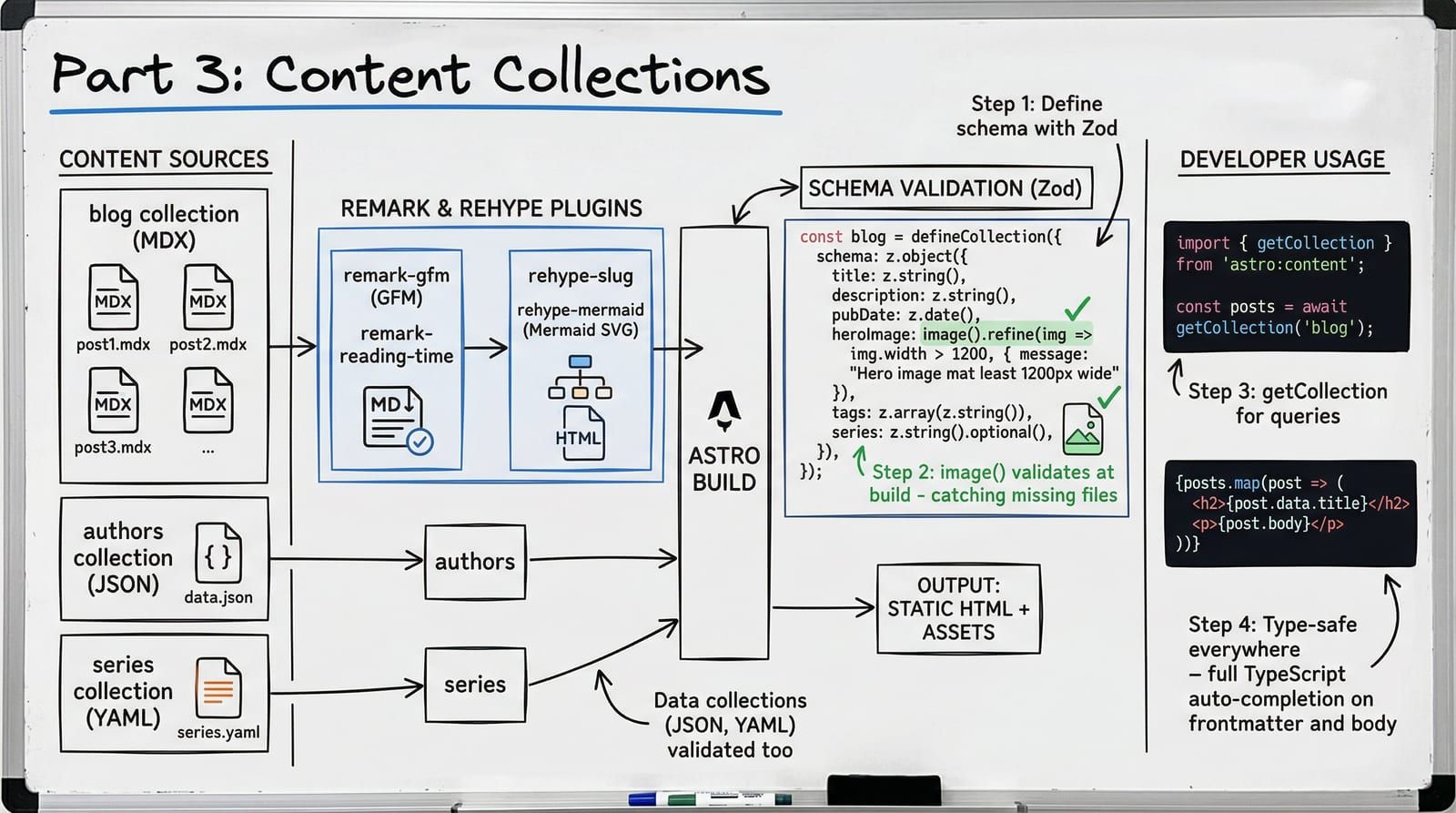
Your blog has 50 posts. One has a date field that reads "Aprll 10" instead of a proper date. Another is missing its required tags array entirely. A third references hero-iamge.jpg — a file that does not exist. You discover none of this until a reader reports a broken page in production.
Content Collections prevent all three failures. Every field in every content file is validated against a Zod schema at build time. A typo in a date? Build fails. Missing tag array? Build fails. A hero image pointing to a file that is not on disk? Build fails — before your readers ever see the damage.
In Part 1 we scaffolded the project. In Part 2 we wired up islands for interactivity. Now we build the content layer that makes the whole thing worth deploying.
The Content Layer API
Astro 5 replaced the legacy content system with the Content Layer API. The old approach relied on magic directories and implicit conventions. The new system is explicit: you define collections with loaders, validate with Zod schemas, and query with type-safe functions.
The single source of truth is src/content.config.ts. Not src/content/config.ts (that was Astro 4). Not a contentlayer.config.ts. One file, one schema definition, full TypeScript inference.
Defining Collections
A collection needs two things: a loader that tells Astro where to find files, and a schema that tells Astro what shape the data must have.
Here is the blog collection from Blogcraft:
import { defineCollection, z } from 'astro:content';import { glob } from 'astro/loaders';
const blog = defineCollection({  loader: glob({ pattern: '**/*.mdx', base: './src/content/blog' }),  schema: ({ image }) => z.object({    title: z.string().max(100),    description: z.string().max(300),    pubDate: z.coerce.date(),    updatedDate: z.coerce.date().optional(),    heroImage: image(),    heroAlt: z.string(),    author: z.string().default('default'),    tags: z.array(z.string()),    category: z.enum([      'engineering', 'architecture', 'data', 'devops',      'ai-ml', 'rust', 'frontend', 'tutorial'    ]),    draft: z.boolean().default(false),    featured: z.boolean().default(false),    series: z.object({      slug: z.string(),      order: z.number(),    }).optional(),    toc: z.boolean().default(true),    readingTime: z.number().optional(),  }),});
Every piece of this schema earns its place. z.string().max(100) on the title prevents runaway SEO titles. z.coerce.date() accepts both 2026-04-10 and "2026-04-10T00:00:00Z" — it coerces the string to a Date object. z.enum() on category restricts values to a known set, so a typo like "tutoral" fails the build instead of silently creating an uncategorized post.
The image() helper deserves special attention.
Image Validation with image()
The image() function is not a standard Zod type. It is an Astro-provided schema helper passed through the destructured { image } parameter in the schema function. It does two things no regular z.string() can:
-
Validates the file exists at build time. If your frontmatter says
heroImage: ../../assets/images/heroes/missing.jpgand that file is not on disk, the build fails immediately with a clear error pointing to the exact file and field. -
Returns processed image metadata. The resolved value is not a string path — it is an image object with
src,width,height, andformatproperties. This metadata feeds directly into Astro’s<Image>and<Picture>components for responsive image generation.
When you use the processed image in a layout:
---import { Picture } from 'astro:assets';
const { post, headings, readingTime } = Astro.props;---
<article>  <Picture    src={post.data.heroImage}    alt={post.data.heroAlt}    widths={[400, 800, 1200]}    formats={['avif', 'webp', 'jpeg']}    class="hero-image"  />  <!-- ... --></article>
Astro’s image service (Sharp) generates optimized variants at build time — AVIF, WebP, and JPEG fallback at multiple widths. The <Picture> component emits a <picture> element with <source> tags and proper srcset attributes. Zero runtime cost, zero layout shift (because width and height are known from the schema).
Multiple Collection Types
Content Collections are not limited to MDX. Any structured data with a loader and schema qualifies. Blogcraft uses three collections:
const authors = defineCollection({  loader: glob({ pattern: '**/*.json', base: './src/content/authors' }),  schema: z.object({    name: z.string(),    bio: z.string(),    avatar: z.string(),    social: z.object({      github: z.string().url().optional(),      twitter: z.string().url().optional(),      linkedin: z.string().url().optional(),    }).optional(),  }),});
const series = defineCollection({  loader: glob({ pattern: '**/*.yaml', base: './src/content/series' }),  schema: ({ image }) => z.object({    title: z.string().max(100),    description: z.string().max(300),    coverImage: image(),    coverAlt: z.string(),    status: z.enum(['ongoing', 'complete']),    comingSoon: z.array(z.string()).default([]),  }),});
export const collections = { blog, authors, series };
JSON for authors. YAML for series metadata. MDX for posts. The glob loader handles all of them — you just change the pattern and base path. Each collection gets its own fully-typed schema, and Astro generates TypeScript types for all of them.
Querying Collections
Astro 5 provides two primary query functions: getCollection for lists and getEntry for single items.
import { getCollection, getEntry } from 'astro:content';
// All published posts, sorted newest firstconst posts = (await getCollection('blog', ({ data }) => !data.draft))  .sort((a, b) => b.data.pubDate.valueOf() - a.data.pubDate.valueOf());
// Single author by ID (filename without extension)const author = await getEntry('authors', 'default');
// Filter by tagconst rustPosts = await getCollection('blog', ({ data }) =>  !data.draft && data.tags.includes('rust'));
// Filter by seriesconst seriesPosts = (await getCollection('blog', ({ data }) =>  !data.draft && data.series?.slug === 'astro-deep-dive')).sort((a, b) => (a.data.series?.order ?? 0) - (b.data.series?.order ?? 0));
The filter callback in getCollection runs at build time. It receives the full typed data object, so TypeScript knows data.draft is a boolean, data.tags is string[], and data.series is { slug: string; order: number } | undefined. No type assertions. No as any. The schema is the type.
Dynamic Routes with getStaticPaths
Every blog post needs a URL. In Astro 5, dynamic routes use getStaticPaths to generate pages at build time:
---import { getCollection, render } from 'astro:content';import BlogPostLayout from '../../layouts/BlogPostLayout.astro';import Callout from '../../components/mdx/Callout.astro';import ComparisonTable from '../../components/mdx/ComparisonTable.astro';import Tabs from '../../components/mdx/Tabs.astro';// ... other MDX components
export async function getStaticPaths() {  const posts = await getCollection('blog', ({ data }) => !data.draft);  return posts.map((post) => ({    params: { slug: post.id },    props: { post },  }));}
const { post } = Astro.props;const { Content, headings, remarkPluginFrontmatter } = await render(post);const readingTime = remarkPluginFrontmatter?.minutesRead ?? '5 min read';
const mdxComponents = {  Callout,  ComparisonTable,  Tabs,  // ... register all MDX components};---<BlogPostLayout post={post} headings={headings} readingTime={readingTime}>  <Content components={mdxComponents} /></BlogPostLayout>
Two critical Astro 5 changes to note here:
-
render()is a standalone import, not a method on the entry. The oldentry.render()from Astro 4 is gone. You importrenderfromastro:contentand callrender(entry). -
post.idis the content identifier. In Astro 5’s Content Layer,idis derived from the filename (minus the extension). There is no separateslugproperty —idserves as both the identifier and the route parameter.
Type Safety: Schema to TypeScript
When you run astro dev or astro build, Astro generates TypeScript types from your schemas into .astro/types.d.ts. Every getCollection('blog') call returns CollectionEntry<'blog'>[] where CollectionEntry<'blog'> has a fully typed data property matching your Zod schema.
This means:
- Autocomplete works on
post.data.title,post.data.tags,post.data.series?.order - Accessing
post.data.nonexistentis a compile error - The
categoryfield autocompletes to'engineering' | 'architecture' | 'data' | ... post.data.pubDateis typed asDate, notstring
You never write an interface for your frontmatter. The schema is the interface.
Series Support
Linking posts within a series requires the series field in the schema and a query that groups by series slug:
import { getCollection } from 'astro:content';
export async function getSeriesPosts(seriesSlug: string) {  return (await getCollection('blog', ({ data }) =>    !data.draft && data.series?.slug === seriesSlug  )).sort((a, b) =>    (a.data.series?.order ?? 0) - (b.data.series?.order ?? 0)  );}
export function getSeriesNavigation(  posts: Awaited<ReturnType<typeof getSeriesPosts>>,  currentOrder: number,) {  const currentIndex = posts.findIndex(    (p) => p.data.series?.order === currentOrder,  );  return {    prev: currentIndex > 0 ? posts[currentIndex - 1] : null,    next: currentIndex < posts.length - 1 ? posts[currentIndex + 1] : null,    total: posts.length,    current: currentIndex + 1,  };}
The layout calls getSeriesNavigation and renders prev/next links. Because the series order is a number in the schema, sorting is deterministic. No string comparison surprises.
Schema Parity with Your CMS
If you use a CMS like Keystatic alongside Content Collections, the CMS field definitions must match the Zod schema exactly. A field that is required in the schema but optional in the CMS means authors can save content that fails the build.
Blogcraft enforces parity with a prebuild script:
// Parse the Zod schema and Keystatic config programmatically// Compare field names, types, required/optional status// Fail the build if any drift is detected
// Runs during: pnpm build → prebuild hook// Exit code 1 = drift detected, build aborted
This script runs before every build. If someone adds a field to the Keystatic config without updating content.config.ts (or vice versa), the build fails with a clear diff showing exactly what drifted.
The Content Pipeline
MDX files do not go straight from source to HTML. They pass through a pipeline of remark and rehype plugins, each transforming the content:
%3b%7d%23mermaid-0 .cluster rect%7bfill:hsl(0%2c 0%25%2c 98.9215686275%25)%3bstroke:%23707070%3bstroke-width:1px%3b%7d%23mermaid-0 .cluster text%7bfill:%23333%3b%7d%23mermaid-0 .cluster span%7bcolor:%23333%3b%7d%23mermaid-0 div.mermaidTooltip%7bposition:absolute%3btext-align:center%3bmax-width:200px%3bpadding:2px%3bfont-family:arial%2csans-serif%3bfont-size:12px%3bbackground:hsl(-160%2c 0%25%2c 93.3333333333%25)%3bborder:1px solid %23707070%3bborder-radius:2px%3bpointer-events:none%3bz-index:100%3b%7d%23mermaid-0 .flowchartTitleText%7btext-anchor:middle%3bfont-size:18px%3bfill:black%3b%7d%23mermaid-0 rect.text%7bfill:none%3bstroke-width:0%3b%7d%23mermaid-0 .icon-shape%2c%23mermaid-0 .image-shape%7bbackground-color:white%3btext-align:center%3b%7d%23mermaid-0 .icon-shape p%2c%23mermaid-0 .image-shape p%7bbackground-color:white%3bpadding:2px%3b%7d%23mermaid-0 .icon-shape .label rect%2c%23mermaid-0 .image-shape .label rect%7bopacity:0.5%3bbackground-color:white%3bfill:white%3b%7d%23mermaid-0 .label-icon%7bdisplay:inline-block%3bheight:1em%3boverflow:visible%3bvertical-align:-0.125em%3b%7d%23mermaid-0 .node .label-icon path%7bfill:currentColor%3bstroke:revert%3bstroke-width:revert%3b%7d%23mermaid-0 .node .neo-node%7bstroke:%23999%3b%7d%23mermaid-0 %5bdata-look='neo'%5d.node rect%2c%23mermaid-0 %5bdata-look='neo'%5d.cluster rect%2c%23mermaid-0 %5bdata-look='neo'%5d.node polygon%7bstroke:url(%23mermaid-0-gradient)%3bfilter:drop-shadow( 1px 2px 2px rgba(185%2c185%2c185%2c1))%3b%7d%23mermaid-0 %5bdata-look='neo'%5d.node path%7bstroke:url(%23mermaid-0-gradient)%3bstroke-width:1px%3b%7d%23mermaid-0 %5bdata-look='neo'%5d.node .outer-path%7bfilter:drop-shadow( 1px 2px 2px rgba(185%2c185%2c185%2c1))%3b%7d%23mermaid-0 %5bdata-look='neo'%5d.node .neo-line path%7bstroke:%23999%3bfilter:none%3b%7d%23mermaid-0 %5bdata-look='neo'%5d.node circle%7bstroke:url(%23mermaid-0-gradient)%3bfilter:drop-shadow( 1px 2px 2px rgba(185%2c185%2c185%2c1))%3b%7d%23mermaid-0 %5bdata-look='neo'%5d.node circle .state-start%7bfill:black%3b%7d%23mermaid-0 %5bdata-look='neo'%5d.icon-shape .icon%7bfill:url(%23mermaid-0-gradient)%3bfilter:drop-shadow( 1px 2px 2px rgba(185%2c185%2c185%2c1))%3b%7d%23mermaid-0 %5bdata-look='neo'%5d.icon-shape .icon-neo path%7bstroke:url(%23mermaid-0-gradient)%3bfilter:drop-shadow( 1px 2px 2px rgba(185%2c185%2c185%2c1))%3b%7d%23mermaid-0 :root%7b--mermaid-font-family:arial%2csans-serif%3b%7d%3c/style%3e%3cg%3e%3cmarker id='mermaid-0_flowchart-v2-pointEnd' class='marker flowchart-v2' viewBox='0 0 10 10' refX='5' refY='5' markerUnits='userSpaceOnUse' markerWidth='8' markerHeight='8' orient='auto'%3e%3cpath d='M 0 0 L 10 5 L 0 10 z' class='arrowMarkerPath' style='stroke-width: 1%3b stroke-dasharray: 1%2c 0%3b'/%3e%3c/marker%3e%3cmarker id='mermaid-0_flowchart-v2-pointStart' class='marker flowchart-v2' viewBox='0 0 10 10' refX='4.5' refY='5' markerUnits='userSpaceOnUse' markerWidth='8' markerHeight='8' orient='auto'%3e%3cpath d='M 0 5 L 10 10 L 10 0 z' class='arrowMarkerPath' style='stroke-width: 1%3b stroke-dasharray: 1%2c 0%3b'/%3e%3c/marker%3e%3cmarker id='mermaid-0_flowchart-v2-pointEnd-margin' class='marker flowchart-v2' viewBox='0 0 11.5 14' refX='11.5' refY='7' markerUnits='userSpaceOnUse' markerWidth='10.5' markerHeight='14' orient='auto'%3e%3cpath d='M 0 0 L 11.5 7 L 0 14 z' class='arrowMarkerPath' style='stroke-width: 0%3b stroke-dasharray: 1%2c 0%3b'/%3e%3c/marker%3e%3cmarker id='mermaid-0_flowchart-v2-pointStart-margin' class='marker flowchart-v2' viewBox='0 0 11.5 14' refX='1' refY='7' markerUnits='userSpaceOnUse' markerWidth='11.5' markerHeight='14' orient='auto'%3e%3cpolygon points='0%2c7 11.5%2c14 11.5%2c0' class='arrowMarkerPath' style='stroke-width: 0%3b stroke-dasharray: 1%2c 0%3b'/%3e%3c/marker%3e%3cmarker id='mermaid-0_flowchart-v2-circleEnd' class='marker flowchart-v2' viewBox='0 0 10 10' refX='11' refY='5' markerUnits='userSpaceOnUse' markerWidth='11' markerHeight='11' orient='auto'%3e%3ccircle cx='5' cy='5' r='5' class='arrowMarkerPath' style='stroke-width: 1%3b stroke-dasharray: 1%2c 0%3b'/%3e%3c/marker%3e%3cmarker id='mermaid-0_flowchart-v2-circleStart' class='marker flowchart-v2' viewBox='0 0 10 10' refX='-1' refY='5' markerUnits='userSpaceOnUse' markerWidth='11' markerHeight='11' orient='auto'%3e%3ccircle cx='5' cy='5' r='5' class='arrowMarkerPath' style='stroke-width: 1%3b stroke-dasharray: 1%2c 0%3b'/%3e%3c/marker%3e%3cmarker id='mermaid-0_flowchart-v2-circleEnd-margin' class='marker flowchart-v2' viewBox='0 0 10 10' refY='5' refX='12.25' markerUnits='userSpaceOnUse' markerWidth='14' markerHeight='14' orient='auto'%3e%3ccircle cx='5' cy='5' r='5' class='arrowMarkerPath' style='stroke-width: 0%3b stroke-dasharray: 1%2c 0%3b'/%3e%3c/marker%3e%3cmarker id='mermaid-0_flowchart-v2-circleStart-margin' class='marker flowchart-v2' viewBox='0 0 10 10' refX='-2' refY='5' markerUnits='userSpaceOnUse' markerWidth='14' markerHeight='14' orient='auto'%3e%3ccircle cx='5' cy='5' r='5' class='arrowMarkerPath' style='stroke-width: 0%3b stroke-dasharray: 1%2c 0%3b'/%3e%3c/marker%3e%3cmarker id='mermaid-0_flowchart-v2-crossEnd' class='marker cross flowchart-v2' viewBox='0 0 11 11' refX='12' refY='5.2' markerUnits='userSpaceOnUse' markerWidth='11' markerHeight='11' orient='auto'%3e%3cpath d='M 1%2c1 l 9%2c9 M 10%2c1 l -9%2c9' class='arrowMarkerPath' style='stroke-width: 2%3b stroke-dasharray: 1%2c 0%3b'/%3e%3c/marker%3e%3cmarker id='mermaid-0_flowchart-v2-crossStart' class='marker cross flowchart-v2' viewBox='0 0 11 11' refX='-1' refY='5.2' markerUnits='userSpaceOnUse' markerWidth='11' markerHeight='11' orient='auto'%3e%3cpath d='M 1%2c1 l 9%2c9 M 10%2c1 l -9%2c9' class='arrowMarkerPath' style='stroke-width: 2%3b stroke-dasharray: 1%2c 0%3b'/%3e%3c/marker%3e%3cmarker id='mermaid-0_flowchart-v2-crossEnd-margin' class='marker cross flowchart-v2' viewBox='0 0 15 15' refX='17.7' refY='7.5' markerUnits='userSpaceOnUse' markerWidth='12' markerHeight='12' orient='auto'%3e%3cpath d='M 1%2c1 L 14%2c14 M 1%2c14 L 14%2c1' class='arrowMarkerPath' style='stroke-width: 2.5%3b'/%3e%3c/marker%3e%3cmarker id='mermaid-0_flowchart-v2-crossStart-margin' class='marker cross flowchart-v2' viewBox='0 0 15 15' refX='-3.5' refY='7.5' markerUnits='userSpaceOnUse' markerWidth='12' markerHeight='12' orient='auto'%3e%3cpath d='M 1%2c1 L 14%2c14 M 1%2c14 L 14%2c1' class='arrowMarkerPath' style='stroke-width: 2.5%3b stroke-dasharray: 1%2c 0%3b'/%3e%3c/marker%3e%3cg class='root'%3e%3cg class='clusters'/%3e%3cg class='edgePaths'%3e%3cpath d='M203.594%2c331L207.76%2c331C211.927%2c331%2c220.26%2c331%2c227.927%2c331C235.594%2c331%2c242.594%2c331%2c246.094%2c331L249.594%2c331' id='mermaid-0-L_A_B_0' class='edge-thickness-normal edge-pattern-solid edge-thickness-normal edge-pattern-solid flowchart-link' style='%3b' data-edge='true' data-et='edge' data-id='L_A_B_0' data-points='W3sieCI6MjAzLjU5Mzc1LCJ5IjozMzF9LHsieCI6MjI4LjU5Mzc1LCJ5IjozMzF9LHsieCI6MjUzLjU5Mzc1LCJ5IjozMzF9XQ==' data-look='classic' marker-end='url(%23mermaid-0_flowchart-v2-pointEnd)'/%3e%3cpath d='M366.008%2c304L380.262%2c289.167C394.516%2c274.333%2c423.023%2c244.667%2c443.466%2c229.833C463.909%2c215%2c476.286%2c215%2c482.475%2c215L488.664%2c215' id='mermaid-0-L_B_C_0' class='edge-thickness-normal edge-pattern-solid edge-thickness-normal edge-pattern-solid flowchart-link' style='%3b' data-edge='true' data-et='edge' data-id='L_B_C_0' data-points='W3sieCI6MzY2LjAwNzgxMjUsInkiOjMwNH0seyJ4Ijo0NTEuNTMxMjUsInkiOjIxNX0seyJ4Ijo0OTIuNjY0MDYyNSwieSI6MjE1fV0=' data-look='classic' marker-end='url(%23mermaid-0_flowchart-v2-pointEnd)'/%3e%3cpath d='M597.779%2c188L615.795%2c162.5C633.811%2c137%2c669.843%2c86%2c699.365%2c60.5C728.888%2c35%2c751.901%2c35%2c763.408%2c35L774.914%2c35' id='mermaid-0-L_C_D_0' class='edge-thickness-normal edge-pattern-solid edge-thickness-normal edge-pattern-solid flowchart-link' style='%3b' data-edge='true' data-et='edge' data-id='L_C_D_0' data-points='W3sieCI6NTk3Ljc3ODkwNjI1LCJ5IjoxODh9LHsieCI6NzA1Ljg3NSwieSI6MzV9LHsieCI6Nzc4LjkxNDA2MjUsInkiOjM1fV0=' data-look='classic' marker-end='url(%23mermaid-0_flowchart-v2-pointEnd)'/%3e%3cpath d='M916.289%2c35L928.462%2c35C940.635%2c35%2c964.982%2c35%2c980.655%2c35C996.328%2c35%2c1003.328%2c35%2c1006.828%2c35L1010.328%2c35' id='mermaid-0-L_D_E_0' class='edge-thickness-normal edge-pattern-solid edge-thickness-normal edge-pattern-solid flowchart-link' style='%3b' data-edge='true' data-et='edge' data-id='L_D_E_0' data-points='W3sieCI6OTE2LjI4OTA2MjUsInkiOjM1fSx7IngiOjk4OS4zMjgxMjUsInkiOjM1fSx7IngiOjEwMTQuMzI4MTI1LCJ5IjozNX1d' data-look='classic' marker-end='url(%23mermaid-0_flowchart-v2-pointEnd)'/%3e%3cpath d='M426.531%2c331L430.698%2c331C434.865%2c331%2c443.198%2c331%2c453.26%2c331C463.323%2c331%2c475.115%2c331%2c481.01%2c331L486.906%2c331' id='mermaid-0-L_B_B1_0' class='edge-thickness-normal edge-pattern-solid edge-thickness-normal edge-pattern-solid flowchart-link' style='%3b' data-edge='true' data-et='edge' data-id='L_B_B1_0' data-points='W3sieCI6NDI2LjUzMTI1LCJ5IjozMzF9LHsieCI6NDUxLjUzMTI1LCJ5IjozMzF9LHsieCI6NDg2LjkwNjI1LCJ5IjozMzF9XQ==' data-look='classic'/%3e%3cpath d='M363.575%2c358L378.235%2c374.833C392.894%2c391.667%2c422.213%2c425.333%2c441.039%2c442.167C459.865%2c459%2c468.198%2c459%2c472.365%2c459L476.531%2c459' id='mermaid-0-L_B_B2_0' class='edge-thickness-normal edge-pattern-solid edge-thickness-normal edge-pattern-solid flowchart-link' style='%3b' data-edge='true' data-et='edge' data-id='L_B_B2_0' data-points='W3sieCI6MzYzLjU3NTQzOTQ1MzEyNSwieSI6MzU4fSx7IngiOjQ1MS41MzEyNSwieSI6NDU5fSx7IngiOjQ3Ni41MzEyNSwieSI6NDU5fV0=' data-look='classic'/%3e%3cpath d='M632.354%2c188L644.607%2c181.833C656.861%2c175.667%2c681.368%2c163.333%2c704.239%2c157.167C727.109%2c151%2c748.344%2c151%2c758.961%2c151L769.578%2c151' id='mermaid-0-L_C_C1_0' class='edge-thickness-normal edge-pattern-solid edge-thickness-normal edge-pattern-solid flowchart-link' style='%3b' data-edge='true' data-et='edge' data-id='L_C_C1_0' data-points='W3sieCI6NjMyLjM1Mzc1OTc2NTYyNSwieSI6MTg4fSx7IngiOjcwNS44NzUsInkiOjE1MX0seyJ4Ijo3NjkuNTc4MTI1LCJ5IjoxNTF9XQ==' data-look='classic'/%3e%3cpath d='M632.354%2c242L644.607%2c248.167C656.861%2c254.333%2c681.368%2c266.667%2c697.788%2c272.833C714.208%2c279%2c722.542%2c279%2c726.708%2c279L730.875%2c279' id='mermaid-0-L_C_C2_0' class='edge-thickness-normal edge-pattern-solid edge-thickness-normal edge-pattern-solid flowchart-link' style='%3b' data-edge='true' data-et='edge' data-id='L_C_C2_0' data-points='W3sieCI6NjMyLjM1Mzc1OTc2NTYyNSwieSI6MjQyfSx7IngiOjcwNS44NzUsInkiOjI3OX0seyJ4Ijo3MzAuODc1LCJ5IjoyNzl9XQ==' data-look='classic'/%3e%3cpath d='M596.587%2c242L614.801%2c269.5C633.016%2c297%2c669.446%2c352%2c695.02%2c379.5C720.594%2c407%2c735.313%2c407%2c742.672%2c407L750.031%2c407' id='mermaid-0-L_C_C3_0' class='edge-thickness-normal edge-pattern-solid edge-thickness-normal edge-pattern-solid flowchart-link' style='%3b' data-edge='true' data-et='edge' data-id='L_C_C3_0' data-points='W3sieCI6NTk2LjU4NjY2OTkyMTg3NSwieSI6MjQyfSx7IngiOjcwNS44NzUsInkiOjQwN30seyJ4Ijo3NTAuMDMxMjUsInkiOjQwN31d' data-look='classic'/%3e%3c/g%3e%3cg class='edgeLabels'%3e%3cg class='edgeLabel'%3e%3cg class='label' data-id='L_A_B_0' transform='translate(0%2c 0)'%3e%3cforeignObject width='0' height='0'%3e%3cdiv xmlns='http://www.w3.org/1999/xhtml' class='labelBkg' style='display: table-cell%3b white-space: nowrap%3b line-height: 1.5%3b max-width: 200px%3b text-align: center%3b'%3e%3cspan class='edgeLabel'%3e%3c/span%3e%3c/div%3e%3c/foreignObject%3e%3c/g%3e%3c/g%3e%3cg class='edgeLabel'%3e%3cg class='label' data-id='L_B_C_0' transform='translate(0%2c 0)'%3e%3cforeignObject width='0' height='0'%3e%3cdiv xmlns='http://www.w3.org/1999/xhtml' class='labelBkg' style='display: table-cell%3b white-space: nowrap%3b line-height: 1.5%3b max-width: 200px%3b text-align: center%3b'%3e%3cspan class='edgeLabel'%3e%3c/span%3e%3c/div%3e%3c/foreignObject%3e%3c/g%3e%3c/g%3e%3cg class='edgeLabel'%3e%3cg class='label' data-id='L_C_D_0' transform='translate(0%2c 0)'%3e%3cforeignObject width='0' height='0'%3e%3cdiv xmlns='http://www.w3.org/1999/xhtml' class='labelBkg' style='display: table-cell%3b white-space: nowrap%3b line-height: 1.5%3b max-width: 200px%3b text-align: center%3b'%3e%3cspan class='edgeLabel'%3e%3c/span%3e%3c/div%3e%3c/foreignObject%3e%3c/g%3e%3c/g%3e%3cg class='edgeLabel'%3e%3cg class='label' data-id='L_D_E_0' transform='translate(0%2c 0)'%3e%3cforeignObject width='0' height='0'%3e%3cdiv xmlns='http://www.w3.org/1999/xhtml' class='labelBkg' style='display: table-cell%3b white-space: nowrap%3b line-height: 1.5%3b max-width: 200px%3b text-align: center%3b'%3e%3cspan class='edgeLabel'%3e%3c/span%3e%3c/div%3e%3c/foreignObject%3e%3c/g%3e%3c/g%3e%3cg class='edgeLabel'%3e%3cg class='label' data-id='L_B_B1_0' transform='translate(0%2c 0)'%3e%3cforeignObject width='0' height='0'%3e%3cdiv xmlns='http://www.w3.org/1999/xhtml' class='labelBkg' style='display: table-cell%3b white-space: nowrap%3b line-height: 1.5%3b max-width: 200px%3b text-align: center%3b'%3e%3cspan class='edgeLabel'%3e%3c/span%3e%3c/div%3e%3c/foreignObject%3e%3c/g%3e%3c/g%3e%3cg class='edgeLabel'%3e%3cg class='label' data-id='L_B_B2_0' transform='translate(0%2c 0)'%3e%3cforeignObject width='0' height='0'%3e%3cdiv xmlns='http://www.w3.org/1999/xhtml' class='labelBkg' style='display: table-cell%3b white-space: nowrap%3b line-height: 1.5%3b max-width: 200px%3b text-align: center%3b'%3e%3cspan class='edgeLabel'%3e%3c/span%3e%3c/div%3e%3c/foreignObject%3e%3c/g%3e%3c/g%3e%3cg class='edgeLabel'%3e%3cg class='label' data-id='L_C_C1_0' transform='translate(0%2c 0)'%3e%3cforeignObject width='0' height='0'%3e%3cdiv xmlns='http://www.w3.org/1999/xhtml' class='labelBkg' style='display: table-cell%3b white-space: nowrap%3b line-height: 1.5%3b max-width: 200px%3b text-align: center%3b'%3e%3cspan class='edgeLabel'%3e%3c/span%3e%3c/div%3e%3c/foreignObject%3e%3c/g%3e%3c/g%3e%3cg class='edgeLabel'%3e%3cg class='label' data-id='L_C_C2_0' transform='translate(0%2c 0)'%3e%3cforeignObject width='0' height='0'%3e%3cdiv xmlns='http://www.w3.org/1999/xhtml' class='labelBkg' style='display: table-cell%3b white-space: nowrap%3b line-height: 1.5%3b max-width: 200px%3b text-align: center%3b'%3e%3cspan class='edgeLabel'%3e%3c/span%3e%3c/div%3e%3c/foreignObject%3e%3c/g%3e%3c/g%3e%3cg class='edgeLabel'%3e%3cg class='label' data-id='L_C_C3_0' transform='translate(0%2c 0)'%3e%3cforeignObject width='0' height='0'%3e%3cdiv xmlns='http://www.w3.org/1999/xhtml' class='labelBkg' style='display: table-cell%3b white-space: nowrap%3b line-height: 1.5%3b max-width: 200px%3b text-align: center%3b'%3e%3cspan class='edgeLabel'%3e%3c/span%3e%3c/div%3e%3c/foreignObject%3e%3c/g%3e%3c/g%3e%3c/g%3e%3cg class='nodes'%3e%3cg class='node default' id='mermaid-0-flowchart-A-0' data-look='classic' transform='translate(105.796875%2c 331)'%3e%3crect class='basic label-container' style='' x='-97.796875' y='-39' width='195.59375' height='78'/%3e%3cg class='label' style='' transform='translate(-67.796875%2c -24)'%3e%3crect/%3e%3cforeignObject width='135.59375' height='48'%3e%3cdiv xmlns='http://www.w3.org/1999/xhtml' style='display: table-cell%3b white-space: nowrap%3b line-height: 1.5%3b max-width: 200px%3b text-align: center%3b'%3e%3cspan class='nodeLabel'%3e%3cp%3eMDX Source%3cbr /%3e(frontmatter %2b JSX)%3c/p%3e%3c/span%3e%3c/div%3e%3c/foreignObject%3e%3c/g%3e%3c/g%3e%3cg class='node default' id='mermaid-0-flowchart-B-1' data-look='classic' transform='translate(340.0625%2c 331)'%3e%3crect class='basic label-container' style='' x='-86.46875' y='-27' width='172.9375' height='54'/%3e%3cg class='label' style='' transform='translate(-56.46875%2c -12)'%3e%3crect/%3e%3cforeignObject width='112.9375' height='24'%3e%3cdiv xmlns='http://www.w3.org/1999/xhtml' style='display: table-cell%3b white-space: nowrap%3b line-height: 1.5%3b max-width: 200px%3b text-align: center%3b'%3e%3cspan class='nodeLabel'%3e%3cp%3eRemark Plugins%3c/p%3e%3c/span%3e%3c/div%3e%3c/foreignObject%3e%3c/g%3e%3c/g%3e%3cg class='node default' id='mermaid-0-flowchart-C-3' data-look='classic' transform='translate(578.703125%2c 215)'%3e%3crect class='basic label-container' style='' x='-86.0390625' y='-27' width='172.078125' height='54'/%3e%3cg class='label' style='' transform='translate(-56.0390625%2c -12)'%3e%3crect/%3e%3cforeignObject width='112.078125' height='24'%3e%3cdiv xmlns='http://www.w3.org/1999/xhtml' style='display: table-cell%3b white-space: nowrap%3b line-height: 1.5%3b max-width: 200px%3b text-align: center%3b'%3e%3cspan class='nodeLabel'%3e%3cp%3eRehype Plugins%3c/p%3e%3c/span%3e%3c/div%3e%3c/foreignObject%3e%3c/g%3e%3c/g%3e%3cg class='node default' id='mermaid-0-flowchart-D-5' data-look='classic' transform='translate(847.6015625%2c 35)'%3e%3crect class='basic label-container' style='' x='-68.6875' y='-27' width='137.375' height='54'/%3e%3cg class='label' style='' transform='translate(-38.6875%2c -12)'%3e%3crect/%3e%3cforeignObject width='77.375' height='24'%3e%3cdiv xmlns='http://www.w3.org/1999/xhtml' style='display: table-cell%3b white-space: nowrap%3b line-height: 1.5%3b max-width: 200px%3b text-align: center%3b'%3e%3cspan class='nodeLabel'%3e%3cp%3eAstro Build%3c/p%3e%3c/span%3e%3c/div%3e%3c/foreignObject%3e%3c/g%3e%3c/g%3e%3cg class='node default' id='mermaid-0-flowchart-E-7' data-look='classic' transform='translate(1088.3359375%2c 35)'%3e%3crect class='basic label-container' style='' x='-74.0078125' y='-27' width='148.015625' height='54'/%3e%3cg class='label' style='' transform='translate(-44.0078125%2c -12)'%3e%3crect/%3e%3cforeignObject width='88.015625' height='24'%3e%3cdiv xmlns='http://www.w3.org/1999/xhtml' style='display: table-cell%3b white-space: nowrap%3b line-height: 1.5%3b max-width: 200px%3b text-align: center%3b'%3e%3cspan class='nodeLabel'%3e%3cp%3eStatic HTML%3c/p%3e%3c/span%3e%3c/div%3e%3c/foreignObject%3e%3c/g%3e%3c/g%3e%3cg class='node default' id='mermaid-0-flowchart-B1-9' data-look='classic' transform='translate(578.703125%2c 331)'%3e%3crect class='basic label-container' style='' x='-91.796875' y='-39' width='183.59375' height='78'/%3e%3cg class='label' style='' transform='translate(-61.796875%2c -24)'%3e%3crect/%3e%3cforeignObject width='123.59375' height='48'%3e%3cdiv xmlns='http://www.w3.org/1999/xhtml' style='display: table-cell%3b white-space: nowrap%3b line-height: 1.5%3b max-width: 200px%3b text-align: center%3b'%3e%3cspan class='nodeLabel'%3e%3cp%3eremarkGfm%3cbr /%3e(tables%2c task lists)%3c/p%3e%3c/span%3e%3c/div%3e%3c/foreignObject%3e%3c/g%3e%3c/g%3e%3cg class='node default' id='mermaid-0-flowchart-B2-11' data-look='classic' transform='translate(578.703125%2c 459)'%3e%3crect class='basic label-container' style='' x='-102.171875' y='-39' width='204.34375' height='78'/%3e%3cg class='label' style='' transform='translate(-72.171875%2c -24)'%3e%3crect/%3e%3cforeignObject width='144.34375' height='48'%3e%3cdiv xmlns='http://www.w3.org/1999/xhtml' style='display: table-cell%3b white-space: nowrap%3b line-height: 1.5%3b max-width: 200px%3b text-align: center%3b'%3e%3cspan class='nodeLabel'%3e%3cp%3eremarkReadingTime%3cbr /%3e(word count)%3c/p%3e%3c/span%3e%3c/div%3e%3c/foreignObject%3e%3c/g%3e%3c/g%3e%3cg class='node default' id='mermaid-0-flowchart-C1-13' data-look='classic' transform='translate(847.6015625%2c 151)'%3e%3crect class='basic label-container' style='' x='-78.0234375' y='-39' width='156.046875' height='78'/%3e%3cg class='label' style='' transform='translate(-48.0234375%2c -24)'%3e%3crect/%3e%3cforeignObject width='96.046875' height='48'%3e%3cdiv xmlns='http://www.w3.org/1999/xhtml' style='display: table-cell%3b white-space: nowrap%3b line-height: 1.5%3b max-width: 200px%3b text-align: center%3b'%3e%3cspan class='nodeLabel'%3e%3cp%3erehypeSlug%3cbr /%3e(heading IDs)%3c/p%3e%3c/span%3e%3c/div%3e%3c/foreignObject%3e%3c/g%3e%3c/g%3e%3cg class='node default' id='mermaid-0-flowchart-C2-15' data-look='classic' transform='translate(847.6015625%2c 279)'%3e%3crect class='basic label-container' style='' x='-116.7265625' y='-39' width='233.453125' height='78'/%3e%3cg class='label' style='' transform='translate(-86.7265625%2c -24)'%3e%3crect/%3e%3cforeignObject width='173.453125' height='48'%3e%3cdiv xmlns='http://www.w3.org/1999/xhtml' style='display: table-cell%3b white-space: nowrap%3b line-height: 1.5%3b max-width: 200px%3b text-align: center%3b'%3e%3cspan class='nodeLabel'%3e%3cp%3erehypeAutolinkHeadings%3cbr /%3e(anchor links)%3c/p%3e%3c/span%3e%3c/div%3e%3c/foreignObject%3e%3c/g%3e%3c/g%3e%3cg class='node default' id='mermaid-0-flowchart-C3-17' data-look='classic' transform='translate(847.6015625%2c 407)'%3e%3crect class='basic label-container' style='' x='-97.5703125' y='-39' width='195.140625' height='78'/%3e%3cg class='label' style='' transform='translate(-67.5703125%2c -24)'%3e%3crect/%3e%3cforeignObject width='135.140625' height='48'%3e%3cdiv xmlns='http://www.w3.org/1999/xhtml' style='display: table-cell%3b white-space: nowrap%3b line-height: 1.5%3b max-width: 200px%3b text-align: center%3b'%3e%3cspan class='nodeLabel'%3e%3cp%3erehypeMermaid%3cbr /%3e(diagrams %e2%86%92 SVG)%3c/p%3e%3c/span%3e%3c/div%3e%3c/foreignObject%3e%3c/g%3e%3c/g%3e%3c/g%3e%3c/g%3e%3c/g%3e%3cdefs%3e%3cfilter id='mermaid-0-drop-shadow' height='130%25' width='130%25'%3e%3cfeDropShadow dx='4' dy='4' stdDeviation='0' flood-opacity='0.06' flood-color='black'/%3e%3c/filter%3e%3c/defs%3e%3cdefs%3e%3cfilter id='mermaid-0-drop-shadow-small' height='150%25' width='150%25'%3e%3cfeDropShadow dx='2' dy='2' stdDeviation='0' flood-opacity='0.06' flood-color='black'/%3e%3c/filter%3e%3c/defs%3e%3clinearGradient id='mermaid-0-gradient' gradientUnits='objectBoundingBox' x1='0%25' y1='0%25' x2='100%25' y2='0%25'%3e%3cstop offset='0%25' stop-color='hsl(0%2c 0%25%2c 83.3333333333%25)' stop-opacity='1'/%3e%3cstop offset='100%25' stop-color='hsl(0%2c 0%25%2c 88.9215686275%25)' stop-opacity='1'/%3e%3c/linearGradient%3e%3c/svg%3e)
Each plugin operates on the AST (abstract syntax tree) at a specific stage. Remark plugins work on the Markdown AST (mdast). Rehype plugins work on the HTML AST (hast). The order within each stage matters — rehypeSlug must run before rehypeAutolinkHeadings because autolink needs the IDs that slug generates.
Here is the relevant section from astro.config.ts:
markdown: { remarkPlugins: [remarkGfm, remarkReadingTime], rehypePlugins: [ rehypeSlug, [rehypeAutolinkHeadings, { behavior: 'append' }], [rehypeMermaid, { strategy: 'inline-svg', mermaidConfig: { fontFamily: 'General Sans, sans-serif', theme: 'neutral', }, }], ],},The remarkReadingTime plugin is a custom remark plugin that counts words and injects a minutesRead string into remarkPluginFrontmatter. The render() function exposes this via its return value, so the layout can display “8 min read” without any client-side calculation.
Integration Order: Why It Matters
In astro.config.ts, the integrations array is ordered. This is not cosmetic — it determines the build pipeline:
integrations: [ expressiveCode({ /* ... */ }), // MUST come first mdx(), // MUST come after expressiveCode react(), keystatic(), sitemap(),],Expressive Code must register before MDX. It intercepts code fences and transforms them into styled blocks with syntax highlighting, line numbers, and frame decorations. If MDX processes the code fences first, Expressive Code never sees them and your code blocks render as unstyled <pre> tags.
This is not documented prominently. It will cost you an hour of debugging if you get it wrong.
| Approach | Schema Validation | Type Safety | Image Processing | Multi-Format |
|---|---|---|---|---|
| Astro Content Layer | Zod at build time | Full TypeScript inference | Built-in image() helper | MDX, JSON, YAML, custom loaders |
| Contentlayer (deprecated) | Zod-like, custom DSL | Generated types | Manual | MDX, JSON |
| Manual frontmatter parsing | None (runtime errors) | Manual interfaces | Manual | Whatever you build |
| gray-matter + manual Zod | Possible but DIY | Manual wiring | Manual | Whatever you build |
Putting It All Together
Here is the complete content.config.ts that powers Blogcraft — three collections, three formats, full type safety:
import { defineCollection, z } from 'astro:content';import { glob } from 'astro/loaders';
const blog = defineCollection({  loader: glob({ pattern: '**/*.mdx', base: './src/content/blog' }),  schema: ({ image }) => z.object({    title: z.string().max(100),    description: z.string().max(300),    pubDate: z.coerce.date(),    updatedDate: z.coerce.date().optional(),    heroImage: image(),    heroAlt: z.string(),    author: z.string().default('default'),    tags: z.array(z.string()),    category: z.enum([      'engineering', 'architecture', 'data', 'devops',      'ai-ml', 'rust', 'frontend', 'tutorial',    ]),    draft: z.boolean().default(false),    featured: z.boolean().default(false),    series: z.object({ slug: z.string(), order: z.number() }).optional(),    toc: z.boolean().default(true),    readingTime: z.number().optional(),  }),});
const authors = defineCollection({  loader: glob({ pattern: '**/*.json', base: './src/content/authors' }),  schema: z.object({    name: z.string(),    bio: z.string(),    avatar: z.string(),    social: z.object({      github: z.string().url().optional(),      twitter: z.string().url().optional(),      linkedin: z.string().url().optional(),    }).optional(),  }),});
const series = defineCollection({  loader: glob({ pattern: '**/*.yaml', base: './src/content/series' }),  schema: ({ image }) => z.object({    title: z.string().max(100),    description: z.string().max(300),    coverImage: image(),    coverAlt: z.string(),    status: z.enum(['ongoing', 'complete']),    comingSoon: z.array(z.string()).default([]),  }),});
export const collections = { blog, authors, series };
Every MDX file, every JSON author profile, every YAML series definition passes through Zod validation before a single HTML page is generated. A malformed date, a missing image, a misspelled category — the build catches it.
What We Covered
This post established the content foundation:
- Content Layer API with
defineCollectionandglobloader replaces the legacy content system - Zod schemas validate every field at build time, including the
image()helper that catches missing files content.config.tsis the single source of truth for all content typesgetCollectionandrenderprovide type-safe querying and rendering (note:render(entry), notentry.render())- Dynamic routes via
getStaticPathsgenerate one HTML page per content entry - Remark and rehype plugins transform MDX through a deterministic pipeline
- Integration order in
astro.config.tsis load-bearing — Expressive Code before MDX, always
In Part 4, we deploy all of this to Cloudflare Pages with GitHub Actions, Lighthouse CI, and the configuration that makes deploy day boring.