
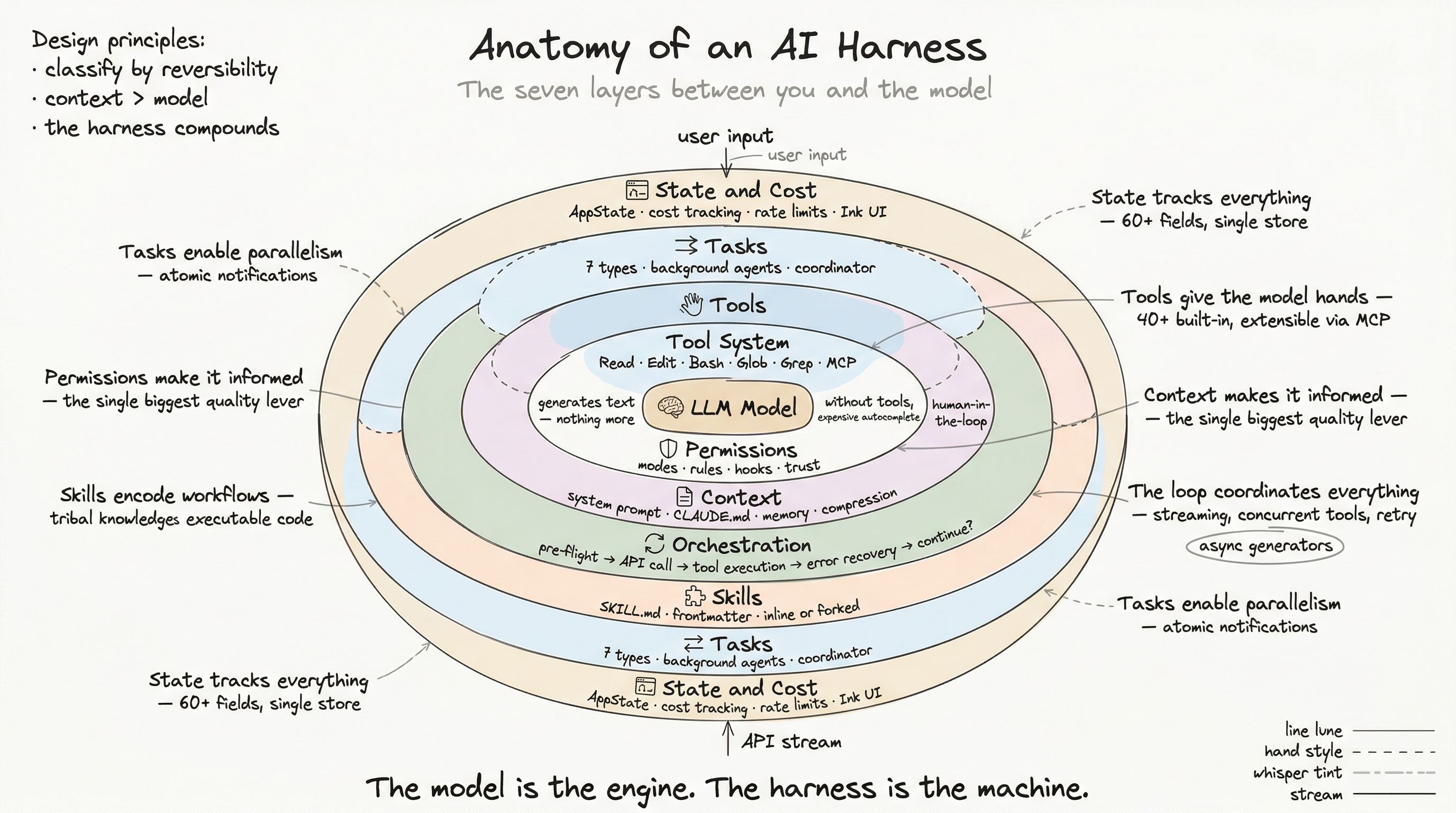
Open your AI coding assistant. Type a request. Watch it read your files, edit your code, run your tests, and commit the result. The entire interaction feels like magic — until something goes wrong and you realize you have no mental model of what just happened.
Between the moment you pressed Enter and the moment the model’s response appeared, your request passed through seven distinct architectural layers. Each layer made decisions. Each layer could have stopped, modified, or redirected the flow. The model — the part everyone argues about — is just one piece. And arguably not the most important one.
This series dissects a production AI harness by reading its actual source code. Not theory. Not a whiteboard sketch. The real system, with its real trade-offs.
What Is a Harness, Precisely?
A harness is the complete runtime system that wraps a language model to make it useful for real work. It handles everything the model cannot handle alone: reading files, executing commands, remembering context across sessions, enforcing safety constraints, managing concurrent operations, tracking costs, and rendering a usable interface.
The model generates text. The harness makes that text do things.
If you have used Claude Code, Cursor, Aider, Windsurf, or GitHub Copilot Workspace, you have used a harness. The quality of that harness — not the quality of the underlying model — is what determines whether AI assistance feels magical or frustrating.
The Seven Layers
Every production AI harness solves the same categories of problems, though implementations differ wildly. Here is the map:
Layer 1: The Tool System
A language model without tools is a very expensive autocomplete. Tools give the model the ability to interact with the real world — reading files, editing code, running shell commands, searching the web, calling APIs.
In a production harness, a tool is not just a function. It is a typed contract with:
- An input schema that validates what the model sends
- An output type that structures what comes back
- A permission check that runs before execution
- Concurrency classification that determines if this tool can run alongside others
- UI rendering methods for displaying progress and results
- Safety predicates (
isReadOnly,isDestructive) that feed into the permission system
A real production system carries 40+ built-in tools, plus an open-ended set of external tools via the Model Context Protocol (MCP). When the tool count exceeds ~60, the system switches to deferred loading — the model sees tool names but not full schemas until it searches for the ones it needs. This keeps the context window focused.
The tool system is the hands. Without it, the model is paralyzed. Post 2 goes deep on this layer.
Layer 2: The Permission Boundary
Giving an AI agent shell access and file editing without guardrails is how you lose a Saturday recovering from rm -rf. The permission layer sits between “the model wants to do X” and “X actually happens.”
Production permission systems are not simple allow/deny lists. They are layered rule engines with:
- Multiple permission modes (default prompting, auto-accept edits, plan-only, full bypass)
- Rule sources at different trust levels (enterprise policy > project settings > user settings > session overrides)
- Hooks — user-defined shell commands that fire before or after tool execution and can block, modify, or augment operations
- Dangerous pattern detection — AST-level analysis of bash commands to identify code executors, network calls, destructive operations
- Decision logging — every permission decision is tracked with its source, reason, and outcome for auditability
The design challenge is the boundary between “ask too much” (unusable) and “ask too little” (dangerous). The solution: classify every operation by reversibility and blast radius. Read a file? Automatic. Delete a branch? Stop and explain. Post 3 dissects this layer.
Layer 3: Context Engineering
Every conversation with a language model starts from zero — unless the harness intervenes. Context engineering is the art of constructing the model’s working memory before each interaction.
In production, this involves:
- System prompt construction — a multi-section, partially cached document that includes tool usage instructions, safety constraints, coding conventions, and session-specific guidance. The prompt is split at a dynamic boundary — everything before it is globally cacheable across users; everything after is user-specific.
- CLAUDE.md hierarchy — project instruction files loaded in priority order: managed (enterprise), user (global), project (repo), local (machine-specific). Each layer can include other files via
@pathdirectives. - Persistent memory — a file-based system with typed memories (user preferences, feedback corrections, project context, external references). A side model selects up to 5 relevant memories per conversation.
- Context compression — when the conversation approaches the context window limit, a multi-stage pipeline activates: tool result budgeting, micro-compaction (caching tool outputs), context collapse, and full conversation summarization.
Context is the single biggest lever for output quality. A well-briefed model with a mediocre architecture outperforms a frontier model flying blind. Post 4 explores this layer in depth.
Layer 4: The Orchestration Loop
This is the engine room. The orchestration loop is the state machine that coordinates everything: sending messages to the API, receiving streaming responses, dispatching tool calls, feeding results back, handling errors, and deciding when to continue or stop.
The production loop is not a simple while(true) { ask(); do(); }. It is a multi-phase pipeline:
- Pre-flight — compact context if needed, apply tool result budgets, check token limits
- API call — stream the response, extract tool use blocks as they arrive
- Tool execution — run tools through a streaming executor that partitions calls by concurrency safety (read-only tools run in parallel; write tools run serially with exclusive access)
- Error recovery — a three-stage escalation: context collapse (cheap), reactive compaction (moderate), max-output-tokens escalation (expensive)
- Continuation check — token budget analysis, diminishing returns detection, stop hooks
The entire loop is implemented as an async generator, yielding progress events to the UI in real time. Post 5 maps this state machine.
Layer 5: Skills
Ad-hoc prompting works for one-off questions. Repeatable workflows deserve structure. A skill is a packaged AI workflow — a markdown file with frontmatter metadata, step-by-step instructions, and reference material.
Skills in production support:
- Multiple sources — bundled (compiled into the binary), managed (enterprise-pushed), user-level, project-level, and MCP-sourced
- Conditional activation — skills can specify file path patterns and activate only when matching files are touched
- Execution modes — inline (expands into the current conversation) or forked (spawns an isolated sub-agent with its own context)
- Variable substitution —
${ARGUMENTS},${CLAUDE_SKILL_DIR},${CLAUDE_SESSION_ID}and inline shell commands - Security boundaries — bundled skill files extracted to nonce-prefixed directories with owner-only permissions; MCP skills cannot execute inline shell commands
Skills turn tribal knowledge into executable automation. Post 6 details the skill system.
Layer 6: Tasks and Concurrency
A production harness is not single-threaded. Multiple operations can run simultaneously: background agents exploring the codebase, shell commands executing, remote agents running on cloud infrastructure, and the main conversation continuing.
The task system manages this complexity with:
- Seven task types — local shell, local agent, remote agent, in-process teammate, workflow, MCP monitor, and “dream” (automatic memory consolidation)
- Lifecycle tracking — pending, running, completed, failed, killed — with atomic notification delivery to prevent duplicates
- Output streaming — each task writes to disk with a read pointer, enabling incremental output consumption
- Sub-agent coordination — a coordinator mode where the main agent spawns workers, delegates tasks, and synthesizes results through a structured protocol
The hardest problem is not parallelism — it is notification delivery. When a background task completes, the main conversation must learn about it at the right moment, with the right context. Post 7 covers this system.
Layer 7: State, Cost, and the Production Surface
Everything above runs on a foundation of state management, cost tracking, and user interface rendering that most architectural discussions ignore — but that determines whether the system is actually usable.
This layer includes:
- Application state — a centralized store tracking 60+ fields: UI state, permission context, MCP connections, plugin status, agent registry, speculation state, and more. A single
onChangeAppStatehandler dispatches all side effects. - Cost tracking — per-model token accounting, session-level cost persistence across restarts, rate limit detection with early warning thresholds, overage management
- Settings cascade — CLI flags > user settings > managed settings > project config > defaults, with enterprise policy overrides that users cannot circumvent
- Terminal UI — a custom React reconciler (Ink) rendering to the terminal with double-buffered frames, Yoga-based layout, mouse tracking, text selection, and hyperlink support
- Multiple entry points — CLI, SDK, desktop app, IDE extensions, remote sessions — all feeding into the same core engine
This is where “works in a demo” becomes “works in production.” Post 8 covers the production surface.
Why This Architecture Matters
You do not need to build a harness from scratch to benefit from understanding this architecture. Every one of these layers maps to a decision you make when configuring or extending your AI tools:
| Layer | Your lever |
|---|---|
| Tools | Which MCP servers you connect, what capabilities you give the model |
| Permissions | Your settings.json rules, your hooks, your trust boundaries |
| Context | Your CLAUDE.md files, your memory entries, your project conventions |
| Orchestration | Your model selection, your token budget, your error tolerance |
| Skills | Your custom skills, your team’s shared workflows |
| Tasks | Your use of background agents, your delegation patterns |
| State & Cost | Your cost monitoring, your rate limit awareness |
Understanding the harness means understanding where your leverage actually is. The model is a commodity — the system around it is the engineering.
Reading Order
This series is designed to read in order, but each post stands alone. If you are building tools, start with Post 2. If you are worried about safety, jump to Post 3. If you want to understand why your AI assistant seems to “forget” things, Post 4 is your answer.
The architecture is the same one powering the tool you might be using right now. Let’s open it up.