
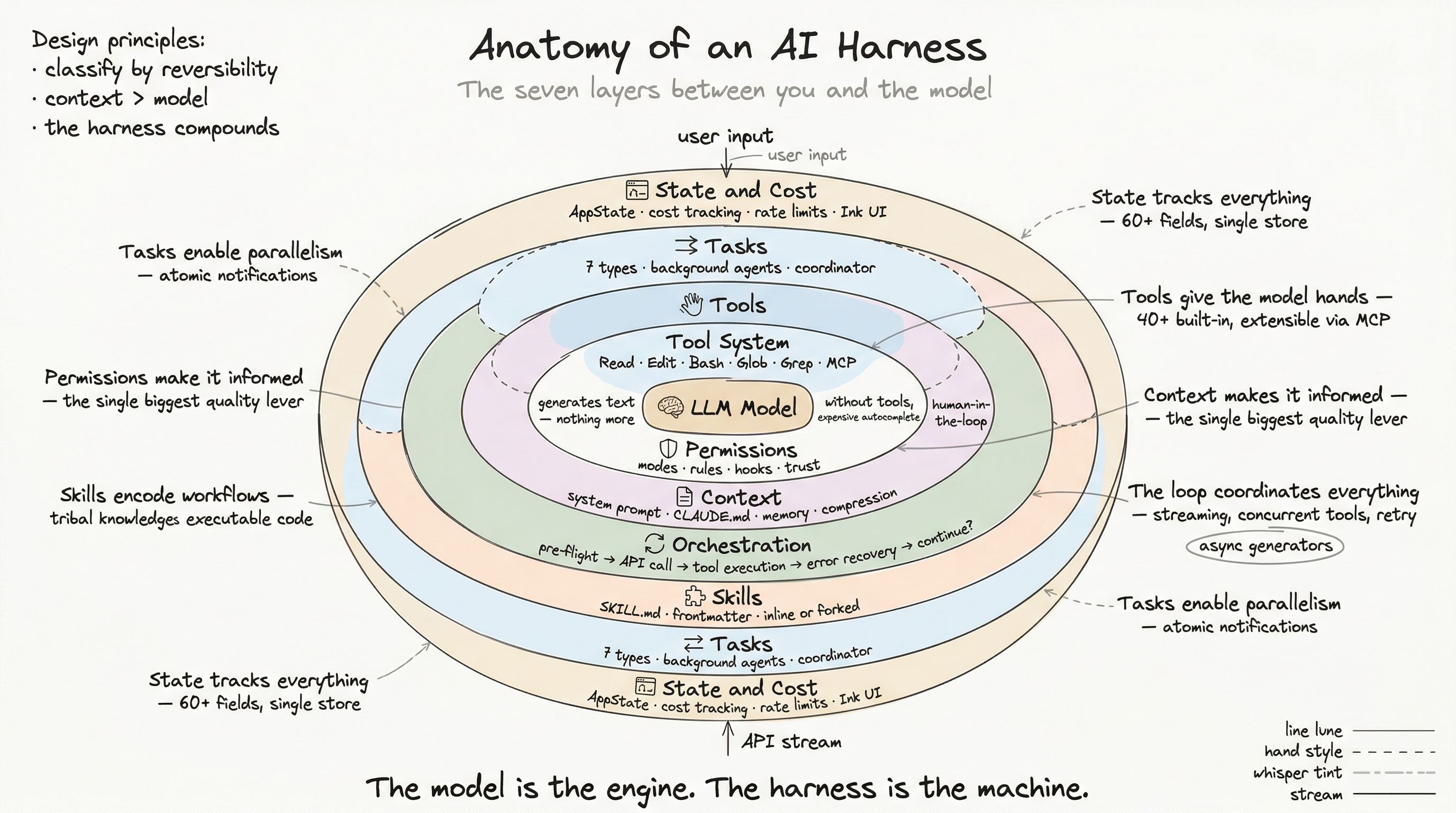
Every layer we have examined so far — tools, permissions, context — converges in one place: the orchestration loop. This is the state machine that coordinates the conversation between user, model, and tools. It is responsible for the most complex control flow in the entire harness.
The orchestration loop is not a simple request-response cycle. It is a multi-phase pipeline with error recovery, token budget management, concurrent tool execution, and streaming output — all running as an async generator that yields events to the UI in real time.
The Two Engines
The orchestration layer has two interacting components:
-
QueryEngine — owns the conversation lifecycle and session state. It is the outer loop that handles user input, slash commands, transcript recording, and result emission.
-
query() — the inner loop that manages the actual model interaction. It handles context compaction, API calls, tool execution, error recovery, and continuation decisions.
User types message ↓QueryEngine.submitMessage() [outer loop] ├─ Process user input (slash commands, attachments) ├─ Record transcript (eager write for resumability) ├─ Build system initialization message └─ Enter query() loop [inner loop] ├─ Pre-flight (compact, collapse, budget) ├─ API call (streaming) ├─ Tool execution (concurrent) ├─ Error recovery ├─ Stop hooks └─ Continue or return ↓Yield final result with analyticsThe separation matters. QueryEngine handles session-level concerns (max turns, USD budgets, structured output retries). The query loop handles turn-level concerns (compaction, tool dispatch, error recovery). Each has its own state, and neither leaks into the other.
The Inner Loop: A State Machine
The query() function is the most complex piece of code in the harness. Here is the state machine it implements:
Phase 1: Pre-flight
Before every API call, the system runs a compaction pipeline:
1. applyToolResultBudget() — Cap per-message tool result sizes2. snipCompact() — Remove stale context markers3. microcompact() — Cache old tool results to disk4. applyCollapsesIfNeeded() — Collapse context for large inputs5. autocompact() — Full summarization if approaching limitEach stage is progressively more aggressive. The system tries the cheapest operations first (capping result sizes costs nothing) and only escalates to full summarization when necessary.
If auto-compaction fires, the system captures the remaining token budget before compacting and carries it forward — ensuring the model knows how much room it has left.
Phase 2: API Call
The model call streams via async iteration:
for await (const event of deps.callModel({ messages, tools: availableTools, systemPrompt, maxTokens: currentMaxTokens, queryTracking: { chainId, depth }})) { // Process stream events: // - message_start: new assistant message // - content_block_start: text or tool_use beginning // - content_block_delta: incremental content // - content_block_stop: block complete // - message_delta: usage stats, stop reason // - message_stop: response complete}As tool_use blocks arrive in the stream, they are immediately fed to the streaming tool executor — tools can begin executing before the model finishes generating the rest of its response. This overlapping execution is a significant latency optimization.
Phase 3: Tool Execution
The streaming tool executor is the concurrency engine. As described in Post 2, it partitions tools by safety and executes them accordingly:
Read-only, concurrent-safe tools → run in parallel (up to 10)Write tools, non-concurrent tools → run serially with exclusive accessEach tool execution follows the full pipeline: validate → check permissions → pre-hooks → execute → post-hooks → process result.
Results are yielded as they complete, not batched at the end. The UI shows tool results appearing in real time as each operation finishes.
Phase 4: Error Recovery
Here is where the state machine earns its complexity. The system has three escalation stages for handling errors:
Stage A: Collapse drain (cheap)
If prompt-too-long error AND pending collapses available: Apply next collapse stage Retry API callStage B: Reactive compact (moderate)
If prompt-too-long error AND no pending collapses: Strip images from messages Run full conversation summarization Retry with compacted contextStage C: Max output tokens recovery (last resort)
If model hits max_tokens limit AND response is incomplete: Escalate from 8K → 64K max tokens (one-shot guard) Add nudge message: "Continue from where you left off" Retry (up to 3 attempts, with diminishing returns detection)The key design: errors are withheld during processing. If the system detects a recoverable error (prompt-too-long, max-output-tokens), it does not surface it to the user immediately. Instead, it holds the error, attempts recovery, and only surfaces it if recovery fails. From the user’s perspective, the conversation continues seamlessly.
Phase 5: Continuation Check
After each successful turn, the system decides: continue or stop?
function checkTokenBudget(tracker, budget, turnTokens) {  // Skip check for sub-agents and null budgets  if (isSubAgent || !budget) return 'continue'
  // Stop if > 90% of budget consumed  if (turnTokens / budget > 0.9) return 'stop'
  // Detect diminishing returns: 3+ continuations with < 500 token delta  if (continuationCount >= 3 && avgDelta < 500) return 'stop'
  // Continue with nudge  return 'continue'}
Diminishing returns detection prevents the model from burning tokens on increasingly marginal output — a common pattern where the model keeps adding “one more thing” in an infinite tail.
Streaming Tool Execution
The streaming tool executor deserves special attention because it solves a subtle problem: how do you run tools concurrently while maintaining correct ordering for the model?
The problem
The model requests 5 tools: 3 file reads and 2 file writes. The reads are concurrent-safe. The writes are not. You want to run the reads in parallel (fast) but the writes serially (safe).
But here is the complication: tool results must be fed back to the model as tool_result blocks that correspond to the original tool_use blocks. If you run reads in parallel and they complete out of order, the results are still correct — but if a write starts before a read that it depends on finishes, the write might operate on stale state.
The solution
The executor uses a status state machine per tool:
queued → executing → completed → yieldedCombined with a queue processor:
function canExecuteTool(tool): boolean { // Tool can start if: // 1. No other tools are currently executing, OR // 2. All executing tools (and this tool) are concurrent-safe return noExecuting || (allExecutingAreConcurrent && thisTool.isConcurrencySafe)}After each tool completes, the processor checks the queue for newly eligible tools. This creates natural batching: reads pile up in the queue, then execute as a concurrent batch. When a write arrives, it waits for the batch to drain, then gets exclusive access.
Error cascading
If a bash command fails mid-batch, the executor aborts sibling tools in the same batch (they might depend on the failed command’s side effects). But file reads and web fetches are isolated — a failed fetch does not cancel an unrelated file read.
Synthetic error messages are generated for aborted tools, ensuring the model sees a tool_result for every tool_use it generated.
Retry and Backoff
API calls can fail for many reasons: rate limiting (429), server overload (529), connection errors, timeouts. The retry system classifies errors and applies appropriate strategies:
Retryable errors: 429, 529, ECONNRESET, EPIPEMax retries: 10Base backoff: 500ms
529 special handling:  - Foreground (REPL, SDK): retry up to 3 times  - Background (summaries): fail immediately  - Unattended (persistent): retry up to 5min backoff, 6hr cap
Background queries (like memory extraction or post-conversation summarization) fail fast on 529 because there is no user waiting. Foreground queries retry because the user is staring at the screen. Unattended sessions (like scheduled agents) retry aggressively because there is nobody to manually restart them.
During long retry waits, the system yields heartbeat events every 30 seconds to keep the connection alive and prove to the UI that the session has not crashed.
Transcript Persistence
The harness writes conversation transcripts eagerly:
User sends message → transcript written immediately (before API call)This is not logging — it is resumability. If the process crashes mid-conversation, the transcript has already captured the user’s message. On resume, the system can reconstruct the conversation state from the transcript and continue from where it left off.
Assistant messages are written fire-and-forget during streaming, and a final flush happens before the result is yielded.
Dependency Injection for Testing
The query loop accepts its dependencies through an injection interface:
type QueryDeps = { callModel: (params) => AsyncIterable<StreamEvent> microcompact: (messages) => Message[] autocompact: (messages, budget) => Message[] uuid: () => string}In production, these resolve to the real implementations. In tests, they are mocked:
const testDeps: QueryDeps = { callModel: mockModelStream([ textBlock("Let me read that file"), toolUseBlock("FileRead", { path: "/src/index.ts" }) ]), microcompact: identity, autocompact: identity, uuid: () => 'test-uuid'}This pattern enables testing the orchestration logic — the most complex code in the system — without making real API calls or executing real tools.
The Complete Data Flow
Putting it all together:
User Input ↓processUserInput() ← slash commands, attachments, file references ↓recordTranscript() ← eager write for resumability ↓buildSystemInitMessage() ← system prompt + context + git status ↓query() loop: ├─ Pre-flight: budget → snip → micro → collapse → auto ├─ API stream → extract tool_use blocks ├─ StreamingToolExecutor: │ ├─ Partition by concurrency safety │ ├─ Execute (parallel reads, serial writes) │ ├─ Permission checks + hooks per tool │ └─ Yield results as they complete ├─ Feed tool_results back as user messages ├─ Error recovery (collapse → compact → max-tokens) ├─ Stop hooks (background tasks, metadata) └─ Token budget continuation check ↓recordTranscript() ← final flush ↓Yield result { status, usage, cost, duration, errors }Every arrow in this diagram is a potential failure point. The orchestration loop’s job is to make failures invisible when possible, recoverable when necessary, and transparent when neither option works.
Next: Skills — Packaging AI Workflows as Code, where we examine how repeatable AI workflows are defined, loaded, and executed as first-class artifacts.