
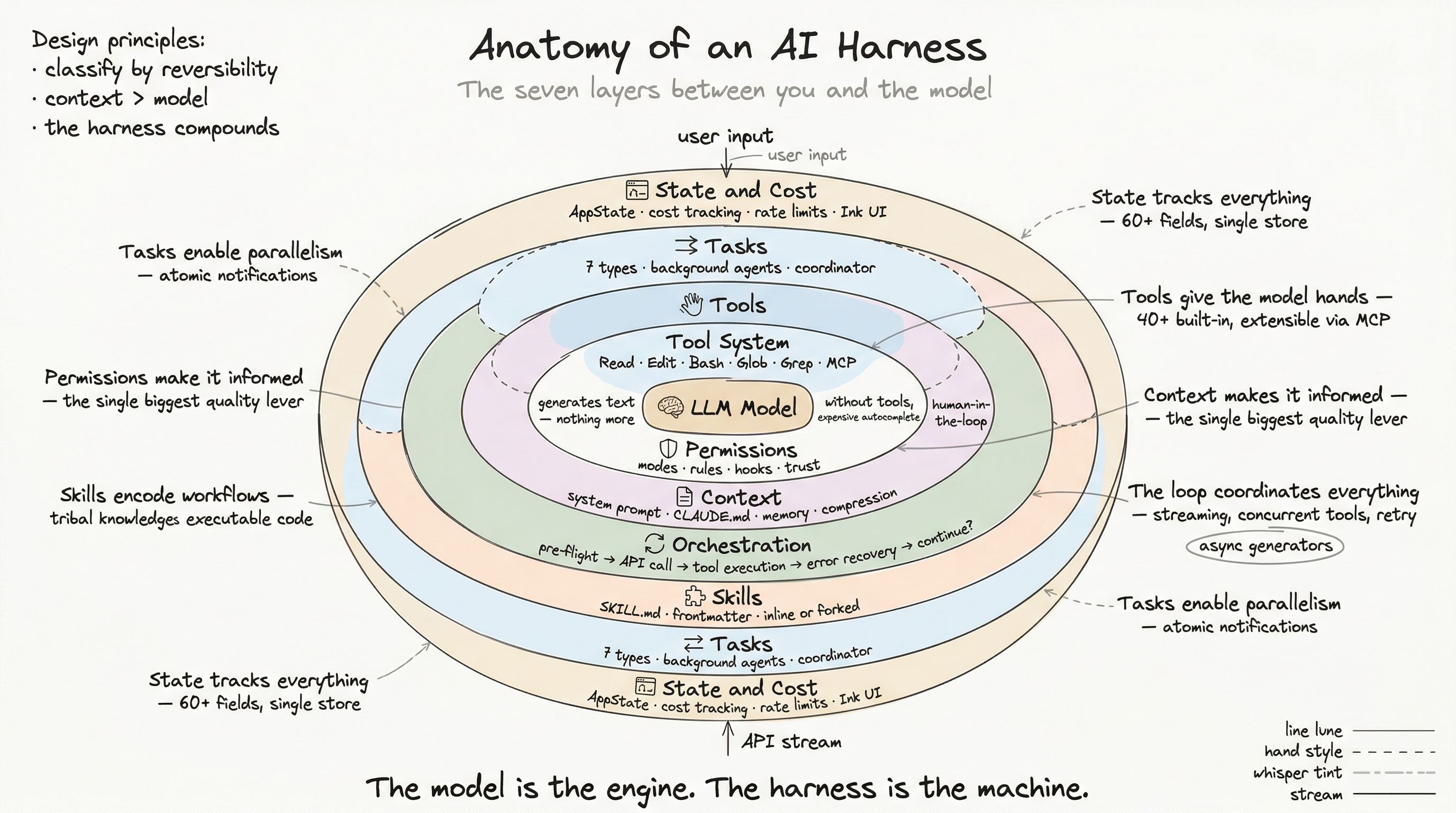
Here is the single most impactful optimization in any AI harness, and it has nothing to do with the model: context engineering — the discipline of constructing exactly the right information for the model to see before it generates a response.
A frontier model with bad context produces bad output. A smaller model with perfect context frequently outperforms it. Context is not just “what the model knows.” It is the model’s entire world. If something is not in the context, it does not exist.
System Prompt Construction
The system prompt is the foundation of every interaction. It defines who the model is, what it can do, and how it should behave. In production, this is not a static string — it is a multi-section, dynamically assembled document with careful caching semantics.
The cache boundary
The system prompt is split at a critical marker: the dynamic boundary.
┌─────────────────────────────────────┐│ STATIC SECTIONS (globally cached) ││ - Core identity and behavior ││ - Tool usage instructions ││ - Safety constraints ││ - Coding conventions ││ - Tone and style │├─────────────────────────────────────┤ ← DYNAMIC BOUNDARY│ DYNAMIC SECTIONS (per-user) ││ - Available skills list ││ - Memory system instructions ││ - Environment info ││ - MCP server instructions ││ - Language preferences ││ - Token budget │└─────────────────────────────────────┘Everything above the boundary is identical for all users. The API’s prompt caching kicks in: when multiple users share the same static prefix, the cache hit rate compounds. This is not a minor optimization — at scale, it reduces costs and latency dramatically.
Everything below the boundary is user-specific and recomputed per session. MCP instructions are marked as uncached sections because MCP servers can connect and disconnect mid-session — stale instructions would cause the model to call tools that no longer exist.
Section memoization
Most dynamic sections are memoized per conversation: computed once and cached until /clear or /compact resets the session. Only truly volatile sections (MCP instructions, beta headers) recompute every turn.
// Memoized: computed once per sessionconst skillsSection = systemPromptSection('skills', () =>  buildSkillsList(activeSkills))
// Uncached: recomputed every turnconst mcpSection = DANGEROUS_uncachedSystemPromptSection(  'mcp',  () => buildMCPInstructions(activeConnections),  'MCP servers can connect/disconnect mid-session')
The naming convention — DANGEROUS_uncached — is intentional. It forces the developer to acknowledge the cache-breaking cost and document the reason.
The CLAUDE.md Hierarchy
The system prompt defines the model’s general behavior. CLAUDE.md files define project-specific instructions. They are the single most important lever for users who want better AI output.
Loading order
CLAUDE.md files load in a specific priority chain:
1. /etc/claude-code/CLAUDE.md (managed — enterprise admin)2. ~/.claude/CLAUDE.md (user — personal, all projects)3. CLAUDE.md (project — checked into repo)4. .claude/CLAUDE.md (project — alternative location)5. .claude/rules/*.md (project — modular rules)6. CLAUDE.local.md (local — machine-specific, gitignored)Later files override earlier ones. Files closer to the current working directory have higher priority than files higher up the directory tree.
The @include directive
CLAUDE.md files support transitive inclusion:
## Project Conventions
@./docs/api-conventions.md@./docs/testing-standards.md@~/shared-rules/security-checklist.md
The system resolves these paths, prevents circular references (by tracking processed files), and silently ignores files that do not exist. This enables modular rule sets: a security team maintains a shared checklist, and every project includes it.
What belongs in CLAUDE.md
The most effective CLAUDE.md files are specific and actionable:
## Constraints- Tech stack: Astro 5.x, React 19, Tailwind CSS 4- Package manager: pnpm (locked)- Zero-JS by default on content pages
## Conventions- client:load is BANNED (enforced by CI check)- Use client:visible for in-viewport components- Use client:idle for heavy components- Design tokens: CSS variables only, no hardcoded hex
The model reads this at the start of every conversation. These instructions replace the “re-explain your project every time” treadmill that makes ad-hoc prompting painful.
Persistent Memory
CLAUDE.md handles project context. Persistent memory handles everything else: user preferences, past corrections, reference pointers, and project-specific knowledge that does not belong in version control.
Memory architecture
Memory is file-based, stored at ~/.claude/projects/<project>/memory/:
memory/├── MEMORY.md (index file — always loaded)├── user_preferences.md (user memory)├── feedback_testing.md (feedback memory)├── project_auth_rewrite.md (project memory)└── reference_linear.md (reference memory)Four memory types
| Type | Purpose | Example |
|---|---|---|
| user | Who you are, how you work | ”Senior Go engineer, new to React” |
| feedback | Corrections + confirmations | ”Don’t mock databases — burned by prod divergence” |
| project | Ongoing work context | ”Auth rewrite driven by legal compliance, not tech debt” |
| reference | External system pointers | ”Pipeline bugs tracked in Linear project INGEST” |
Each memory file has YAML frontmatter:
---name: Testing approachdescription: Integration tests must hit a real databasetype: feedback---
Don't mock the database in integration tests.
**Why:** Last quarter, mocked tests passed but the prod migration failedbecause the mock didn't replicate a constraint that existed in production.
**How to apply:** When writing tests for data layer code, always usea test database with real migrations applied.
Relevance selection
The index file (MEMORY.md) is always loaded — capped at 200 lines. But individual memory files are loaded on demand. Before each conversation, a side model (Sonnet, running as a lightweight query) receives the memory index and the user’s current request, then selects up to 5 relevant memories:
async function findRelevantMemories(query, memoryDir) {  const headers = await scanMemoryFiles(memoryDir)
  const selected = await sideQuery({    model: 'sonnet',    prompt: `Select up to 5 memories relevant to: ${query}`,    context: headers.map(h => `${h.filename}: ${h.description}`)  })
  return selected.filter(isValidFilename)}
This means the system scales with memory count. You can accumulate hundreds of memories over months, and the relevance selector ensures only the useful ones consume context tokens.
What not to save
The memory system explicitly excludes information that is better derived from the current state:
- Code patterns, file paths, architecture — read the code
- Git history — run
git log - Debugging solutions — the fix is in the code, the reason is in the commit message
- Anything already in CLAUDE.md — avoid duplication
- Ephemeral task state — use tasks, not memory
This discipline prevents memory bloat. Memory is for information that would be lost between sessions and cannot be recovered from the codebase.
Context Compression
Even with careful context engineering, conversations eventually fill the context window. A deep debugging session might accumulate thousands of tool results. The harness deploys a multi-stage compression pipeline before hitting the limit:
Stage 1: Tool result budgeting
Each turn, the system caps the aggregate size of tool results. Large outputs (multi-megabyte grep results, verbose build logs) are persisted to disk with a preview sent to the model:
[Result too large — saved to .claude/tools/abc123/result.txt]First 500 lines shown below:...Stage 2: Micro-compaction
Tool results from earlier turns are replaced with cached references. The model saw the full result when it was generated; in subsequent turns, only a compact reference remains.
Stage 3: Context collapse
When token usage approaches the limit, the system strips low-value content: images (replaced with [image] markers), verbose tool outputs, and redundant system messages.
Stage 4: Full conversation summarization
The nuclear option. The entire conversation history is sent to a summarization model (Sonnet), which produces a condensed version. After compaction:
- Up to 5 recently-read files are restored (within a 50K token budget, 5K per file)
- Active skill context is restored (within a 25K token skill budget)
- The model receives a summary message explaining what happened
The system tracks pendingPostCompaction to correlate cache misses with compaction events — if the first API call after compaction is slow, that is expected.
Auto-compaction triggers
Compaction fires in two cases:
- Proactive — token usage approaching the window limit (calculated from
input_tokens + cache_creation + cache_read) - Reactive — the API returns a “prompt too long” error, and the system compacts and retries
The proactive path is preferred. Reactive compaction means the user experienced an error, even if the system recovered transparently.
The Context Window as a Design Constraint
The context window is not just a technical limit — it is a design constraint that shapes every decision in the harness:
- Tool result sizes are bounded because each byte competes for context space
- Memory files are individually loaded rather than bulk-imported because selectivity preserves budget
- System prompt sections are memoized because recomputation wastes cache alignment
- Skills support forked execution specifically because inline expansion consumes the parent’s context
- Background agents get their own context windows, preventing a research task from crowding out the main conversation
The harness does not just manage context — it wages a constant war for context efficiency. Every feature is designed with the question: “How many tokens does this cost, and is the information worth that price?”
The Compounding Effect
Context engineering is where harness quality separates from harness adequacy. A mediocre harness dumps everything into the context and hopes for the best. A production harness:
- Prioritizes (CLAUDE.md hierarchy, memory relevance selection)
- Caches (prompt section memoization, cache boundary alignment)
- Compresses (multi-stage pipeline, proactive triggers)
- Separates (background agents get independent contexts)
- Persists (memory survives across sessions, project instructions survive across team members)
The result: the model consistently sees the right information, in the right order, at the right time. Not because the model got smarter, but because the harness got better at briefing it.
Next: The Orchestration Loop — Where Everything Converges, where we trace the complete path from user input through API call, tool execution, error recovery, and response delivery.