
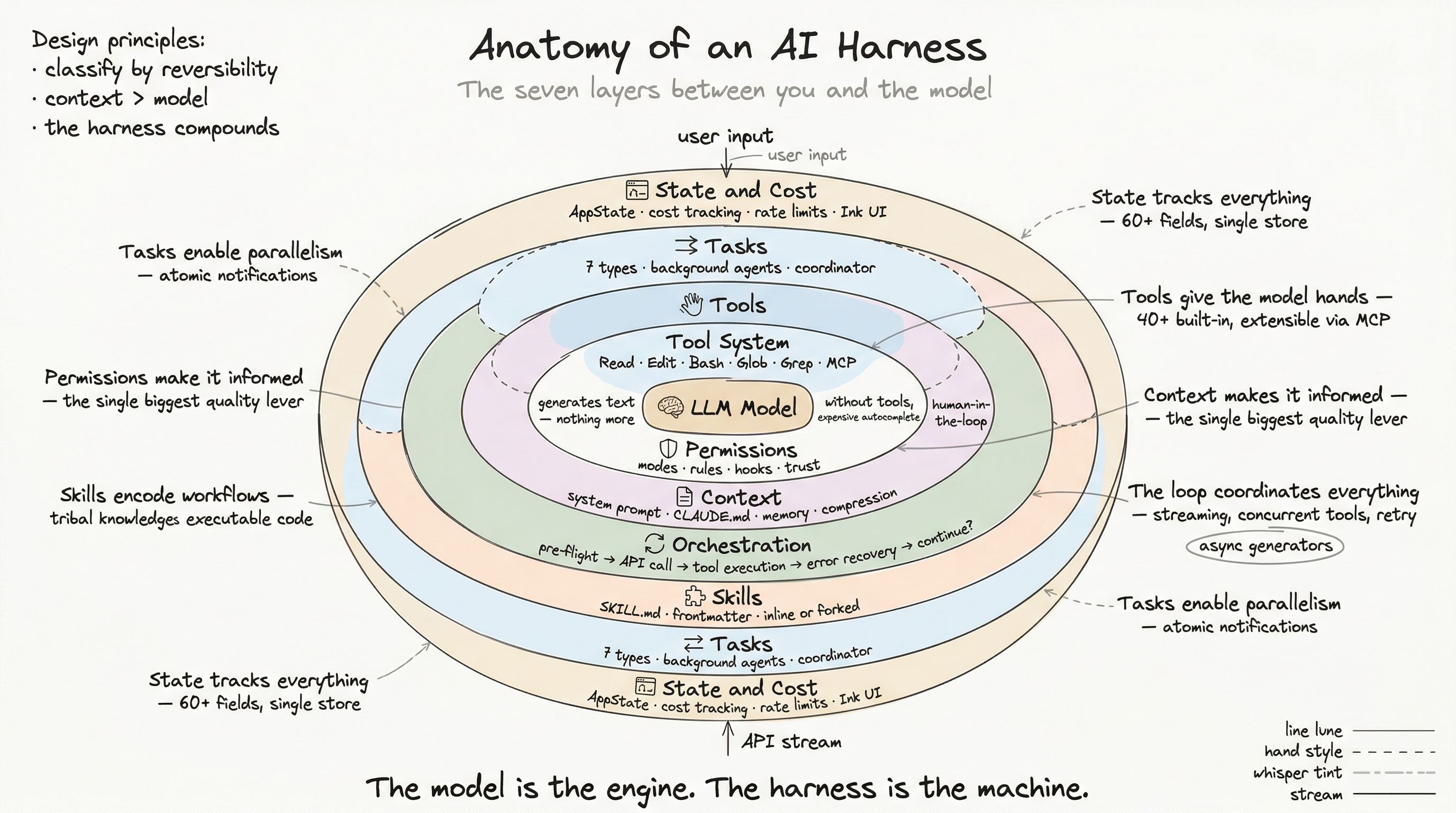
When you ask an AI assistant to “research the authentication patterns in this codebase and then implement the new login flow,” you are describing two operations: a research phase and an implementation phase. In a single-threaded system, these run sequentially — the model reads for 30 seconds, then writes for 60 seconds, while you wait.
In a production harness, the model can delegate research to a background agent while it starts planning the implementation. Multiple operations run concurrently. The main conversation continues while background work executes. Results flow back when ready.
This is the task system.
Seven Task Types
The system manages seven distinct types of concurrent work:
| Type | Description | ID Prefix |
|---|---|---|
local_bash | Shell command execution | b |
local_agent | Background agent (sub-query) | a |
remote_agent | Cloud-hosted agent | r |
in_process_teammate | In-process team member | t |
local_workflow | Workflow script execution | w |
monitor_mcp | MCP resource monitor | m |
dream | Automatic memory consolidation | d |
Each type generates task IDs with a type prefix followed by 8 random base-36 characters (36^8 = 2.8 trillion combinations). The prefix makes IDs visually distinguishable: a7k9d2x1 is an agent, b3f8v6w2 is a bash command.
Task Lifecycle
Every task follows a state machine:
pending → running → completed → failed → killedThe isTerminalTaskStatus() function returns true for completed, failed, and killed — the three states from which a task never returns.
Registration
function registerTask(task: TaskState, setAppState) {  // Check for replacement (resume case)  const existing = appState.tasks[task.id]  if (existing && existing.retain) {    // Merge with UI-held state to preserve display    task = { ...task, ...preservedUIFields(existing) }  }
  // Store in centralized state  setAppState(prev => ({    ...prev,    tasks: { ...prev.tasks, [task.id]: task }  }))
  // Notify SDK consumers  emitSDKEvent('task_started', { taskId: task.id })}
Output streaming
Each task writes output to a disk file at {sessionDir}/tasks/{taskId}. A read pointer (outputOffset) tracks how much the consumer has read, enabling incremental delta extraction:
function getTaskOutputDelta(taskId, currentOffset) { const content = readFileFrom(outputFile, currentOffset) return { delta: content, newOffset: currentOffset + content.length }}This means the main conversation can check on a background task and see only what has changed since the last check — not the entire output history.
Polling
The harness polls task state at 1-second intervals:
function pollTasks(getAppState, setAppState) {  const tasks = getAppState().tasks
  for (const task of Object.values(tasks)) {    if (isRunning(task)) {      // Get output delta for status display      const delta = getTaskOutputDelta(task.id, task.outputOffset)      updateOffset(task.id, delta.newOffset)    }
    if (isTerminal(task) && task.notified) {      // Eligible for eviction      if (pastGracePeriod(task)) {        evictTask(task.id)      }    }  }}
The Notification Problem
The hardest challenge in the task system is not parallelism — it is notification delivery. When a background agent completes, the main conversation needs to know. But the main conversation might be mid-API-call, or waiting for user input, or processing its own tool results.
The solution: atomic notification delivery.
function enqueueAgentNotification(taskId, result) {  let shouldEnqueue = false
  updateTaskState(taskId, setAppState, task => {    if (task.notified) return task  // Already sent — no-op    shouldEnqueue = true    return { ...task, notified: true }  })
  if (shouldEnqueue) {    enqueuePendingNotification({      value: formatTaskNotification(taskId, result),      mode: 'task-notification'    })  }}
The notified flag is a check-and-set guard: only the first call succeeds. This prevents duplicate notifications when multiple code paths detect the same task completion (race condition between polling and direct completion callback).
Notification format
Task notifications use XML tags that the model is trained to parse:
<task_notification> <task_id>a7k9d2x1</task_id> <tool_use_id>toolu_abc123</tool_use_id> <status>completed</status> <summary>Analyzed 47 files in src/auth/</summary> <result> Found 3 authentication patterns: 1. JWT-based (/api/protected/*) 2. API key (/api/external/*) 3. Session cookie (/admin/*) </result> <usage> <total_tokens>24891</total_tokens> <tool_uses>23</tool_uses> <duration_ms>18432</duration_ms> </usage></task_notification>The model receives this as a system message and can reference the results in its next response.
Local Agent Tasks: The Workhorse
The most common task type is local_agent — a background sub-query running the same model with its own context window.
State shape
type LocalAgentTaskState = TaskStateBase & { agentId: string prompt: string agentType: string // 'general-purpose', 'code-reviewer', etc. model?: string isBackgrounded: boolean // false = foreground, true = background pendingMessages: string[] // Queued during tool rounds progress?: { toolUseCount: number tokenCount: number recentActivities: ToolActivity[] // Last 5 summary?: string }}Progress tracking
As the background agent works, the harness tracks its activity:
type ToolActivity = { toolName: string input: Record<string, unknown> activityDescription?: string // "Reading src/auth/jwt.ts" isSearch?: boolean isRead?: boolean}The last 5 activities are kept in a FIFO queue, giving the UI a real-time view of what the agent is doing. A separate background summarization periodically compresses the full activity history into a one-line summary.
Backgrounding the main conversation
A unique variant: the user can background the main conversation itself. Pressing Ctrl+B twice converts the current query into a LocalMainSessionTask:
function registerMainSessionTask(messages, state) { return registerTask({ type: 'local_agent', agentType: 'main-session', prompt: extractCurrentPrompt(messages), isBackgrounded: true, // ... links output to existing transcript })}The conversation continues executing in the background while the user gets their terminal back. When complete, the task notification appears and the user can resume.
Coordinator Mode: Multi-Agent Orchestration
For complex tasks, a single agent is not enough. Coordinator mode enables a lead agent to spawn, direct, and synthesize results from multiple worker agents.
The coordinator receives special system prompt instructions:
Task workflow phases:1. Research — Parallel research agents explore different aspects2. Synthesis — Combine research into a coherent plan3. Implementation — Serial workers execute plan steps4. Verification — Verify results match intent
Concurrency guidelines:- Research: parallel (no file conflicts)- Implementation: serial (prevents write races)- Verification: after all implementation complete
Worker tool pools
Workers get a restricted tool set. The coordinator knows exactly what each worker can do:
const workerTools = isSimpleMode ? [BashTool, FileReadTool, FileEditTool] // Minimal : allTools.filter(t => !isInternalTool(t)) // Full minus internalThe coordinator’s system prompt lists available tools so it can make informed delegation decisions: “This worker can read and edit files but cannot run web searches — delegate the documentation lookup to a different worker.”
Communication protocol
Coordinator and workers communicate through two mechanisms:
- AgentTool — The coordinator spawns new workers with a description and prompt
- SendMessageTool — The coordinator continues an existing worker with additional instructions
Workers cannot communicate with each other directly — all coordination flows through the lead agent. This prevents message races and ensures the coordinator maintains a complete picture of the work.
Remote Agent Tasks
Some operations need more resources than a local machine provides. Remote agents execute on cloud infrastructure:
type RemoteAgentTaskState = TaskStateBase & { remoteTaskType: 'remote-agent' | 'ultraplan' | 'ultrareview' | 'background-pr' sessionId: string command: string title: string todoList: TodoList log: SDKMessage[] isLongRunning?: boolean}Remote tasks poll for status updates rather than streaming:
async function pollRemoteSessionEvents(taskId) { while (!isTerminal(task.status)) { const events = await fetchRemoteEvents(task.sessionId, lastEventId) for (const event of events) { updateTaskFromEvent(taskId, event) } await sleep(pollInterval) }}Completion checkers
Remote tasks can register custom completion logic:
registerCompletionChecker(taskId, (task, event) => { // Custom logic: is this review complete? if (event.type === 'review_complete' && event.bugs.length === 0) { return { status: 'completed', result: 'No issues found' } } return null // Not complete yet})Dream Tasks: Background Memory Consolidation
The most unusual task type: dreams. These are automatic background processes that consolidate session memories:
type DreamTaskState = TaskStateBase & { type: 'dream' phase: 'starting' | 'updating' sessionsReviewing: number filesTouched: string[] turns: DreamTurn[] // Max 30 priorMtime: number // For lock rewinding on kill}Dream tasks review past conversation sessions and extract patterns, corrections, and insights into the persistent memory system. They are UI-only — the model never sees dream notifications, preventing self-referential loops.
Eviction and Cleanup
Terminal tasks do not persist forever. The eviction system cleans up:
function evictTerminalTask(taskId, setAppState) {  const task = appState.tasks[taskId]
  // Guard conditions  if (!isTerminal(task.status)) return      // Still running  if (!task.notified) return                 // Notification pending  if (task.retain) return                    // UI holding reference  if (withinGracePeriod(task, 30_000)) return  // 30s grace for display
  // Evict  delete appState.tasks[taskId]}
The grace period (30 seconds for local agents, 3 seconds for killed tasks) ensures the UI has time to display the completion before the task disappears.
Architectural Insights
Three patterns from the task system apply broadly:
1. Atomic notifications solve the “who tells whom” problem. When multiple code paths can detect the same state change, a check-and-set flag ensures exactly one notification. This is simpler and more reliable than distributed coordination protocols.
2. Disk-backed output with read pointers enables efficient incremental consumption. Instead of buffering unbounded output in memory, tasks write to disk and consumers read deltas. This handles arbitrarily long-running tasks without memory pressure.
3. Type-prefixed IDs provide instant classification. When you see a7k9d2x1 in a log, you know it is an agent without looking it up. This small design decision compounds in debugging sessions where you are scanning thousands of events.
Next: State, Cost, and the Production Surface, where we examine the state management, cost tracking, rate limiting, and UI rendering that make all of this usable.