
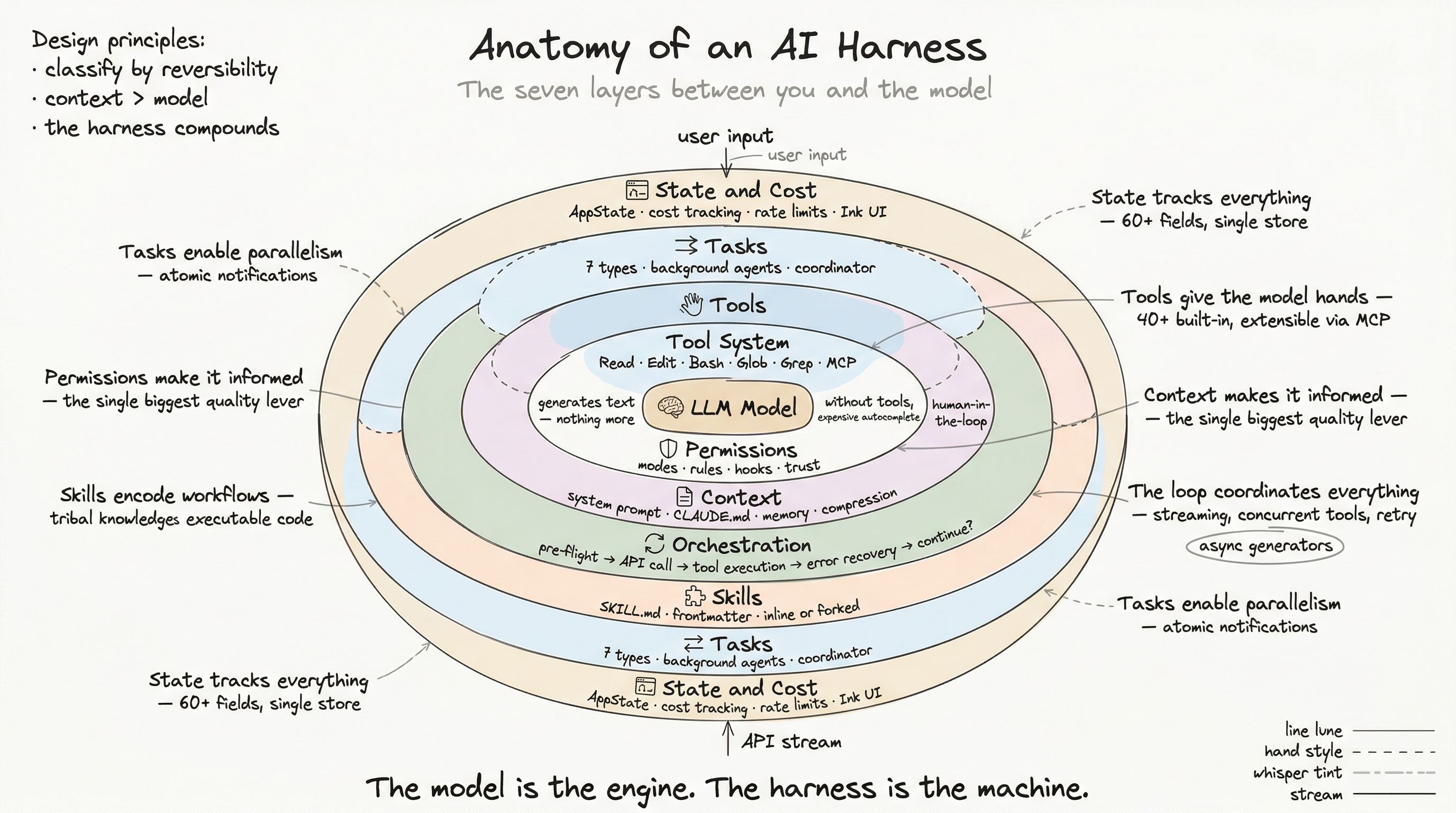
Every layer of the harness we have examined — tools, permissions, context, orchestration, skills, tasks — runs on a foundation that rarely gets discussed: state management, cost tracking, and user interface rendering. These are not glamorous topics. They are the difference between a demo and a product.
A harness that cannot track how much money it is spending is a liability. A harness that cannot render its activity to a terminal is invisible. A harness that cannot manage its own state across sessions, plugins, agents, and MCP connections is fragile. This post covers the production surface — the layer that makes everything else usable.
Centralized State: One Store to Rule Them
The harness uses a single AppState store — a plain object with 60+ fields, updated through a setState() function that notifies subscribers on change.
type AppState = {  // Settings & config  settings: SettingsJson  mainLoopModel: ModelSetting  thinkingEnabled: boolean  verbose: boolean
  // Permissions  toolPermissionContext: ToolPermissionContext
  // Tasks & agents  tasks: Record<string, TaskState>  agentNameRegistry: Map<string, AgentId>  foregroundedTaskId?: string
  // MCP & plugins  mcp: {    clients: MCPServerConnection[]    tools: Tool[]    commands: Command[]    resources: Record<string, ServerResource[]>  }  plugins: {    enabled: LoadedPlugin[]    installationStatus: PluginInstallStatus  }
  // UI  expandedView: 'none' | 'tasks' | 'teammates'  statusLineText: string  spinnerTip: string  activeOverlays: ReadonlySet<string>
  // ... 40+ more fields}
Why one store?
With agents, tasks, MCP connections, plugins, and UI all running concurrently, distributed state would create coordination nightmares. A single store provides:
- Atomic updates — change task status and UI state in one setState call
- Single subscription point — components subscribe to the store, not to each other
- Debuggability — snapshot the entire state at any point for diagnosis
Side effects through onChange
The store is pure data. Side effects are dispatched through a single onChangeAppState handler:
function onChangeAppState(state, prevState) {  // Model change → persist to settings  if (state.mainLoopModel !== prevState.mainLoopModel) {    updateSettings({ model: state.mainLoopModel })    updateBootstrapState({ model: state.mainLoopModel })  }
  // Permission mode change → notify SDK + remote sessions  if (state.toolPermissionContext.mode !== prevState.toolPermissionContext.mode) {    notifyPermissionModeChanged(state.toolPermissionContext.mode)    notifySessionMetadataChanged()  }
  // Settings change → clear credential caches  if (state.settings !== prevState.settings) {    clearApiKeyHelperCache()    clearAwsCredentialCache()    applyConfigEnvironmentVariables(state.settings)  }}
This is a single choke point for all mutations. When something breaks, there is one place to add logging, one place to add guards, one place to trace the change.
Bootstrap State: Global Singletons
Separate from AppState, the harness maintains bootstrap state — values initialized once at startup that represent the session’s identity:
// Immutable project identityconst originalCwd: string          // Never changes, even in worktreesconst projectRoot: string          // Git rootconst sessionId: SessionId         // UUID, regenerated on resume
// Cost accumulatorslet totalCostUSD: number = 0let totalAPIDuration: number = 0let totalLinesAdded: number = 0let totalLinesRemoved: number = 0
// Per-model trackingconst modelUsage: Record<string, {  inputTokens: number  outputTokens: number  cacheReadTokens: number  cacheWriteTokens: number  costUSD: number}> = {}
Bootstrap state is the source of truth for session identity and metrics. It survives conversation compaction, tool execution, and state resets. It is the first thing restored on session resume.
Cost Tracking
An AI harness that does not track costs is a credit card with no statement. The production system tracks cost at three granularities:
Per-API-call
Every API response includes usage data:
function addToTotalSessionCost(cost, usage, model) {  totalCostUSD += cost
  modelUsage[model] = {    inputTokens: (modelUsage[model]?.inputTokens ?? 0) + usage.input_tokens,    outputTokens: (modelUsage[model]?.outputTokens ?? 0) + usage.output_tokens,    cacheReadTokens: (modelUsage[model]?.cacheReadTokens ?? 0) + usage.cache_read,    cacheWriteTokens: (modelUsage[model]?.cacheWriteTokens ?? 0) + usage.cache_creation,    costUSD: (modelUsage[model]?.costUSD ?? 0) + cost  }}
Per-session
On process exit, costs are persisted to project config:
function saveCurrentSessionCosts() { saveProjectConfig({ lastSessionId: sessionId, lastCost: totalCostUSD, lastAPIDuration: totalAPIDuration, lastModelUsage: modelUsage, lastLinesAdded: totalLinesAdded, lastLinesRemoved: totalLinesRemoved, })}This enables session resume with cost continuity: when you resume a previous session, the harness restores the accumulated cost state so the running total remains accurate.
Per-turn
Turn-level accounting tracks where time is spent:
// Per-turn metrics (reset each turn)let turnHookDurationMs = 0let turnToolDurationMs = 0let turnClassifierDurationMs = 0let turnToolCount = 0This answers: “Was this turn slow because of the model, the tools, or the permission hooks?” — a critical diagnostic question when debugging latency.
Rate Limit Management
For users on usage-based plans, rate limits are a constant concern. The harness tracks limits in real time:
type RateLimitState = { status: 'allowed' | 'allowed_warning' | 'rejected' utilization: number // 0.0 to 1.0 resetsAt: number // Unix epoch overageStatus?: 'available' | 'disabled' overageDisabledReason?: string}Early warning
The system does not wait for rejection. It monitors utilization headers from every API response:
anthropic-ratelimit-unified-5h-utilization: 0.87anthropic-ratelimit-unified-5h-reset: 2026-04-12T14:30:00ZWhen utilization crosses thresholds (90% for 5-hour window, 75% for 7-day window), the harness displays warnings proactively.
Fallback thresholds
When the server does not send headers, the system uses time-relative fallbacks:
5-hour window: warn at 90% utilization + 72% time elapsed7-day window: warn at 75% utilization + adaptive time thresholdThese heuristics prevent surprises. A user who has used 90% of their 5-hour budget with 72% of the window elapsed is on track to hit the limit — warning them early gives them time to adjust.
The Settings Cascade
Configuration comes from many sources. The harness resolves them in precedence order:
CLI flags (highest) ↓User settings (~/.claude/settings.json) ↓Managed settings (enterprise admin, remote-fetched) ↓Project settings (.claude/settings.json) ↓Local settings (.claude/local_settings.json) ↓Defaults (lowest)Enterprise override
When allowManagedPermissionRulesOnly is set in managed settings, the cascade short-circuits: only managed and policy settings apply. Users cannot override their admin’s configuration. This creates a zero-trust enterprise layer without requiring a separate deployment.
Settings sync
For users across multiple machines, settings sync keeps configuration consistent:
async function uploadUserSettingsInBackground() { const changed = diffSettings(local, remote) if (changed.length > 0) { await uploadChangedEntries(changed) // Incremental, 500KB max per file }}Sync is background, non-blocking, and incremental. Settings changes propagate across machines without manual intervention.
The Terminal UI: React-to-Terminal Rendering
The harness renders its interface using Ink — a custom React reconciler that targets the terminal instead of the DOM.
How it works
React component tree ↓Custom reconciler (not React DOM) ↓Yoga layout engine (Flexbox for terminals) ↓ANSI output buffer ↓Double-buffered frame diff ↓Terminal write (only dirty regions)The reconciler converts React components into terminal DOM nodes (frame, text, rectangle). Yoga computes layout using the same Flexbox algorithm that React Native uses. The output buffer generates ANSI escape sequences. Double buffering (front frame / back frame) minimizes flicker.
Input handling
Terminal input is complex. The harness supports:
- CSI u (Kitty protocol) — Modern terminals with full key reporting
- xterm modifyOtherKeys — Legacy terminals with modifier support
- SGR mouse mode 1003 — Full mouse tracking (click, drag, scroll, hover)
- Text selection — Word and line selection with double/triple click
Input parsing converts raw terminal escape sequences into structured ParsedKey objects with name, modifiers, and raw sequence — abstracting away the insanity of terminal protocols.
Performance optimizations
Rendering 300+ React components to a terminal at interactive speed requires care:
- Virtual scrolling — VirtualMessageList renders only visible messages
- String interning — CharPool and HyperlinkPool deduplicate repeated strings
- Memoization — React.memo, useMemo for expensive computations
- Throttling — High-frequency events (resize, input) are debounced
- Checkpoint profiling — Startup time is measured at 15+ checkpoints to identify bottlenecks
Multiple Entry Points
The harness is not a single application — it is a core engine with multiple frontends:
CLI entry
The primary entry point. Bootstraps the full interactive REPL:
cli.tsx → fast-path checks (--version, --daemon) → init.ts (config, auth, telemetry, MCP) → main.tsx (Commander CLI, GrowthBook, settings) → replLauncher.tsx (Ink rendering, message loop)SDK entry
For programmatic access — IDE extensions, custom tooling:
import { createSession } from '@anthropic-ai/claude-code'
const session = await createSession({  model: 'claude-sonnet-4-6',  tools: ['Read', 'Edit', 'Bash'],  onMessage: (msg) => console.log(msg)})
await session.send("Fix the failing tests")
The SDK uses the same core engine but replaces the Ink UI with callback-based message delivery.
Remote sessions
Cloud-hosted sessions (CCR — Claude Code Remote) where the harness runs on infrastructure and the UI is a thin client. Communication happens over SSE or WebSocket transports:
type Transport = SSETransport | WebSocketTransport | HybridTransportThe HybridTransport falls back between SSE and WebSocket based on connection quality — ensuring reliable operation across different network conditions.
Session Lifecycle
A session is not a single API call — it is a stateful lifecycle with persistence:
Session start → trust dialog → onboarding → REPL loop ↓ (process exit)Save: cost state, session ID, transcript ↓ (resume)Restore: cost state, conversation history, task state ↓Continue from where you left offSession state is tracked through a three-state machine:
type SessionState = 'idle' | 'running' | 'requires_action'The requires_action state is critical for remote sessions: when the harness needs user input (permission prompt, clarification question), it publishes this state so the remote UI can render the appropriate dialog.
What “Production” Means
After dissecting all eight layers of this harness, a pattern emerges. “Production” is not about features — it is about what happens when things go wrong:
- Tools fail → error cascading and synthetic results prevent orphaned state
- Context overflows → multi-stage compression fires automatically
- API calls fail → retry with exponential backoff and classification
- Users interrupt → abort signals propagate cleanly through all layers
- Processes crash → transcript persistence enables seamless resume
- Costs spike → real-time tracking with early warnings
- Permissions conflict → traceable decision logging with source attribution
- MCP servers disconnect → uncached prompt sections detect staleness
Every layer is designed for the unhappy path. The happy path is easy — the unhappy path is where engineering lives.
Series Conclusion
We started with a question: what lives between you and the model? The answer is seven layers of production engineering — each solving a category of problems that the model cannot solve for itself.
The model generates text. The tool system makes it do things. The permission boundary makes it safe. Context engineering makes it informed. The orchestration loop makes it reliable. Skills make it consistent. Tasks make it concurrent. And state, cost, and the production surface make it usable.
None of these layers are visible when the harness works well. You type a request, and the right thing happens. That invisibility is the goal — and the measure of a well-engineered harness.
The model is the engine. Everything else is the machine. And the machine is where the engineering is.