
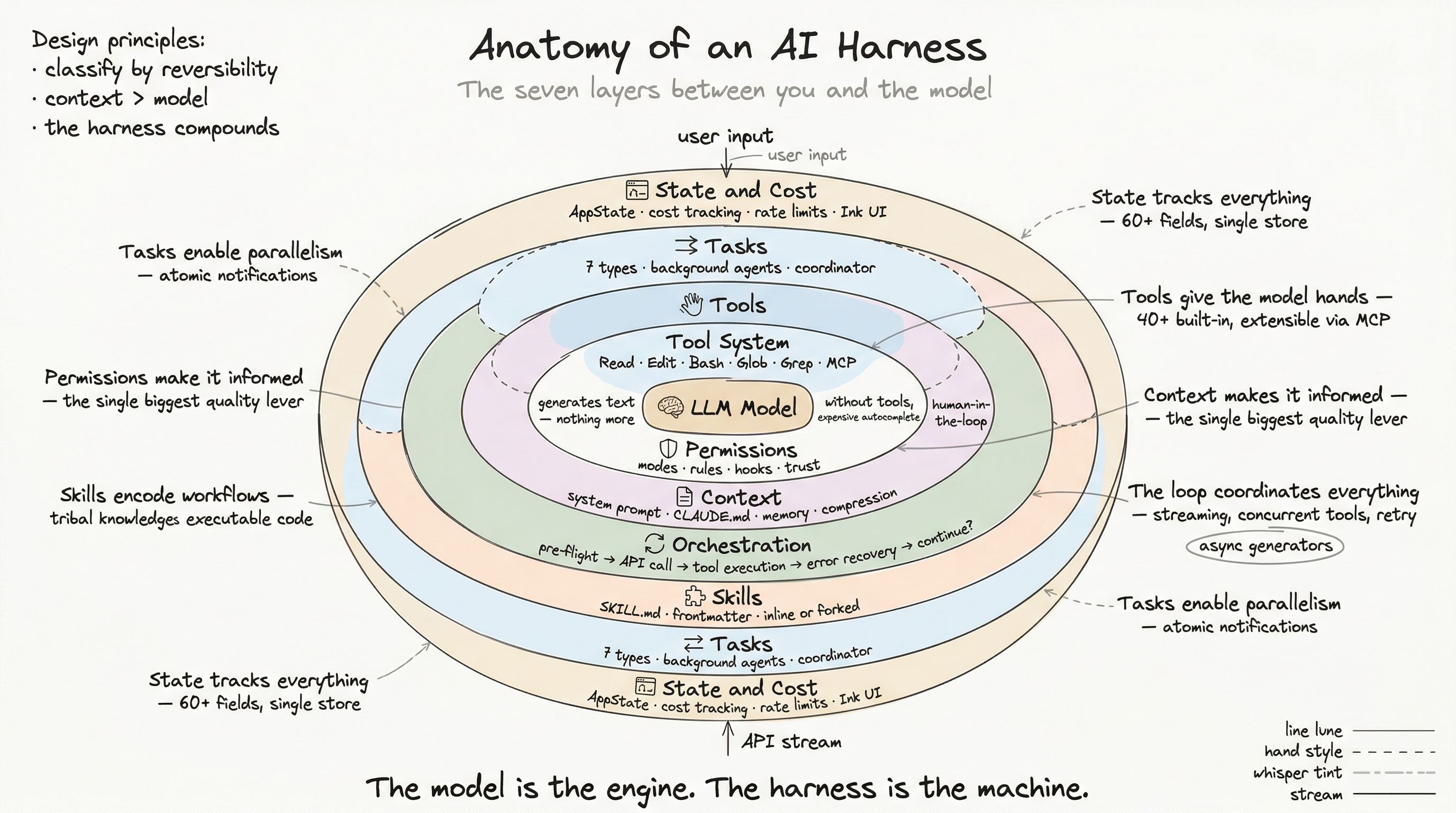
A language model can produce brilliant code — but it cannot save a file. It can reason about a bug — but it cannot run a test. It can suggest a git command — but it cannot execute it. Without tools, a model is an oracle trapped behind glass: it can see the answer but cannot touch the world.
The tool system is what gives the model hands. And in production, those hands need to be precise, safe, observable, and fast.
What a Tool Actually Is
In a naive implementation, a tool is a function: name, inputs, outputs, done. In production, a tool is a typed behavioral contract spanning validation, safety, permissions, concurrency, UI rendering, and extensibility.
Here is what a production tool definition looks like (simplified from the actual type):
type Tool<Input, Output> = {  // Identity  readonly name: string  readonly aliases?: string[]
  // Schema  readonly inputSchema: ZodSchema<Input>  outputSchema?: ZodSchema<Output>
  // Core execution  call(args: Input, context: ToolUseContext): Promise<ToolResult<Output>>  description(input: Input): Promise<string>
  // Safety classification  isReadOnly(input: Input): boolean  isDestructive?(input: Input): boolean  isConcurrencySafe(input: Input): boolean
  // Permission gate  checkPermissions(input: Input, context): Promise<PermissionResult>  validateInput?(input: Input, context): Promise<ValidationResult>
  // UI rendering (6+ methods)  renderToolUseMessage(input: Input): ReactNode  renderToolResultMessage?(output: Output): ReactNode  renderToolUseProgressMessage?(progress): ReactNode  renderToolUseErrorMessage?(error): ReactNode  renderToolUseRejectedMessage?(input: Input): ReactNode
  // Behavioral hints  maxResultSizeChars: number  requiresUserInteraction?(): boolean  interruptBehavior?(): 'cancel' | 'block'}
That is not a function. That is a protocol. Every tool in the system implements this contract, which means the harness can reason about any tool — built-in or external — through the same interface.
The builder pattern
Implementing all ~30 methods for every tool would be painful. The system uses a builder with safe defaults:
const myTool = buildTool({ name: 'MyTool', inputSchema: z.object({ path: z.string() }), async call(args, context) { /* core logic */ }, async description(input) { return `Operating on ${input.path}` }, // Everything else gets safe defaults: // isReadOnly → false, isDestructive → false // isConcurrencySafe → false (conservative) // checkPermissions → allow})Conservative defaults mean a new tool starts locked down. You explicitly opt into concurrency, read-only status, or auto-approval — never the reverse.
The Tool Registry
A production harness does not hardcode its tool list. Tools are assembled through a pipeline that handles feature gates, permission filtering, MCP discovery, deduplication, and cache-stable ordering.
Assembly pipeline
getAllBaseTools() → 40+ tools (feature-gated) ↓getTools(permissions) → filter by deny rules + permission mode ↓assembleToolPool(+mcp) → merge MCP tools, deduplicate, sort ↓Final tool list → sent to model in API callFeature-gated tools
Not every tool ships to every user. The registry uses feature gates to include or exclude tools based on runtime conditions:
function getAllBaseTools(): Tool[] {  const tools = [    // Always available    BashTool, FileReadTool, FileEditTool, FileWriteTool,    GlobTool, GrepTool, AgentTool, WebFetchTool, SkillTool,
    // Feature-gated    ...(feature('AGENT_TRIGGERS') ? [CronCreateTool, CronDeleteTool] : []),    ...(feature('WORKTREE_MODE') ? [EnterWorktreeTool, ExitWorktreeTool] : []),    ...(feature('TODO_V2') ? [TaskCreateTool, TaskGetTool, TaskUpdateTool] : []),    ...(feature('MONITOR_TOOL') ? [MonitorTool] : []),    // ... 15+ more conditional entries  ]  return tools.filter(t => t.isEnabled())}
This is not configuration — it is build-time dead code elimination. When a feature gate evaluates to false, the import and all its transitive dependencies are stripped from the production bundle.
Permission filtering
After assembly, tools pass through deny rules:
function getTools(permissionContext): Tool[] { const base = getAllBaseTools() return filterToolsByDenyRules(base, permissionContext.alwaysDenyRules)}If your enterprise admin says “no shell access,” the Bash tool is not just permission-gated — it is removed from the tool list entirely. The model never sees it, never tries to call it, never wastes tokens reasoning about it.
The 40+ Built-in Tools
Production tools fall into natural categories:
Core I/O — The foundation. File reading (with PDF, image, and notebook support), editing (with diff rendering), writing (with streaming), glob search, grep search, and shell execution. These handle 90% of all tool calls.
Network — Web fetch (with HTML-to-markdown conversion), web search, and headless browser automation. Each has URL pre-approval lists and content size limits.
Agent & Task — Sub-agent spawning, task lifecycle management (create, get, update, list, stop), and background task output retrieval. These enable the multi-agent patterns covered in Post 7.
Planning — Plan mode entry/exit, plan verification, and worktree isolation for safe experimentation on git branches.
MCP Integration — Resource listing and reading from any connected MCP server. MCP tools get wrapped in the standard Tool interface with server-specific permission handling.
Search & Discovery — The ToolSearch tool, which the model uses to find deferred tools by keyword when the full list would overflow the context window.
Execution: From Model Request to Side Effect
When the model produces a tool_use content block, the harness executes a precise sequence:
Model produces tool_use block ↓1. Parse and validate input against schema ↓2. Run validateInput() for semantic checks ↓3. Check permissions (rules → hooks → classifier → user prompt) ↓4. Execute pre-tool hooks (user-defined shell commands) ↓5. Call tool.call() — the actual work ↓6. Execute post-tool hooks ↓7. Process result (persist large outputs, apply budget) ↓8. Return tool_result to modelSteps 3 and 4 are where the permission boundary (Post 3) intervenes. But notice: validation happens before permissions. If the model sends malformed input, the system rejects it immediately without bothering the user with a permission prompt for something that would have failed anyway.
Concurrency partitioning
The model can request multiple tools in a single response. The harness does not execute them all sequentially — that would be slow. Instead, it partitions by concurrency safety:
// Simplified from StreamingToolExecutorfor (const toolUse of toolUseBlocks) { if (tool.isConcurrencySafe(toolUse.input) && allOtherTools.every(t => t.isConcurrencySafe(t.input))) { // Run concurrently (up to 10 in parallel) executeConcurrently(toolUse) } else { // Wait for all concurrent tools to finish, then run serially await drainConcurrentBatch() await executeSerially(toolUse) }}Read a file while searching for a pattern while fetching a URL? All three run simultaneously. But the moment a file write appears, the system drains the concurrent batch and gives the write exclusive access.
This is not premature optimization. When the model requests 6 file reads in one turn — which is common during codebase exploration — concurrent execution cuts wall-clock time by 80%.
Result budgeting
Tool results can be enormous. A grep across a large codebase might return megabytes. The harness applies two controls:
-
Per-tool limit (
maxResultSizeChars) — When exceeded, the full result is persisted to disk and the model receives a preview plus a file path reference. Default: 100KB. File reads set this toInfinityto prevent circular loops (the model would try to read the result file). -
Per-turn budget — Aggregate tool result bytes across all tools in a turn, preventing context overflow from multiple large results.
MCP: The Open Tool Protocol
Built-in tools cover development workflows. But a harness that only supports its own tools is a closed system. The Model Context Protocol (MCP) opens it up.
MCP is a standardized protocol for connecting AI systems to external tool servers. The harness supports five transport types: stdio, Server-Sent Events, HTTP, WebSocket, and native SDK bridges.
When an MCP server connects, the harness:
- Discovers available tools via
client.listTools() - Converts each MCP tool schema to the internal
Toolinterface - Wraps each tool with standard permission handling, result processing, and UI rendering
- Names them
mcp__serverName__toolNamefor namespace isolation
The result: MCP tools are first-class citizens. The model interacts with them identically to built-in tools. The permission system governs them identically. The UI renders them identically.
// MCP tool wrapping (simplified){  name: `mcp__${serverName}__${toolName}`,  isMcp: true,  mcpInfo: { serverName, toolName },
  async call(input, context) {    const result = await mcpClient.callTool(toolName, input)    return { data: result }  },
  async checkPermissions(input, context) {    // Defer to general permission system    return { behavior: 'passthrough' }  }}
Deferred tool loading with ToolSearch
Here is a problem unique to harnesses with MCP support: tool count can explode. A user connects 5 MCP servers, each exposing 20 tools. Combined with 40+ built-ins, that is 140+ tools. Sending full JSON schemas for all of them in every API call wastes thousands of tokens on tools the model will never use in a given conversation.
The solution: deferred loading.
When the total tool count exceeds ~60, the harness switches mode. Tools marked with shouldDefer: true are excluded from the initial API payload — the model sees only their names, not their schemas. A special ToolSearch tool lets the model discover tools by keyword:
Model: ToolSearch({ query: "jupyter notebook" })→ Returns: Full schema for NotebookEditTool
Model: Now I can call NotebookEdit with the correct parameters
Critical tools (Bash, FileEdit, FileRead) are marked alwaysLoad: true and always present. The system sorts tools deterministically for prompt cache stability — the same tool list produces the same cache key, maximizing cache hits across conversations.
What Good Tool Design Looks Like
After dissecting 40+ production tools, patterns emerge:
Tools are honest about their nature. A read-only tool says so. A destructive tool says so. The system trusts these declarations for permission routing and concurrency decisions. Lying about isReadOnly — marking a write operation as read-only — would break the concurrent execution partitioning and could lead to race conditions.
Tools control their own rendering. Each tool defines how it appears in the UI: what the spinner says during execution, what the result looks like, how errors display. This is not cosmetic — it is how the user maintains situational awareness when 6 tools run concurrently.
Tools are discoverable. The searchHint field provides keywords for ToolSearch. The description() method generates context-specific descriptions. The aliases array supports backwards compatibility. A tool that is hard to find is a tool that does not get used.
Tools fail gracefully. validateInput() catches malformed requests before they hit the permission system. maxResultSizeChars prevents context overflow. interruptBehavior() tells the harness whether to cancel or block when the user interrupts mid-execution.
The tool system is where the abstract meets the concrete — where the model’s textual intentions become real-world side effects. Every other layer in the harness exists to make this translation safe, fast, and observable.
Next: The Permission Boundary — Human-in-the-Loop at Scale, where we examine how the harness decides which tool calls to allow, deny, or escalate.