
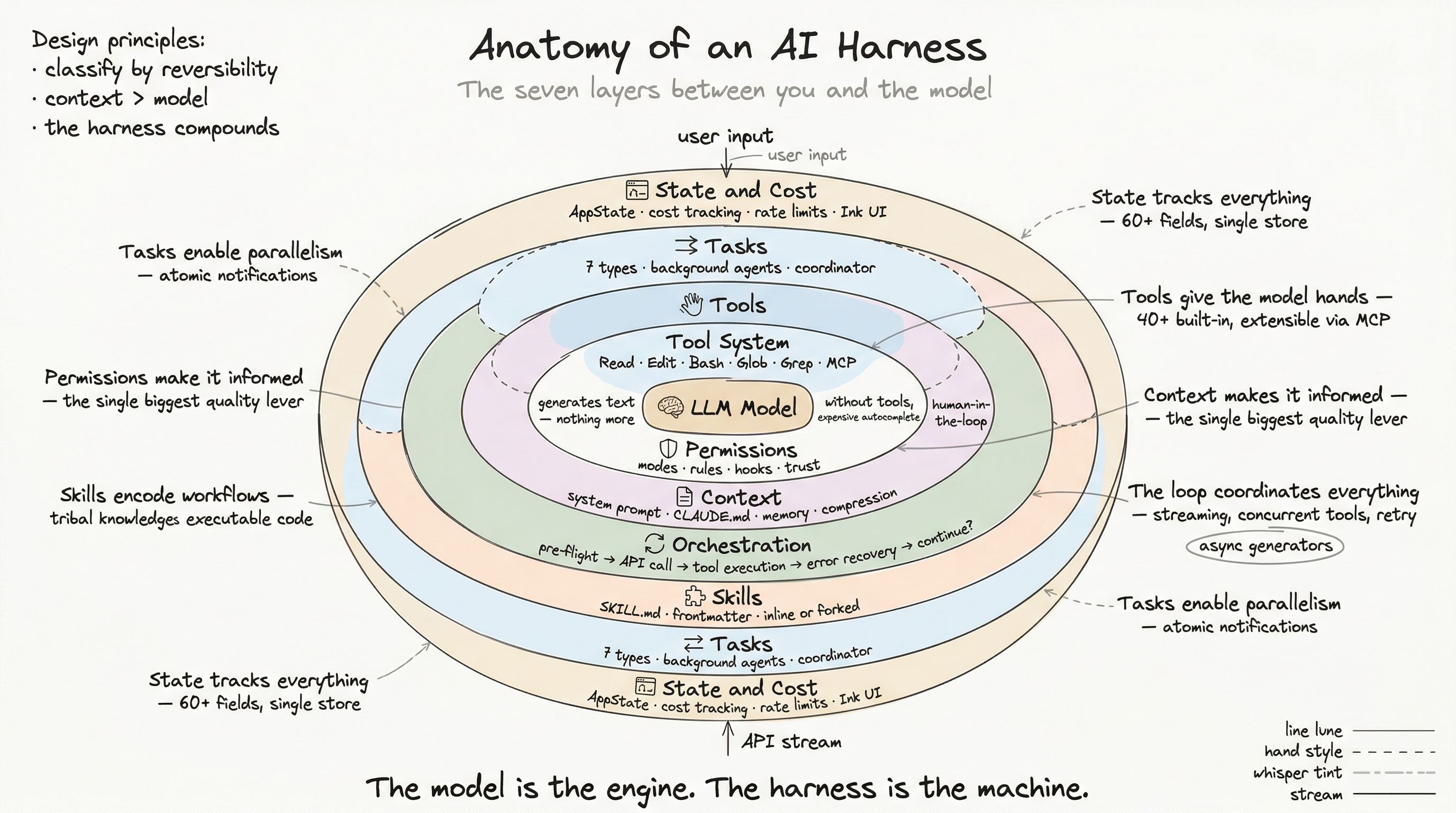
You have solved a problem before. You invested time refining the prompt, adding context, specifying the output format. The AI produced an excellent result. Then the conversation ended, and that carefully-crafted prompt evaporated.
A skill captures that workflow so it never evaporates. It is a markdown file with metadata that tells the harness: when to activate, what to do, what tools to use, and how to execute. Skills turn prompt engineering from a disposable art into a durable engineering artifact.
Anatomy of a Skill
A skill is a directory containing a SKILL.md file with YAML frontmatter:
---name: code-reviewdescription: "Structured code review against team standards"allowed-tools: Read, Grep, Glob, Editmodel: sonnetcontext: forkarguments: file_or_pr---
Review the code at ${ARGUMENTS} against these dimensions:
1. **Correctness** — Does it do what it claims?2. **Security** — OWASP top 10 violations?3. **Performance** — N+1 queries, unnecessary allocations?4. **Accessibility** — WCAG 2.2 AA compliance?5. **Style** — Matches project conventions?
For each finding, provide:- Severity (P0-P3)- File path and line number- What's wrong and why it matters- Concrete fix suggestion
Output a structured verdict: APPROVE, REQUEST_CHANGES, or BLOCK.
The frontmatter is not decoration — every field drives harness behavior.
Frontmatter Fields
| Field | Purpose |
|---|---|
name | Display name (defaults to directory name) |
description | What the skill does (shown to the model for invocation decisions) |
allowed-tools | Restrict which tools the skill can use |
model | Override model for this skill (inherit = use parent’s) |
context | inline (expand in conversation) or fork (sub-agent) |
agent | Agent type when forked (general-purpose, code-reviewer, etc.) |
effort | Effort level (trivial, quick, fast, default, ambitious, epic) |
arguments | Argument names for ${ARGUMENTS} substitution |
paths | Gitignore-style patterns for conditional activation |
user-invocable | Whether users can type /skill-name (default: true) |
disable-model-invocation | Prevent the model from calling this automatically |
hooks | Hook configuration (onBeforeInvoke, onAfterInvoke) |
The Loading Pipeline
Skills come from five sources, loaded in precedence order:
1. Bundled skills (compiled into the binary)2. Managed skills (enterprise admin, /etc/claude-code/.claude/skills/)3. User skills (~/.claude/skills/)4. Project skills (.claude/skills/ in repo, traversing up to root)5. Additional directory (--add-dir CLI flag)6. Legacy commands (.claude/commands/ — deprecated)7. MCP skills (from connected MCP servers)Deduplication and conflict resolution
When multiple sources define a skill with the same name, the harness deduplicates by realpath(). This handles symlinks gracefully — if your user skill is a symlink to a project skill, it is loaded once, not twice.
If two physically different skills share a name, source precedence wins: managed beats user beats project.
Conditional activation
Skills with a paths field are not loaded immediately. They sit in a conditional pool, waiting for matching files to be touched:
---name: react-component-reviewpaths: "src/components/**/*.tsx"---When the model reads or edits a file matching src/components/**/*.tsx, the harness activates the skill:
function activateConditionalSkillsForPaths(filePaths, cwd) { for (const [name, skill] of conditionalSkills) { const patterns = skill.paths if (filePaths.some(f => matchesGitignorePattern(f, patterns))) { dynamicSkills.set(name, skill) conditionalSkills.delete(name) } }}This keeps the skill list focused. A React-specific skill does not clutter the model’s context when you are working on Python backend code.
Dynamic discovery
Skills are not only loaded at startup. As the model reads files in subdirectories, the harness discovers new skill directories:
function discoverSkillDirsForPaths(filePaths, cwd) { for (const filePath of filePaths) { // Walk up from file's parent to root let dir = dirname(filePath) while (dir !== root) { const skillDir = join(dir, '.claude/skills/') if (exists(skillDir) && notGitIgnored(skillDir)) { newDirs.push(skillDir) } dir = dirname(dir) } } return newDirs.sort(deepestFirst)}This means a monorepo with per-package skills “just works.” When the model starts working in packages/auth/, it discovers packages/auth/.claude/skills/ and gains access to auth-specific workflows.
Execution Modes
Skills execute in two modes, and the choice has significant architectural consequences.
Inline execution (default)
The skill content is expanded directly into the current conversation:
User: /code-review src/auth/login.ts ↓Skill content injected as system message ↓Model sees: "Review the code at src/auth/login.ts against these dimensions..." ↓Model responds within the current conversation contextInline execution is fast (no sub-agent overhead) and shares the current context (the model sees everything that happened before the skill invocation). The downside: the skill’s prompt and output consume the parent conversation’s context budget.
Forked execution (context: fork)
The skill spawns an isolated sub-agent with its own context:
User: /deep-analysis src/ ↓New LocalAgentTask created ↓Sub-agent gets: skill prompt + reference files ↓Sub-agent runs independently (own tool permissions, model, budget) ↓Result extracted and returned to parent conversationForked execution provides isolation: the skill cannot see the parent’s conversation history, and its tool calls do not consume the parent’s context. This is essential for expensive operations like “analyze this entire directory” — you do not want 50K tokens of analysis polluting the main conversation.
The trade-off: forked skills cannot reference what happened earlier in the conversation. They are self-contained by design.
How the harness chooses
async function executeSkill(command, args, context) { if (command.context === 'fork') { // Spawn sub-agent const task = await runAgent({ agentDefinition: command.agent || 'general-purpose', prompt: command.getPromptForCommand(args, context), model: command.model, allowedTools: command.allowedTools, }) return extractResult(task) } else { // Inline expansion return injectPromptIntoConversation( command.getPromptForCommand(args, context) ) }}Variable Substitution
Skill content is not static. The harness substitutes variables before execution:
| Variable | Replaced with |
|---|---|
${ARGUMENTS} | User-provided arguments |
${CLAUDE_SKILL_DIR} | Skill’s directory path (for referencing local files) |
${CLAUDE_SESSION_ID} | Current session ID |
`command` (backticks) | Inline shell command output |
The shell command execution is a powerful feature — a skill can embed dynamic context:
Current git branch: `git branch --show-current`Recent changes: `git diff --stat HEAD~5`For security, MCP-sourced skills cannot execute inline shell commands. Only locally-trusted skills (user, project, bundled) can run arbitrary commands.
Bundled Skills
Some skills ship with the harness binary. These are not user-authored — they are part of the product:
registerBundledSkill({  name: 'loop',  description: 'Run a prompt or command on a recurring interval',  aliases: [],  allowedTools: ['ScheduleWakeup'],
  async getPromptForCommand(args, context) {    return [{ type: 'text', text: loopInstructions(args) }]  },
  files: {    'references/loop-guide.md': loopGuideContent  }})
Bundled skills use reference file extraction: supporting files are written to a nonce-prefixed ephemeral directory with 0o700 permissions (owner-only). The skill’s prompt includes Base directory for this skill: /path/to/extracted/ so the model can read reference files on demand.
The nonce prefix and strict permissions prevent symlink attacks — a malicious process cannot predict the extraction path or read the files.
Permission Integration
Skills interact with the permission system at two levels:
-
Skill invocation — Can the model call this skill? Checked against deny rules, then allow rules. If neither matches, auto-allowed if the skill has only safe properties (read-only metadata).
-
Tool usage within the skill — The
allowed-toolsfield restricts which tools the skill can use. A code review skill might only needRead,Grep, andGlob. By restricting to read-only tools, you guarantee the review skill cannot accidentally modify code.
// Permission check for skill invocationasync checkPermissions(input, context) {  // Check deny rules first  if (matchesDenyRule(input.skill)) return { behavior: 'deny' }
  // Check allow rules  if (matchesAllowRule(input.skill)) return { behavior: 'allow' }
  // Auto-allow safe skills (read-only tools, no shell commands)  if (isSafeSkill(command)) return { behavior: 'allow' }
  // Otherwise, ask user  return { behavior: 'ask' }}
Skills as Engineering Artifacts
The most important aspect of skills is not their technical implementation — it is their lifecycle:
- Skills are files. They live in your repository, get reviewed in PRs, and evolve with your project.
- Skills are shared. Put them in
.claude/skills/and every team member gets them automatically. - Skills are composable. A deployment skill can invoke a test skill which invokes a build skill. Forked execution prevents context interference.
- Skills are testable. Because they are markdown with predictable variable substitution, you can verify their content programmatically.
This transforms AI assistance from a personal productivity hack into a team-level capability. The knowledge of how to review code, debug a specific class of issue, or generate a specific artifact is encoded in skills that any team member can invoke — and get consistent results regardless of how they phrase their request.
Next: Tasks and Concurrency — Background Agents at Work, where we examine how the harness manages multiple simultaneous operations, background agents, and inter-agent communication.