
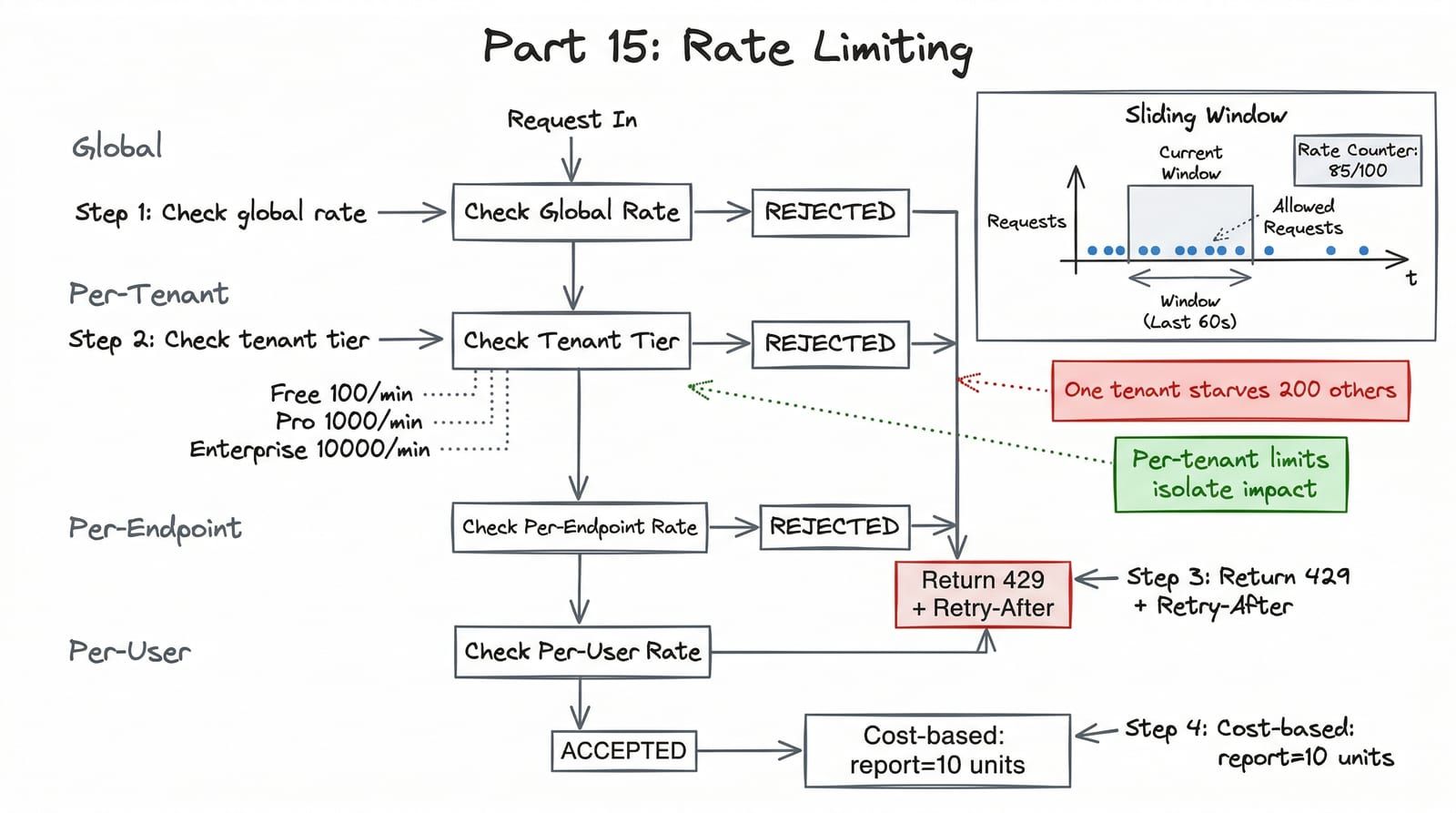
Three months into running ShelfWise in production, a free-tier tenant wrote a script that hammered our search endpoint at 1,000 requests per second. Within ninety seconds, the PostgreSQL connection pool was saturated. Within three minutes, every other tenant — including Barnes & Noble on an enterprise plan — was getting 503s. The incident lasted six hours because we had no rate limiting, no tenant isolation, and no way to shed load from a single bad actor without restarting the entire service.
This is the “noisy neighbor” problem, and it is the number-one operational headache for multi-tenant SaaS. Rate limiting is not a nice-to-have. It is the difference between one tenant having a bad day and two hundred tenants having a bad day.
Algorithm Choice: Sliding Window
Before writing code, you need to pick an algorithm. The three contenders each make different tradeoffs.
| Algorithm | Accuracy | Memory | Burst Handling | Complexity |
|---|---|---|---|---|
| Fixed Window | Low — boundary spike allows 2x burst | Minimal — one counter per window | Poor — resets at window edge | Trivial |
| Sliding Window Log | High — exact request tracking | High — stores every timestamp | Excellent — true rolling window | Moderate |
| Sliding Window Counter | High — weighted approximation | Low — two counters per window | Good — smooths boundary spikes | Low |
| Token Bucket | Medium — allows configured bursts | Minimal — token count + timestamp | Configurable — burst size parameter | Moderate |
Fixed window is the most common and the most dangerous. If your limit is 100 requests per minute and a client sends 100 requests at 0:59 and 100 more at 1:01, they effectively got 200 requests in two seconds. The sliding window counter eliminates this boundary problem with almost no additional cost — two Redis keys instead of one.
We use the sliding window counter for ShelfWise. It provides near-exact accuracy with minimal memory.
The Sliding Window Counter in Redis
The algorithm works by tracking counts in two adjacent fixed windows and weighting them by how far into the current window we are.
from datetime import UTC, datetimefrom dataclasses import dataclassfrom typing import Final
import redis.asyncio as redis
WINDOW_SIZE: Final = 60  # seconds

@dataclass(frozen=True, slots=True)class RateLimitResult:    allowed: bool    limit: int    remaining: int    reset_at: int  # Unix timestamp    retry_after: float | None = None  # seconds, only set when denied

class SlidingWindowRateLimiter:    """Sliding window counter rate limiter backed by Redis."""
    def __init__(self, redis_client: redis.Redis) -> None:        self._redis = redis_client
    async def check(        self, key: str, limit: int, window: int = WINDOW_SIZE,    ) -> RateLimitResult:        now = datetime.now(UTC).timestamp()        current_window = int(now // window) * window        previous_window = current_window - window
        current_key = f"rl:{key}:{current_window}"        previous_key = f"rl:{key}:{previous_window}"
        async with self._redis.pipeline(transaction=True) as pipe:            pipe.get(previous_key)            pipe.incr(current_key)            pipe.expire(current_key, window * 2)            results = await pipe.execute()
        previous_count = int(results[0] or 0)        current_count = int(results[1])  # already incremented
        # Weight previous window by how much of it overlaps        elapsed = now - current_window        weight = 1.0 - (elapsed / window)        weighted_count = int(previous_count * weight) + current_count
        reset_at = current_window + window        remaining = max(0, limit - weighted_count)        allowed = weighted_count <= limit
        retry_after: float | None = None        if not allowed:            retry_after = reset_at - now
        return RateLimitResult(            allowed=allowed,            limit=limit,            remaining=remaining,            reset_at=reset_at,            retry_after=retry_after,        )
The INCR + EXPIRE pipeline is atomic. Even under high concurrency, every request gets an accurate count. The weighted calculation means a client cannot exploit the window boundary.
Four Tiers of Rate Limiting
A single rate limit is not enough. ShelfWise enforces four tiers, checked in order:
%3b%7d%23mermaid-0 .cluster rect%7bfill:hsl(0%2c 0%25%2c 98.9215686275%25)%3bstroke:%23707070%3bstroke-width:1px%3b%7d%23mermaid-0 .cluster text%7bfill:%23333%3b%7d%23mermaid-0 .cluster span%7bcolor:%23333%3b%7d%23mermaid-0 div.mermaidTooltip%7bposition:absolute%3btext-align:center%3bmax-width:200px%3bpadding:2px%3bfont-family:arial%2csans-serif%3bfont-size:12px%3bbackground:hsl(-160%2c 0%25%2c 93.3333333333%25)%3bborder:1px solid %23707070%3bborder-radius:2px%3bpointer-events:none%3bz-index:100%3b%7d%23mermaid-0 .flowchartTitleText%7btext-anchor:middle%3bfont-size:18px%3bfill:black%3b%7d%23mermaid-0 rect.text%7bfill:none%3bstroke-width:0%3b%7d%23mermaid-0 .icon-shape%2c%23mermaid-0 .image-shape%7bbackground-color:white%3btext-align:center%3b%7d%23mermaid-0 .icon-shape p%2c%23mermaid-0 .image-shape p%7bbackground-color:white%3bpadding:2px%3b%7d%23mermaid-0 .icon-shape .label rect%2c%23mermaid-0 .image-shape .label rect%7bopacity:0.5%3bbackground-color:white%3bfill:white%3b%7d%23mermaid-0 .label-icon%7bdisplay:inline-block%3bheight:1em%3boverflow:visible%3bvertical-align:-0.125em%3b%7d%23mermaid-0 .node .label-icon path%7bfill:currentColor%3bstroke:revert%3bstroke-width:revert%3b%7d%23mermaid-0 .node .neo-node%7bstroke:%23999%3b%7d%23mermaid-0 %5bdata-look='neo'%5d.node rect%2c%23mermaid-0 %5bdata-look='neo'%5d.cluster rect%2c%23mermaid-0 %5bdata-look='neo'%5d.node polygon%7bstroke:url(%23mermaid-0-gradient)%3bfilter:drop-shadow( 1px 2px 2px rgba(185%2c185%2c185%2c1))%3b%7d%23mermaid-0 %5bdata-look='neo'%5d.node path%7bstroke:url(%23mermaid-0-gradient)%3bstroke-width:1px%3b%7d%23mermaid-0 %5bdata-look='neo'%5d.node .outer-path%7bfilter:drop-shadow( 1px 2px 2px rgba(185%2c185%2c185%2c1))%3b%7d%23mermaid-0 %5bdata-look='neo'%5d.node .neo-line path%7bstroke:%23999%3bfilter:none%3b%7d%23mermaid-0 %5bdata-look='neo'%5d.node circle%7bstroke:url(%23mermaid-0-gradient)%3bfilter:drop-shadow( 1px 2px 2px rgba(185%2c185%2c185%2c1))%3b%7d%23mermaid-0 %5bdata-look='neo'%5d.node circle .state-start%7bfill:black%3b%7d%23mermaid-0 %5bdata-look='neo'%5d.icon-shape .icon%7bfill:url(%23mermaid-0-gradient)%3bfilter:drop-shadow( 1px 2px 2px rgba(185%2c185%2c185%2c1))%3b%7d%23mermaid-0 %5bdata-look='neo'%5d.icon-shape .icon-neo path%7bstroke:url(%23mermaid-0-gradient)%3bfilter:drop-shadow( 1px 2px 2px rgba(185%2c185%2c185%2c1))%3b%7d%23mermaid-0 :root%7b--mermaid-font-family:arial%2csans-serif%3b%7d%3c/style%3e%3cg%3e%3cmarker id='mermaid-0_flowchart-v2-pointEnd' class='marker flowchart-v2' viewBox='0 0 10 10' refX='5' refY='5' markerUnits='userSpaceOnUse' markerWidth='8' markerHeight='8' orient='auto'%3e%3cpath d='M 0 0 L 10 5 L 0 10 z' class='arrowMarkerPath' style='stroke-width: 1%3b stroke-dasharray: 1%2c 0%3b'/%3e%3c/marker%3e%3cmarker id='mermaid-0_flowchart-v2-pointStart' class='marker flowchart-v2' viewBox='0 0 10 10' refX='4.5' refY='5' markerUnits='userSpaceOnUse' markerWidth='8' markerHeight='8' orient='auto'%3e%3cpath d='M 0 5 L 10 10 L 10 0 z' class='arrowMarkerPath' style='stroke-width: 1%3b stroke-dasharray: 1%2c 0%3b'/%3e%3c/marker%3e%3cmarker id='mermaid-0_flowchart-v2-pointEnd-margin' class='marker flowchart-v2' viewBox='0 0 11.5 14' refX='11.5' refY='7' markerUnits='userSpaceOnUse' markerWidth='10.5' markerHeight='14' orient='auto'%3e%3cpath d='M 0 0 L 11.5 7 L 0 14 z' class='arrowMarkerPath' style='stroke-width: 0%3b stroke-dasharray: 1%2c 0%3b'/%3e%3c/marker%3e%3cmarker id='mermaid-0_flowchart-v2-pointStart-margin' class='marker flowchart-v2' viewBox='0 0 11.5 14' refX='1' refY='7' markerUnits='userSpaceOnUse' markerWidth='11.5' markerHeight='14' orient='auto'%3e%3cpolygon points='0%2c7 11.5%2c14 11.5%2c0' class='arrowMarkerPath' style='stroke-width: 0%3b stroke-dasharray: 1%2c 0%3b'/%3e%3c/marker%3e%3cmarker id='mermaid-0_flowchart-v2-circleEnd' class='marker flowchart-v2' viewBox='0 0 10 10' refX='11' refY='5' markerUnits='userSpaceOnUse' markerWidth='11' markerHeight='11' orient='auto'%3e%3ccircle cx='5' cy='5' r='5' class='arrowMarkerPath' style='stroke-width: 1%3b stroke-dasharray: 1%2c 0%3b'/%3e%3c/marker%3e%3cmarker id='mermaid-0_flowchart-v2-circleStart' class='marker flowchart-v2' viewBox='0 0 10 10' refX='-1' refY='5' markerUnits='userSpaceOnUse' markerWidth='11' markerHeight='11' orient='auto'%3e%3ccircle cx='5' cy='5' r='5' class='arrowMarkerPath' style='stroke-width: 1%3b stroke-dasharray: 1%2c 0%3b'/%3e%3c/marker%3e%3cmarker id='mermaid-0_flowchart-v2-circleEnd-margin' class='marker flowchart-v2' viewBox='0 0 10 10' refY='5' refX='12.25' markerUnits='userSpaceOnUse' markerWidth='14' markerHeight='14' orient='auto'%3e%3ccircle cx='5' cy='5' r='5' class='arrowMarkerPath' style='stroke-width: 0%3b stroke-dasharray: 1%2c 0%3b'/%3e%3c/marker%3e%3cmarker id='mermaid-0_flowchart-v2-circleStart-margin' class='marker flowchart-v2' viewBox='0 0 10 10' refX='-2' refY='5' markerUnits='userSpaceOnUse' markerWidth='14' markerHeight='14' orient='auto'%3e%3ccircle cx='5' cy='5' r='5' class='arrowMarkerPath' style='stroke-width: 0%3b stroke-dasharray: 1%2c 0%3b'/%3e%3c/marker%3e%3cmarker id='mermaid-0_flowchart-v2-crossEnd' class='marker cross flowchart-v2' viewBox='0 0 11 11' refX='12' refY='5.2' markerUnits='userSpaceOnUse' markerWidth='11' markerHeight='11' orient='auto'%3e%3cpath d='M 1%2c1 l 9%2c9 M 10%2c1 l -9%2c9' class='arrowMarkerPath' style='stroke-width: 2%3b stroke-dasharray: 1%2c 0%3b'/%3e%3c/marker%3e%3cmarker id='mermaid-0_flowchart-v2-crossStart' class='marker cross flowchart-v2' viewBox='0 0 11 11' refX='-1' refY='5.2' markerUnits='userSpaceOnUse' markerWidth='11' markerHeight='11' orient='auto'%3e%3cpath d='M 1%2c1 l 9%2c9 M 10%2c1 l -9%2c9' class='arrowMarkerPath' style='stroke-width: 2%3b stroke-dasharray: 1%2c 0%3b'/%3e%3c/marker%3e%3cmarker id='mermaid-0_flowchart-v2-crossEnd-margin' class='marker cross flowchart-v2' viewBox='0 0 15 15' refX='17.7' refY='7.5' markerUnits='userSpaceOnUse' markerWidth='12' markerHeight='12' orient='auto'%3e%3cpath d='M 1%2c1 L 14%2c14 M 1%2c14 L 14%2c1' class='arrowMarkerPath' style='stroke-width: 2.5%3b'/%3e%3c/marker%3e%3cmarker id='mermaid-0_flowchart-v2-crossStart-margin' class='marker cross flowchart-v2' viewBox='0 0 15 15' refX='-3.5' refY='7.5' markerUnits='userSpaceOnUse' markerWidth='12' markerHeight='12' orient='auto'%3e%3cpath d='M 1%2c1 L 14%2c14 M 1%2c14 L 14%2c1' class='arrowMarkerPath' style='stroke-width: 2.5%3b stroke-dasharray: 1%2c 0%3b'/%3e%3c/marker%3e%3cg class='root'%3e%3cg class='clusters'/%3e%3cg class='edgePaths'%3e%3cpath d='M227.699%2c62L227.699%2c66.167C227.699%2c70.333%2c227.699%2c78.667%2c227.699%2c86.333C227.699%2c94%2c227.699%2c101%2c227.699%2c104.5L227.699%2c108' id='mermaid-0-L_A_B_0' class='edge-thickness-normal edge-pattern-solid edge-thickness-normal edge-pattern-solid flowchart-link' style='%3b' data-edge='true' data-et='edge' data-id='L_A_B_0' data-points='W3sieCI6MjI3LjY5OTIxODc1LCJ5Ijo2Mn0seyJ4IjoyMjcuNjk5MjE4NzUsInkiOjg3fSx7IngiOjIyNy42OTkyMTg3NSwieSI6MTEyfV0=' data-look='classic' marker-end='url(%23mermaid-0_flowchart-v2-pointEnd)'/%3e%3cpath d='M174.192%2c239.665L152.425%2c254.749C130.657%2c269.834%2c87.121%2c300.003%2c65.354%2c338.503C43.586%2c377.003%2c43.586%2c423.833%2c43.586%2c470.664C43.586%2c517.495%2c43.586%2c564.326%2c43.586%2c608.931C43.586%2c653.536%2c43.586%2c695.917%2c43.586%2c738.297C43.586%2c780.677%2c43.586%2c823.057%2c43.586%2c866.474C43.586%2c909.891%2c43.586%2c954.344%2c43.586%2c998.797C43.586%2c1043.25%2c43.586%2c1087.703%2c53.72%2c1115.764C63.854%2c1143.824%2c84.122%2c1155.492%2c94.256%2c1161.327L104.391%2c1167.161' id='mermaid-0-L_B_R_0' class='edge-thickness-normal edge-pattern-solid edge-thickness-normal edge-pattern-solid flowchart-link' style='%3b' data-edge='true' data-et='edge' data-id='L_B_R_0' data-points='W3sieCI6MTc0LjE5MjI2OTc5MDk0ODY3LCJ5IjoyMzkuNjY0OTI2MDQwOTQ4Njd9LHsieCI6NDMuNTg1OTM3NSwieSI6MzMwLjE3MTg3NX0seyJ4Ijo0My41ODU5Mzc1LCJ5Ijo0NzAuNjY0MDYyNX0seyJ4Ijo0My41ODU5Mzc1LCJ5Ijo2MTEuMTU2MjV9LHsieCI6NDMuNTg1OTM3NSwieSI6NzM4LjI5Njg3NX0seyJ4Ijo0My41ODU5Mzc1LCJ5Ijo4NjUuNDM3NX0seyJ4Ijo0My41ODU5Mzc1LCJ5Ijo5OTguNzk2ODc1fSx7IngiOjQzLjU4NTkzNzUsInkiOjExMzIuMTU2MjV9LHsieCI6MTA3Ljg1NzE3NzczNDM3NSwieSI6MTE2OS4xNTYyNX1d' data-look='classic' marker-end='url(%23mermaid-0_flowchart-v2-pointEnd)'/%3e%3cpath d='M259.568%2c261.303L265.797%2c272.782C272.027%2c284.26%2c284.486%2c307.216%2c290.716%2c324.194C296.945%2c341.172%2c296.945%2c352.172%2c296.945%2c357.672L296.945%2c363.172' id='mermaid-0-L_B_C_0' class='edge-thickness-normal edge-pattern-solid edge-thickness-normal edge-pattern-solid flowchart-link' style='%3b' data-edge='true' data-et='edge' data-id='L_B_C_0' data-points='W3sieCI6MjU5LjU2NzYyMDg2MjgxMjMsInkiOjI2MS4zMDM0NzI4ODcxODc3fSx7IngiOjI5Ni45NDUzMTI1LCJ5IjozMzAuMTcxODc1fSx7IngiOjI5Ni45NDUzMTI1LCJ5IjozNjcuMTcxODc1fV0=' data-look='classic' marker-end='url(%23mermaid-0_flowchart-v2-pointEnd)'/%3e%3cpath d='M242.44%2c519.651L225.471%2c534.902C208.502%2c550.153%2c174.563%2c580.654%2c157.594%2c617.095C140.625%2c653.536%2c140.625%2c695.917%2c140.625%2c738.297C140.625%2c780.677%2c140.625%2c823.057%2c140.625%2c866.474C140.625%2c909.891%2c140.625%2c954.344%2c140.625%2c998.797C140.625%2c1043.25%2c140.625%2c1087.703%2c141.843%2c1115.445C143.061%2c1143.188%2c145.497%2c1154.219%2c146.715%2c1159.735L147.933%2c1165.25' id='mermaid-0-L_C_R_0' class='edge-thickness-normal edge-pattern-solid edge-thickness-normal edge-pattern-solid flowchart-link' style='%3b' data-edge='true' data-et='edge' data-id='L_C_R_0' data-points='W3sieCI6MjQyLjQzOTc1Mzk2OTU4NTcsInkiOjUxOS42NTA2OTE0Njk1ODU3fSx7IngiOjE0MC42MjUsInkiOjYxMS4xNTYyNX0seyJ4IjoxNDAuNjI1LCJ5Ijo3MzguMjk2ODc1fSx7IngiOjE0MC42MjUsInkiOjg2NS40Mzc1fSx7IngiOjE0MC42MjUsInkiOjk5OC43OTY4NzV9LHsieCI6MTQwLjYyNSwieSI6MTEzMi4xNTYyNX0seyJ4IjoxNDguNzk1NTMyMjI2NTYyNSwieSI6MTE2OS4xNTYyNX1d' data-look='classic' marker-end='url(%23mermaid-0_flowchart-v2-pointEnd)'/%3e%3cpath d='M328.835%2c542.267L333.948%2c553.748C339.062%2c565.23%2c349.289%2c588.193%2c354.402%2c605.175C359.516%2c622.156%2c359.516%2c633.156%2c359.516%2c638.656L359.516%2c644.156' id='mermaid-0-L_C_D_0' class='edge-thickness-normal edge-pattern-solid edge-thickness-normal edge-pattern-solid flowchart-link' style='%3b' data-edge='true' data-et='edge' data-id='L_C_D_0' data-points='W3sieCI6MzI4LjgzNDY5ODgzNzYyMzE0LCJ5Ijo1NDIuMjY2ODYzNjYyMzc2OX0seyJ4IjozNTkuNTE1NjI1LCJ5Ijo2MTEuMTU2MjV9LHsieCI6MzU5LjUxNTYyNSwieSI6NjQ4LjE1NjI1fV0=' data-look='classic' marker-end='url(%23mermaid-0_flowchart-v2-pointEnd)'/%3e%3cpath d='M314.201%2c783.123L300.332%2c796.842C286.463%2c810.561%2c258.726%2c837.999%2c244.857%2c873.945C230.988%2c909.891%2c230.988%2c954.344%2c230.988%2c998.797C230.988%2c1043.25%2c230.988%2c1087.703%2c224.154%2c1115.668C217.319%2c1143.632%2c203.65%2c1155.108%2c196.816%2c1160.846L189.981%2c1166.584' id='mermaid-0-L_D_R_0' class='edge-thickness-normal edge-pattern-solid edge-thickness-normal edge-pattern-solid flowchart-link' style='%3b' data-edge='true' data-et='edge' data-id='L_D_R_0' data-points='W3sieCI6MzE0LjIwMDg1NTQxMDkxODEsInkiOjc4My4xMjI3MzA0MTA5MTh9LHsieCI6MjMwLjk4ODI4MTI1LCJ5Ijo4NjUuNDM3NX0seyJ4IjoyMzAuOTg4MjgxMjUsInkiOjk5OC43OTY4NzV9LHsieCI6MjMwLjk4ODI4MTI1LCJ5IjoxMTMyLjE1NjI1fSx7IngiOjE4Ni45MTc1NDE1MDM5MDYyNSwieSI6MTE2OS4xNTYyNX1d' data-look='classic' marker-end='url(%23mermaid-0_flowchart-v2-pointEnd)'/%3e%3cpath d='M395.241%2c792.712L403.199%2c804.833C411.157%2c816.954%2c427.073%2c841.196%2c435.03%2c858.817C442.988%2c876.438%2c442.988%2c887.438%2c442.988%2c892.938L442.988%2c898.438' id='mermaid-0-L_D_E_0' class='edge-thickness-normal edge-pattern-solid edge-thickness-normal edge-pattern-solid flowchart-link' style='%3b' data-edge='true' data-et='edge' data-id='L_D_E_0' data-points='W3sieCI6Mzk1LjI0MTE4NDk0NjMwNjM2LCJ5Ijo3OTIuNzExOTQwMDUzNjkzNn0seyJ4Ijo0NDIuOTg4MjgxMjUsInkiOjg2NS40Mzc1fSx7IngiOjQ0Mi45ODgyODEyNSwieSI6OTAyLjQzNzV9XQ==' data-look='classic' marker-end='url(%23mermaid-0_flowchart-v2-pointEnd)'/%3e%3cpath d='M401.523%2c1053.691L391.645%2c1066.769C381.767%2c1079.846%2c362.01%2c1106.001%2c334.697%2c1125.03C307.384%2c1144.059%2c272.513%2c1155.961%2c255.078%2c1161.913L237.643%2c1167.864' id='mermaid-0-L_E_R_0' class='edge-thickness-normal edge-pattern-solid edge-thickness-normal edge-pattern-solid flowchart-link' style='%3b' data-edge='true' data-et='edge' data-id='L_E_R_0' data-points='W3sieCI6NDAxLjUyMzI2Mzg1NDEyNDkzLCJ5IjoxMDUzLjY5MTIzMjYwNDEyNX0seyJ4IjozNDIuMjUzOTA2MjUsInkiOjExMzIuMTU2MjV9LHsieCI6MjMzLjg1NzcyNzA1MDc4MTI1LCJ5IjoxMTY5LjE1NjI1fV0=' data-look='classic' marker-end='url(%23mermaid-0_flowchart-v2-pointEnd)'/%3e%3cpath d='M462.368%2c1075.776L464.734%2c1085.173C467.1%2c1094.57%2c471.831%2c1113.363%2c474.197%2c1128.26C476.563%2c1143.156%2c476.563%2c1154.156%2c476.563%2c1159.656L476.563%2c1165.156' id='mermaid-0-L_E_F_0' class='edge-thickness-normal edge-pattern-solid edge-thickness-normal edge-pattern-solid flowchart-link' style='%3b' data-edge='true' data-et='edge' data-id='L_E_F_0' data-points='W3sieCI6NDYyLjM2ODM4NzIwODIzMDk2LCJ5IjoxMDc1Ljc3NjE0NDA0MTc2OX0seyJ4Ijo0NzYuNTYyNSwieSI6MTEzMi4xNTYyNX0seyJ4Ijo0NzYuNTYyNSwieSI6MTE2OS4xNTYyNX1d' data-look='classic' marker-end='url(%23mermaid-0_flowchart-v2-pointEnd)'/%3e%3c/g%3e%3cg class='edgeLabels'%3e%3cg class='edgeLabel'%3e%3cg class='label' data-id='L_A_B_0' transform='translate(0%2c 0)'%3e%3cforeignObject width='0' height='0'%3e%3cdiv xmlns='http://www.w3.org/1999/xhtml' class='labelBkg' style='display: table-cell%3b white-space: nowrap%3b line-height: 1.5%3b max-width: 200px%3b text-align: center%3b'%3e%3cspan class='edgeLabel'%3e%3c/span%3e%3c/div%3e%3c/foreignObject%3e%3c/g%3e%3c/g%3e%3cg class='edgeLabel' transform='translate(43.5859375%2c 738.296875)'%3e%3cg class='label' data-id='L_B_R_0' transform='translate(-35.5859375%2c -12)'%3e%3cforeignObject width='71.171875' height='24'%3e%3cdiv xmlns='http://www.w3.org/1999/xhtml' class='labelBkg' style='display: table-cell%3b white-space: nowrap%3b line-height: 1.5%3b max-width: 200px%3b text-align: center%3b'%3e%3cspan class='edgeLabel'%3e%3cp%3eExceeded%3c/p%3e%3c/span%3e%3c/div%3e%3c/foreignObject%3e%3c/g%3e%3c/g%3e%3cg class='edgeLabel' transform='translate(296.9453125%2c 330.171875)'%3e%3cg class='label' data-id='L_B_C_0' transform='translate(-11.5625%2c -12)'%3e%3cforeignObject width='23.125' height='24'%3e%3cdiv xmlns='http://www.w3.org/1999/xhtml' class='labelBkg' style='display: table-cell%3b white-space: nowrap%3b line-height: 1.5%3b max-width: 200px%3b text-align: center%3b'%3e%3cspan class='edgeLabel'%3e%3cp%3eOK%3c/p%3e%3c/span%3e%3c/div%3e%3c/foreignObject%3e%3c/g%3e%3c/g%3e%3cg class='edgeLabel' transform='translate(140.625%2c 865.4375)'%3e%3cg class='label' data-id='L_C_R_0' transform='translate(-35.5859375%2c -12)'%3e%3cforeignObject width='71.171875' height='24'%3e%3cdiv xmlns='http://www.w3.org/1999/xhtml' class='labelBkg' style='display: table-cell%3b white-space: nowrap%3b line-height: 1.5%3b max-width: 200px%3b text-align: center%3b'%3e%3cspan class='edgeLabel'%3e%3cp%3eExceeded%3c/p%3e%3c/span%3e%3c/div%3e%3c/foreignObject%3e%3c/g%3e%3c/g%3e%3cg class='edgeLabel' transform='translate(359.515625%2c 611.15625)'%3e%3cg class='label' data-id='L_C_D_0' transform='translate(-11.5625%2c -12)'%3e%3cforeignObject width='23.125' height='24'%3e%3cdiv xmlns='http://www.w3.org/1999/xhtml' class='labelBkg' style='display: table-cell%3b white-space: nowrap%3b line-height: 1.5%3b max-width: 200px%3b text-align: center%3b'%3e%3cspan class='edgeLabel'%3e%3cp%3eOK%3c/p%3e%3c/span%3e%3c/div%3e%3c/foreignObject%3e%3c/g%3e%3c/g%3e%3cg class='edgeLabel' transform='translate(230.98828125%2c 998.796875)'%3e%3cg class='label' data-id='L_D_R_0' transform='translate(-35.5859375%2c -12)'%3e%3cforeignObject width='71.171875' height='24'%3e%3cdiv xmlns='http://www.w3.org/1999/xhtml' class='labelBkg' style='display: table-cell%3b white-space: nowrap%3b line-height: 1.5%3b max-width: 200px%3b text-align: center%3b'%3e%3cspan class='edgeLabel'%3e%3cp%3eExceeded%3c/p%3e%3c/span%3e%3c/div%3e%3c/foreignObject%3e%3c/g%3e%3c/g%3e%3cg class='edgeLabel' transform='translate(442.98828125%2c 865.4375)'%3e%3cg class='label' data-id='L_D_E_0' transform='translate(-11.5625%2c -12)'%3e%3cforeignObject width='23.125' height='24'%3e%3cdiv xmlns='http://www.w3.org/1999/xhtml' class='labelBkg' style='display: table-cell%3b white-space: nowrap%3b line-height: 1.5%3b max-width: 200px%3b text-align: center%3b'%3e%3cspan class='edgeLabel'%3e%3cp%3eOK%3c/p%3e%3c/span%3e%3c/div%3e%3c/foreignObject%3e%3c/g%3e%3c/g%3e%3cg class='edgeLabel' transform='translate(334.58685%2c 1134.77333)'%3e%3cg class='label' data-id='L_E_R_0' transform='translate(-35.5859375%2c -12)'%3e%3cforeignObject width='71.171875' height='24'%3e%3cdiv xmlns='http://www.w3.org/1999/xhtml' class='labelBkg' style='display: table-cell%3b white-space: nowrap%3b line-height: 1.5%3b max-width: 200px%3b text-align: center%3b'%3e%3cspan class='edgeLabel'%3e%3cp%3eExceeded%3c/p%3e%3c/span%3e%3c/div%3e%3c/foreignObject%3e%3c/g%3e%3c/g%3e%3cg class='edgeLabel' transform='translate(476.5625%2c 1132.15625)'%3e%3cg class='label' data-id='L_E_F_0' transform='translate(-11.5625%2c -12)'%3e%3cforeignObject width='23.125' height='24'%3e%3cdiv xmlns='http://www.w3.org/1999/xhtml' class='labelBkg' style='display: table-cell%3b white-space: nowrap%3b line-height: 1.5%3b max-width: 200px%3b text-align: center%3b'%3e%3cspan class='edgeLabel'%3e%3cp%3eOK%3c/p%3e%3c/span%3e%3c/div%3e%3c/foreignObject%3e%3c/g%3e%3c/g%3e%3c/g%3e%3cg class='nodes'%3e%3cg class='node default' id='mermaid-0-flowchart-A-0' data-look='classic' transform='translate(227.69921875%2c 35)'%3e%3crect class='basic label-container' style='' x='-94.484375' y='-27' width='188.96875' height='54'/%3e%3cg class='label' style='' transform='translate(-64.484375%2c -12)'%3e%3crect/%3e%3cforeignObject width='128.96875' height='24'%3e%3cdiv xmlns='http://www.w3.org/1999/xhtml' style='display: table-cell%3b white-space: nowrap%3b line-height: 1.5%3b max-width: 200px%3b text-align: center%3b'%3e%3cspan class='nodeLabel'%3e%3cp%3eIncoming Request%3c/p%3e%3c/span%3e%3c/div%3e%3c/foreignObject%3e%3c/g%3e%3c/g%3e%3cg class='node default' id='mermaid-0-flowchart-B-1' data-look='classic' transform='translate(227.69921875%2c 202.5859375)'%3e%3cpolygon points='90.5859375%2c0 181.171875%2c-90.5859375 90.5859375%2c-181.171875 0%2c-90.5859375' class='label-container' transform='translate(-90.0859375%2c 90.5859375)'/%3e%3cg class='label' style='' transform='translate(-51.5859375%2c -24)'%3e%3crect/%3e%3cforeignObject width='103.171875' height='48'%3e%3cdiv xmlns='http://www.w3.org/1999/xhtml' style='display: table-cell%3b white-space: nowrap%3b line-height: 1.5%3b max-width: 200px%3b text-align: center%3b'%3e%3cspan class='nodeLabel'%3e%3cp%3eGlobal Limit%3cbr /%3e10K req/s total%3c/p%3e%3c/span%3e%3c/div%3e%3c/foreignObject%3e%3c/g%3e%3c/g%3e%3cg class='node default' id='mermaid-0-flowchart-R-3' data-look='classic' transform='translate(154.7578125%2c 1196.15625)'%3e%3crect class='basic label-container' style='fill:%23ffcdd2 !important%3bstroke:%23c62828 !important' x='-116.1328125' y='-27' width='232.265625' height='54'/%3e%3cg class='label' style='' transform='translate(-86.1328125%2c -12)'%3e%3crect/%3e%3cforeignObject width='172.265625' height='24'%3e%3cdiv xmlns='http://www.w3.org/1999/xhtml' style='display: table-cell%3b white-space: nowrap%3b line-height: 1.5%3b max-width: 200px%3b text-align: center%3b'%3e%3cspan class='nodeLabel'%3e%3cp%3e429 Too Many Requests%3c/p%3e%3c/span%3e%3c/div%3e%3c/foreignObject%3e%3c/g%3e%3c/g%3e%3cg class='node default' id='mermaid-0-flowchart-C-5' data-look='classic' transform='translate(296.9453125%2c 470.6640625)'%3e%3cpolygon points='103.4921875%2c0 206.984375%2c-103.4921875 103.4921875%2c-206.984375 0%2c-103.4921875' class='label-container' transform='translate(-102.9921875%2c 103.4921875)'/%3e%3cg class='label' style='' transform='translate(-64.4921875%2c -24)'%3e%3crect/%3e%3cforeignObject width='128.984375' height='48'%3e%3cdiv xmlns='http://www.w3.org/1999/xhtml' style='display: table-cell%3b white-space: nowrap%3b line-height: 1.5%3b max-width: 200px%3b text-align: center%3b'%3e%3cspan class='nodeLabel'%3e%3cp%3eTenant Limit%3cbr /%3eBased on plan tier%3c/p%3e%3c/span%3e%3c/div%3e%3c/foreignObject%3e%3c/g%3e%3c/g%3e%3cg class='node default' id='mermaid-0-flowchart-D-9' data-look='classic' transform='translate(359.515625%2c 738.296875)'%3e%3cpolygon points='90.140625%2c0 180.28125%2c-90.140625 90.140625%2c-180.28125 0%2c-90.140625' class='label-container' transform='translate(-89.640625%2c 90.140625)'/%3e%3cg class='label' style='' transform='translate(-51.140625%2c -24)'%3e%3crect/%3e%3cforeignObject width='102.28125' height='48'%3e%3cdiv xmlns='http://www.w3.org/1999/xhtml' style='display: table-cell%3b white-space: nowrap%3b line-height: 1.5%3b max-width: 200px%3b text-align: center%3b'%3e%3cspan class='nodeLabel'%3e%3cp%3eEndpoint Limit%3cbr /%3eCost-weighted%3c/p%3e%3c/span%3e%3c/div%3e%3c/foreignObject%3e%3c/g%3e%3c/g%3e%3cg class='node default' id='mermaid-0-flowchart-E-13' data-look='classic' transform='translate(442.98828125%2c 998.796875)'%3e%3cpolygon points='96.359375%2c0 192.71875%2c-96.359375 96.359375%2c-192.71875 0%2c-96.359375' class='label-container' transform='translate(-95.859375%2c 96.359375)'/%3e%3cg class='label' style='' transform='translate(-57.359375%2c -24)'%3e%3crect/%3e%3cforeignObject width='114.71875' height='48'%3e%3cdiv xmlns='http://www.w3.org/1999/xhtml' style='display: table-cell%3b white-space: nowrap%3b line-height: 1.5%3b max-width: 200px%3b text-align: center%3b'%3e%3cspan class='nodeLabel'%3e%3cp%3eUser Limit%3cbr /%3ePer-user throttle%3c/p%3e%3c/span%3e%3c/div%3e%3c/foreignObject%3e%3c/g%3e%3c/g%3e%3cg class='node default' id='mermaid-0-flowchart-F-17' data-look='classic' transform='translate(476.5625%2c 1196.15625)'%3e%3crect class='basic label-container' style='fill:%23c8e6c9 !important%3bstroke:%232e7d32 !important' x='-90.921875' y='-27' width='181.84375' height='54'/%3e%3cg class='label' style='' transform='translate(-60.921875%2c -12)'%3e%3crect/%3e%3cforeignObject width='121.84375' height='24'%3e%3cdiv xmlns='http://www.w3.org/1999/xhtml' style='display: table-cell%3b white-space: nowrap%3b line-height: 1.5%3b max-width: 200px%3b text-align: center%3b'%3e%3cspan class='nodeLabel'%3e%3cp%3eProcess Request%3c/p%3e%3c/span%3e%3c/div%3e%3c/foreignObject%3e%3c/g%3e%3c/g%3e%3c/g%3e%3c/g%3e%3c/g%3e%3cdefs%3e%3cfilter id='mermaid-0-drop-shadow' height='130%25' width='130%25'%3e%3cfeDropShadow dx='4' dy='4' stdDeviation='0' flood-opacity='0.06' flood-color='black'/%3e%3c/filter%3e%3c/defs%3e%3cdefs%3e%3cfilter id='mermaid-0-drop-shadow-small' height='150%25' width='150%25'%3e%3cfeDropShadow dx='2' dy='2' stdDeviation='0' flood-opacity='0.06' flood-color='black'/%3e%3c/filter%3e%3c/defs%3e%3clinearGradient id='mermaid-0-gradient' gradientUnits='objectBoundingBox' x1='0%25' y1='0%25' x2='100%25' y2='0%25'%3e%3cstop offset='0%25' stop-color='hsl(0%2c 0%25%2c 83.3333333333%25)' stop-opacity='1'/%3e%3cstop offset='100%25' stop-color='hsl(0%2c 0%25%2c 88.9215686275%25)' stop-opacity='1'/%3e%3c/linearGradient%3e%3c/svg%3e)
Each tier protects against a different failure mode:
- Global: prevents infrastructure overload regardless of source
- Tenant: enforces plan-based quotas (ties to the feature flags from Part 10)
- Endpoint: protects expensive operations like search and bulk export
- User: prevents individual account abuse within a tenant
Tenant Tier Configuration
Rate limits come from the tenant’s plan, loaded from the configuration system we built in Part 10.
from dataclasses import dataclassfrom enum import StrEnum

class PlanTier(StrEnum):    FREE = "free"    STARTER = "starter"    BUSINESS = "business"    ENTERPRISE = "enterprise"

@dataclass(frozen=True, slots=True)class TenantRateLimits:    requests_per_minute: int    search_per_minute: int    bulk_export_per_hour: int    api_cost_budget_per_minute: int  # weighted cost units

TIER_LIMITS: dict[PlanTier, TenantRateLimits] = {    PlanTier.FREE: TenantRateLimits(        requests_per_minute=60,        search_per_minute=20,        bulk_export_per_hour=5,        api_cost_budget_per_minute=100,    ),    PlanTier.STARTER: TenantRateLimits(        requests_per_minute=300,        search_per_minute=100,        bulk_export_per_hour=50,        api_cost_budget_per_minute=500,    ),    PlanTier.BUSINESS: TenantRateLimits(        requests_per_minute=3_000,        search_per_minute=500,        bulk_export_per_hour=200,        api_cost_budget_per_minute=5_000,    ),    PlanTier.ENTERPRISE: TenantRateLimits(        requests_per_minute=10_000,        search_per_minute=2_000,        bulk_export_per_hour=1_000,        api_cost_budget_per_minute=50_000,    ),}
When that free-tier tenant scripted 1,000 requests per second, they would hit the 60/minute limit on their second request. Barnes & Noble, on their enterprise plan, would never notice.
Cost-Based Limiting
Not all endpoints cost the same. A GET /books/{id} is a primary key lookup. A GET /books/search?q=... runs full-text search across millions of rows. Treating them equally means you either over-restrict cheap endpoints or under-restrict expensive ones.
The solution is cost-weighted limiting. Each endpoint declares its cost, and the rate limiter deducts that many units from the tenant’s budget.
from typing import Final
# Cost units per request — higher = more expensiveENDPOINT_COSTS: dict[str, int] = {    "GET /api/v1/books/{id}": 1,    "GET /api/v1/books": 3,    "GET /api/v1/books/search": 10,    "POST /api/v1/orders": 5,    "POST /api/v1/bulk/export": 50,    "POST /api/v1/bulk/import": 100,}
DEFAULT_COST: Final = 1
A free-tier tenant with 100 cost units per minute can run 100 book lookups, or 10 searches, or 1 bulk export. The budget forces rational usage without micromanaging every endpoint.
FastAPI Middleware
The middleware ties everything together. It checks all four tiers, sets standard rate limit headers, and implements graceful degradation.
from starlette.middleware.base import BaseHTTPMiddleware, RequestResponseEndpointfrom starlette.requests import Requestfrom starlette.responses import JSONResponse, Response
from src.core.tenant_context import get_current_tenantfrom src.infra.rate_limiter import SlidingWindowRateLimiter, RateLimitResultfrom src.core.rate_limit_config import TIER_LIMITS, PlanTierfrom src.api.rate_limit_costs import ENDPOINT_COSTS, DEFAULT_COST

class RateLimitMiddleware(BaseHTTPMiddleware):    def __init__(self, app, limiter: SlidingWindowRateLimiter) -> None:  # noqa: ANN001        super().__init__(app)        self._limiter = limiter
    async def dispatch(        self, request: Request, call_next: RequestResponseEndpoint,    ) -> Response:        # Step 1: Global limit — protect infrastructure        global_result = await self._limiter.check(            key="global", limit=10_000, window=1,        )        if not global_result.allowed:            return self._reject(global_result)
        tenant = get_current_tenant()        if tenant is None:            return await call_next(request)
        tier = PlanTier(tenant.plan_tier)        limits = TIER_LIMITS[tier]
        # Step 2: Tenant limit — enforce plan quota        tenant_result = await self._limiter.check(            key=f"tenant:{tenant.id}",            limit=limits.requests_per_minute,            window=60,        )        if not tenant_result.allowed:            return self._reject(tenant_result)
        # Step 3: Endpoint cost limit — protect expensive ops        route = f"{request.method} {request.url.path}"        cost = ENDPOINT_COSTS.get(route, DEFAULT_COST)        cost_result = await self._limiter.check(            key=f"cost:{tenant.id}",            limit=limits.api_cost_budget_per_minute,            window=60,        )        # Deduct additional cost units for expensive endpoints        if cost > 1:            for _ in range(cost - 1):                await self._limiter.check(                    key=f"cost:{tenant.id}",                    limit=limits.api_cost_budget_per_minute,                    window=60,                )        if not cost_result.allowed:            return self._reject(cost_result)
        # Step 4: Per-user limit — prevent individual abuse        user_id = getattr(request.state, "user_id", None)        if user_id:            user_result = await self._limiter.check(                key=f"user:{tenant.id}:{user_id}",                limit=limits.requests_per_minute // 10,  # 10% of tenant quota                window=60,            )            if not user_result.allowed:                return self._reject(user_result)
        response = await call_next(request)        self._add_headers(response, tenant_result)        return response
    def _reject(self, result: RateLimitResult) -> JSONResponse:        headers = {            "X-RateLimit-Limit": str(result.limit),            "X-RateLimit-Remaining": "0",            "X-RateLimit-Reset": str(result.reset_at),        }        if result.retry_after is not None:            headers["Retry-After"] = str(int(result.retry_after) + 1)        return JSONResponse(            status_code=429,            content={"detail": "Rate limit exceeded", "retry_after": result.retry_after},            headers=headers,        )
    def _add_headers(self, response: Response, result: RateLimitResult) -> None:        response.headers["X-RateLimit-Limit"] = str(result.limit)        response.headers["X-RateLimit-Remaining"] = str(result.remaining)        response.headers["X-RateLimit-Reset"] = str(result.reset_at)
Every response includes X-RateLimit-Remaining so clients can self-throttle before hitting the wall. Every rejection includes Retry-After so well-behaved clients know exactly when to retry.
Graceful Degradation
Hard-cutting at the limit is abrupt. A better pattern is to introduce artificial latency as the client approaches the limit, giving them a “soft warning” before the hard rejection.
# src/infra/rate_limiter.py — add to SlidingWindowRateLimiter
async def check_with_backpressure(    self, key: str, limit: int, window: int = WINDOW_SIZE,) -> RateLimitResult:    """Apply increasing delay as usage approaches the limit."""    result = await self.check(key, limit, window)
    if result.allowed and result.remaining < limit * 0.2:        # Below 20% remaining — add artificial delay        usage_ratio = 1.0 - (result.remaining / limit)        # Scale from 0ms at 80% usage to 2000ms at 100%        delay = (usage_ratio - 0.8) * 10.0  # 0.0 to 2.0 seconds        await asyncio.sleep(delay)
    return result
When a tenant has used 80% of their quota, requests start taking longer. At 95%, each request adds nearly two seconds of latency. The client notices and backs off — or their users complain and they upgrade their plan. Either outcome is better than a hard 429.
Distributed Rate Limiting
With multiple API instances behind a load balancer, each instance needs the same view of the rate limit state. Redis handles this naturally — every instance reads and writes the same keys.
The concern is clock skew. If instance A thinks the current window starts at t=1000 and instance B thinks it starts at t=1001, their weighted calculations will diverge. The fix is straightforward: use Redis server time instead of local time.
async def _server_time(self) -> float: """Use Redis server time to avoid clock skew across instances.""" seconds, microseconds = await self._redis.time() return seconds + microseconds / 1_000_000Replace datetime.now(UTC).timestamp() with await self._server_time() in the check method. Now every instance computes identical window boundaries regardless of local clock drift.
Rate Limit Key Design
Key design determines isolation granularity. ShelfWise uses a hierarchical naming scheme:
# Key patterns for each tier"rl:global:{window_start}" # Global"rl:tenant:{tenant_id}:{window_start}" # Per-tenant"rl:cost:{tenant_id}:{window_start}" # Cost budget"rl:endpoint:{tenant_id}:{endpoint}:{window_start}" # Per-endpoint"rl:user:{tenant_id}:{user_id}:{window_start}" # Per-userThe tenant ID in every key except global means tenant A’s usage never affects tenant B’s counters. This is the same isolation principle from Part 9 applied to rate limiting.
Testing Rate Limits
Rate limiters are notoriously hard to test because they depend on time. The fix is to inject a clock.
import pytestfrom unittest.mock import AsyncMock
from src.infra.rate_limiter import SlidingWindowRateLimiter

@pytest.fixturedef fake_redis() -> AsyncMock:    mock = AsyncMock()    pipe = AsyncMock()    pipe.execute = AsyncMock(return_value=[b"0", 1, True])    mock.pipeline.return_value.__aenter__ = AsyncMock(return_value=pipe)    mock.pipeline.return_value.__aexit__ = AsyncMock(return_value=False)    return mock

@pytest.mark.asyncioasync def test_first_request_allowed(fake_redis: AsyncMock) -> None:    limiter = SlidingWindowRateLimiter(fake_redis)    result = await limiter.check("test-key", limit=10)    assert result.allowed is True    assert result.remaining == 9

@pytest.mark.asyncioasync def test_limit_exceeded(fake_redis: AsyncMock) -> None:    pipe = AsyncMock()    pipe.execute = AsyncMock(return_value=[b"9", 2, True])    fake_redis.pipeline.return_value.__aenter__ = AsyncMock(return_value=pipe)
    limiter = SlidingWindowRateLimiter(fake_redis)    result = await limiter.check("test-key", limit=10)    assert result.allowed is False    assert result.remaining == 0    assert result.retry_after is not None
What Happens Without This
During ShelfWise’s early days, a single free-tier tenant ran a bulk import script that sent 50,000 requests in under a minute. The PostgreSQL connection pool (sized for normal traffic) was exhausted. Every await session.execute() across all tenants queued behind this one tenant’s flood. Two hundred tenants experienced timeouts and 503 errors for six hours — because our on-call engineer was asleep and the only mitigation was to manually block the tenant’s API key.
With the rate limiting system described here, that tenant would have been throttled after their 60th request in the first minute. The other 199 tenants would never have noticed.
Checklist
Before shipping rate limiting to production:
- Sliding window counter eliminates boundary-spike exploits
- Four tiers protect infrastructure, tenants, endpoints, and users independently
- Cost-weighted limits prevent expensive endpoints from being abused at the same rate as cheap ones
X-RateLimit-*headers let clients self-throttleRetry-Afterheader tells rejected clients exactly when to retry- Graceful degradation adds latency before hard rejection
- Redis server time prevents clock skew across distributed instances
- Rate limit config is driven by tenant tier, not hardcoded
Next in Part 16, we tackle the data integrity problems that rate limiting alone cannot solve: lost updates from concurrent writes, double charges from network retries, and multi-step operations that fail halfway through.